Chapter 11: Ansible Introduction
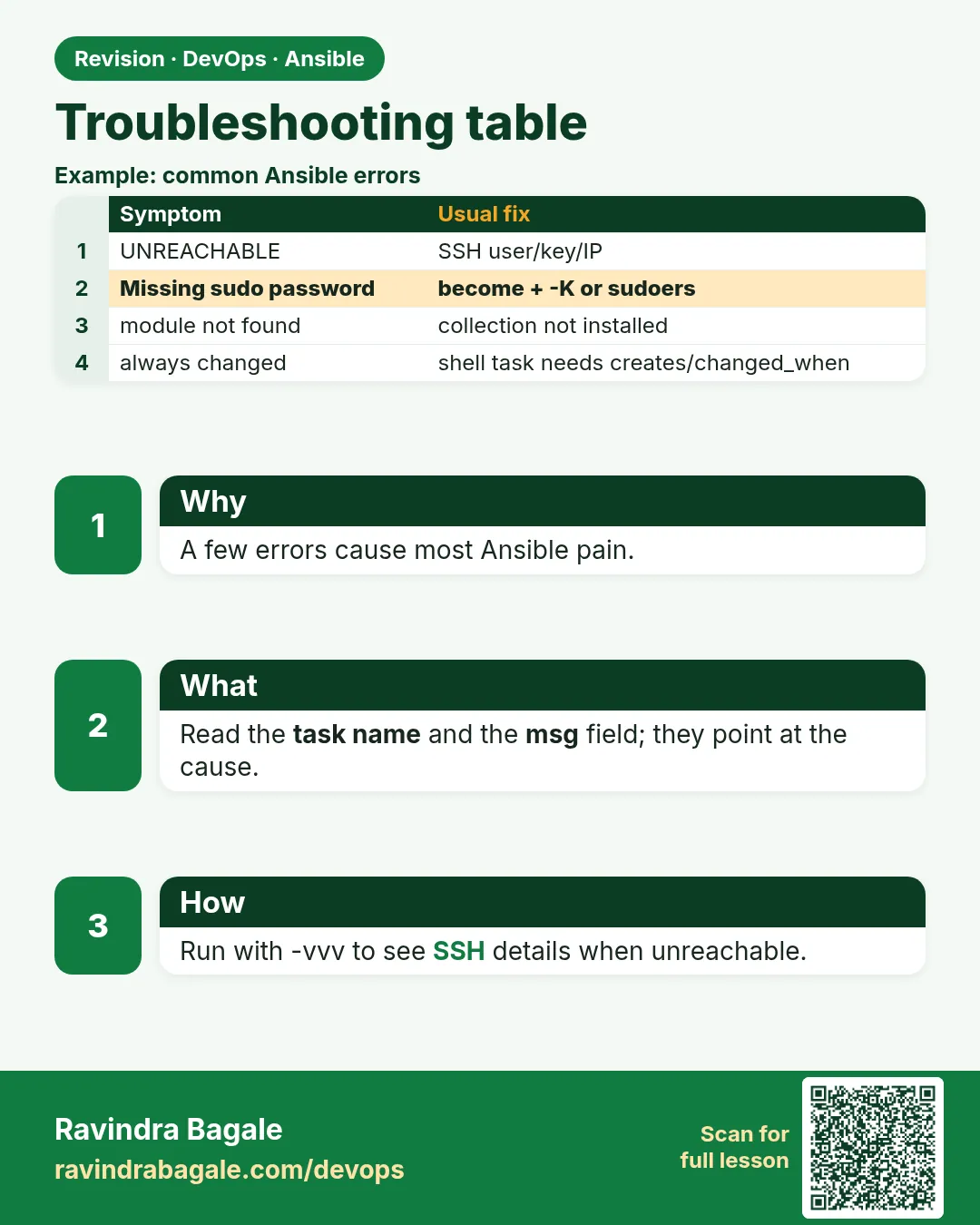
11.10 Troubleshooting table
Why: the problem
Suppose we are at Amazon and the deploy playbook goes red at 11 p.m. The output is long and full of JSON. A junior panics and starts changing random lines. A good engineer reads from the bottom: the PLAY RECAP says which host failed, the fatal line says which task, and msg says why. Then they rerun with -v on just that host. Troubleshooting is a routine, not luck.
What we will build
You will follow one routine for every red run: read the recap, find the fatal task, rerun on one host with more -v, use debug and --start-at-task, and fix the five most common errors: SSH, sudo, Python, YAML and undefined variables.
What: every term in plain English
- PLAY RECAP — The last block. Shows failed and unreachable per host.
- fatal — The line for a task that failed on a host.
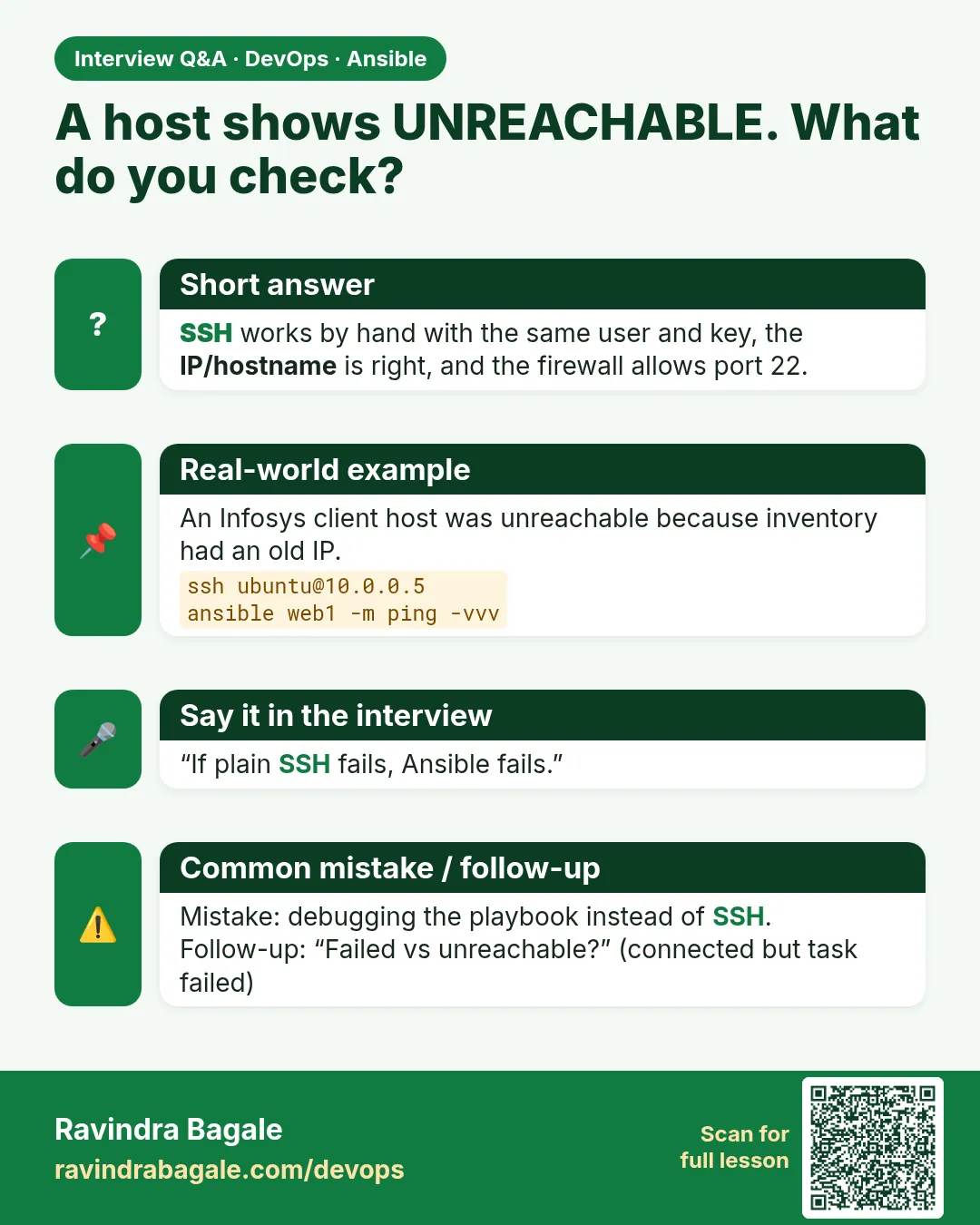
- UNREACHABLE — Ansible could not even connect, so it is an SSH or network problem.
- -v, -vvv, -vvvv — More detail each time. -vvvv shows full SSH commands.
- debug module — Prints a variable during the run.
- --start-at-task — Start the playbook from a named task to save time.
How: step by step
-
Read the recap first
ansible-playbook site.yml 2>&1 | tail -5What it does: Which host, failed or unreachable.
Output
web2 : ok=3 changed=0 unreachable=0 failed=1 -
Find the fatal line
ansible-playbook site.yml 2>&1 | grep -A3 "^fatal"What it does: Task name and msg.
Output
fatal: [web2]: FAILED! => {"msg": "No package matching 'nodejs20' is available"} -
Rerun one host with more detail
ansible-playbook site.yml --limit web2 -vvvWhat it does: Shows module args and SSH.
Output
<10.0.1.12> ESTABLISHED SSH CONNECTION FOR USER: ubuntu -
Print a variable
ansible web2 -m debug -a "var=hostvars[inventory_hostname].ansible_distribution_version"What it does: Check the facts you rely on.
Output
web2 | SUCCESS => {"hostvars[inventory_hostname].ansible_distribution_version": "20.04"} -
Start from the failed task
ansible-playbook site.yml --limit web2 --start-at-task "Install Node.js"What it does: Skip what already worked.
Output
TASK [node_app : Install Node.js] *** -
Step through tasks
ansible-playbook site.yml --limit web2 --stepWhat it does: Answer y/n/c for each task.
Output
Perform task: TASK: Install Node.js (N)o/(y)es/(c)ontinue: -
Rerun the whole play
ansible-playbook site.ymlWhat it does: Green on all hosts.
Output
web2 : ok=12 changed=1 failed=0
Example 1: UNREACHABLE: debug an SSH failure step by step
Stack. OpenSSH
Goal. UNREACHABLE: debug an SSH failure step by step.
terminal
ansible web2 -m ping -vvvv 2>&1 | grep -E "SSH:|Permission|timed out"
ssh -v ubuntu@10.0.1.12 2>&1 | tail -3
ansible web2 -m ping -u ubuntu --private-key ~/.ssh/lab-key.pem
What each line does
-vvvv— Shows the exact ssh command Ansible runs.ssh -v— Plain SSH with details.--private-key— Try the right key.
Green output
web2 | UNREACHABLE! => {"msg": "Failed to connect to the host via ssh: ubuntu@10.0.1.12: Permission denied (publickey)."}
debug1: Offering public key: /home/ravi/.ssh/id_ed25519
debug1: Authentications that can continue: publickey
web2 | SUCCESS => {"ping": "pong"}
Expected result. The server wanted lab-key.pem; set ansible_ssh_private_key_file for web2.
Example 2: Undefined variable in a template: find it with debug and fix with default
Stack. Jinja2 templates
Goal. Undefined variable in a template: find it with debug and fix with default.
roles/nginx/templates/site.conf.j2
server {
    listen {{ nginx_port | default(80) }};
    server_name {{ nginx_server_name }};
}
terminal
ansible web -m debug -a "var=nginx_server_name"
What each line does
debug var=— Shows if the variable exists for each host.| default(80)— Use 80 when nginx_port is not set.
Green output
web1 | SUCCESS => { "nginx_server_name": "shop.example.com" }
web2 | SUCCESS => { "nginx_server_name": "VARIABLE IS NOT DEFINED!" }
Expected result. web2 was missing from group web in one inventory file; adding it fixed the template.
Example 3: OS difference: a package name that exists on Ubuntu 22
Stack. Ubuntu 20.04 and 22.04, Node.js 20
Goal. OS difference: a package name that exists on Ubuntu 22.04 but not 20.04, fixed with when and facts.
roles/node_app/tasks/main.yml
- name: Node.js from Ubuntu repo (22.04+)
  ansible.builtin.apt: { name: nodejs, state: present }
  when: ansible_distribution_version is version('22.04', 'ge')
- name: Node.js from NodeSource (older Ubuntu)
  ansible.builtin.shell: curl -fsSL https://deb.nodesource.com/setup_20.x | bash - && apt-get install -y nodejs
  args:
    creates: /usr/bin/node
  when: ansible_distribution_version is version('22.04', 'lt')
What each line does
when: ... version(...)— Pick the task by OS version.creates: /usr/bin/node— Skip if Node is already there.
Green output
TASK [node_app : Node.js from Ubuntu repo (22.04+)] ****
ok: [web1]
skipping: [web2]
TASK [node_app : Node.js from NodeSource (older Ubuntu)]
skipping: [web1]
changed: [web2]
Expected result. Both servers get Node.js the right way for their OS.
Example 4: Troubleshooting table: message, meaning, first fix
Stack. Runbook
Goal. Troubleshooting table: message, meaning, first fix.
cheatsheet.txt
MESSAGE                                   MEANING                    FIRST FIX
UNREACHABLE ... Permission denied         wrong SSH user or key      ssh by hand, set ansible_user / key
UNREACHABLE ... timed out                 network / firewall         check IP, security group port 22
Missing sudo password                     become needs password      -K or sudoers rule for lab user
/usr/bin/python: not found                no python at that path     ansible_python_interpreter=/usr/bin/python3
Syntax Error while loading YAML           indentation or tab         --syntax-check, 2 spaces
'x' is undefined                          variable not set           debug var=x, add default or group_vars
couldn't resolve module/action            collection missing         ansible-galaxy collection install
Failed to lock apt                        another apt running        wait, or lock_timeout
What each line does
first column— What you will see.last column— What to try first.
Green output
$ grep -i "sudo" cheatsheet.txt
Missing sudo password                     become needs password      -K or sudoers rule for lab user
Expected result. Keep this file in the repo docs folder for on-call.
Verify: did it work?
-
Recap is green
ansible-playbook site.yml | tail -4What it does: failed=0 and unreachable=0 everywhere.
Output
web1 : ok=12 changed=0 unreachable=0 failed=0 web2 : ok=12 changed=0 unreachable=0 failed=0 -
Facts check
ansible all -m setup -a "filter=ansible_distribution_version"What it does: Know your OS versions.
Output
"ansible_distribution_version": "22.04" -
Syntax check
ansible-playbook site.yml --syntax-checkWhat it does: Clean.
Output
playbook: site.yml
When it is red 1
fatal: [web2]: FAILED! => {"changed": false, "msg": "No package matching 'nodejs20' is available"}
Cause. Package name differs by OS or repo.
Fix, step by step
- Check the name: ansible web2 -a "apt-cache policy nodejs".
- Use when with facts for different OS versions.
When it is red 2
ERROR! 'service' is not a valid attribute for a Play
Cause. A task was written at play level; indentation is wrong.
Fix, step by step
- Move it under tasks:.
- Run --syntax-check.
When it is red 3
fatal: [web1]: FAILED! => {"msg": "Timeout (12s) waiting for privilege escalation prompt: "}
Cause. sudo prompt not answered, often a wrong become method or slow server.
Fix, step by step
- Add -K for the sudo password.
- Increase timeout in ansible.cfg ([defaults] timeout = 30).
Cleanup
-
Turn off verbose logs
unset ANSIBLE_DEBUGWhat it does: Back to normal output.
Output
(no output)
Ravindra Bagale's Tip
When it goes red, read from the bottom: recap, fatal, msg. Do not panic.
Red आला की खालून वाचा: recap, fatal, msg. घाबरू नका.
Red आए तो नीचे से पढ़ो: recap, fatal, msg. घबराओ मत.
Practice tasks
Easy Read a recap
Why: Build the habit.
What to do: Make one task fail and read the recap and fatal line.
- Use a wrong package name.
Check: You can name host, task and reason.
Medium Use --start-at-task
Why: Save time.
What to do: Fix the error and continue from that task.
- --start-at-task "Task name"
Check: Run continues from there.
Easy Say troubleshooting in two lines
Why: If you can say it simply, you understand it. Interviewers and juniors both need the short version first.
What to do: Write two short lines about troubleshooting for a fresher who knows only Linux basics.
- Write the problem it solves.
- Write the one command or file you use for it.
- Read it aloud to a friend.
Check: A fresher understands it without asking a question.
Easy Start a two-server Ansible lab
Why: Practice needs safe throwaway servers. If you break them, you delete them and start again in one minute.
What to do: Start two Ubuntu containers that accept SSH, and one control machine with Ansible.
- python3 -m pip install --user ansible-core
- docker run -d --name web1 -p 2221:22 lscr.io/linuxserver/openssh-server
- docker run -d --name web2 -p 2222:22 lscr.io/linuxserver/openssh-server
- ansible --version
Check: ansible --version prints a core version, and ssh to both ports works.
Medium Do it on the second setup
Why: The idea must work on a VM, a container and a cloud server. Only the inventory should change, never the playbook.
What to do: Repeat this lesson on a different target than the one you used first.
- If you used containers, use one EC2 or local VM now.
- Change only the inventory file.
- Run the same playbook.
Check: Same result, and you changed only the inventory.
Medium Break it on purpose
Why: You must know the red output by face. On a real outage there is no time to read slowly.
What to do: Cause one error from the "When it is red" part of this lesson and fix it.
- Follow the error section.
- Copy the exact message into your notes.
- Write the fix in one line.
Check: You fixed it using the steps, without searching the web.
Medium Run it twice and read the recap
Why: Idempotence is the heart of Ansible.
What to do: Run your playbook or command two times and compare the PLAY RECAP lines.
- Run once and note changed=.
- Run again with no edits.
- Explain any task that still says changed.
Check: The second run shows changed=0, or you can explain every change.
Medium Write a runbook page
Why: At 2 a.m. nobody remembers flags. A short written page saves the on-call person.
What to do: Write a one-page runbook for this lesson.
- Title, when to use, exact commands, how to check, how to undo.
Check: A teammate can follow it alone.
Hard Explain it like an interview
Why: Interviewers want real stories, not definitions.
What to do: Record a 60 second answer about this lesson.
- Say the problem, the playbook or command, and one error you hit.
Check: Your answer has a real command and a real error message.
Hard Draw the flow top to bottom
Why: A drawing shows the order of work.
What to do: Draw this lesson as boxes from top to bottom.
- Start at your laptop, go through SSH, end at the check on the server.
Check: Each box matches a real step you ran.
Homework: try at home
Try at home
At home, break your lab in three ways (wrong key, wrong package name, undefined variable). For each, read the recap, find the fatal line, rerun on one host with -vvv and fix it.
Recap
- Read from the bottom: recap, then fatal, then msg.
- UNREACHABLE is SSH or network; FAILED is a task problem.
- Rerun one host with -vvv.
- debug, --start-at-task and --step save time.
- Keep a troubleshooting table in the repo.
FAQ
Why is the output so long?
Each task prints per host. Use -v only when needed and the yaml callback for readability.
Where are logs saved?
Set log_path in ansible.cfg to keep a file.
Can I continue after a failure?
Use ignore_errors on that task, or rescue in a block, only when it is safe.
How do I see the exact command sent?
-vvvv shows SSH; -vvv shows module args.
What is a retry file?
An old feature listing failed hosts. Use --limit instead.
What does --step do?
It asks before each task, so you can go slowly through a playbook you do not trust yet.
Interview questions
-
How do you troubleshoot a failed playbook?
Read the recap, find the fatal task and msg, rerun with --limit and -vvv, check variables with debug, fix and rerun.
-
Difference between FAILED and UNREACHABLE?
UNREACHABLE is a connection problem; FAILED means a task ran and returned an error.
-
How do you handle errors in a playbook?
block, rescue and always; failed_when; ignore_errors with care.
-
How do you debug variables?
debug module, ansible-inventory --host, and -e to test values.
-
How do you deal with different OS versions?
Facts with when, or include OS-specific vars files.
-
How do you keep logs of every run?
log_path in ansible.cfg, or a callback that sends results to a log system.
Quick quiz
Q1. Where do you look first in a red run?
PLAY RECAP.
Q2. UNREACHABLE means what kind of problem?
SSH or network.
Q3. How do you rerun only one host?
--limit host
Q4. How do you start from a task?
--start-at-task "name"
Q5. Which module prints variables?
debug
Did you understand? Let us try it once more.
 Revision card
 Interview card