Practice and Answer Key: New Dynamic Array and LAMBDA Functions
Turn eight support notes into a checked summary and a separate timing report
Ravina receives a small fictional order export. The worksheet has numeric values and cities, but the order ID is embedded in a support note. Some IDs use lowercase. She needs a clean key field, one total per city, a two-axis summary, a configurable late flag and a running amount. Finish each stage before trying to combine the results. These examples are invented workshop scenarios inspired by familiar Blinkit and Amazon Now order contexts.
For the complete workflow use an edition of Excel with REGEXEXTRACT, GROUPBY and PIVOTBY. Microsoft's function catalogue identifies these as Microsoft 365 features. The individual functions have distinct version and app support. LAMBDA, ISOMITTED, SCAN and MAP appear in recent Excel editions, including Excel 2024 as documented. Verify the combination in the installation where the workbook will recalculate. If one function is unavailable, you can still use the raw values to prove expected totals and practice other parts.
Enter the eight original workshop records
On a blank sheet named Notes put these five fields in A1:E9. Enter Amount and Mins as numeric values. The note is text and may contain different phrases. A number in the note does not replace the official numeric field. Formula results should go outside this rectangle. Keep display summaries on separate tabs so they can grow without overwriting another output.
| Note | City | Platform | Amount | Mins |
|---|---|---|---|---|
| Rider note: BLK-2001 handed over, Nagpur | Nagpur | Blinkit | 180 | 12 |
| late! amn-2002 reached in 17 min | Kolhapur | Amazon Now | 95 | 17 |
| BLK-2003 ok | Nagpur | Blinkit | 420 | 9 |
| customer called twice, BLK-2004 | Solapur | Blinkit | 60 | 21 |
| AMN-2005 paid Rs. 310 | Nagpur | Amazon Now | 310 | 14 |
| amn-2006 gate closed, waited | Kolhapur | Amazon Now | 150 | 16 |
| BLK-2007 ok | Solapur | Blinkit | 275 | 11 |
| BLK-2008 left with guard | Kolhapur | Blinkit | 130 | 13 |
Use the original input before making any error or growth test. The numeric controls are eight records and total ₹1,620. There are three different cities and two platform labels. The note can help identify a record, but its casual phrasing such as late should not replace a measured threshold rule.
Lab 1. Normalize the order key and reconcile one- and two-axis summaries
On Notes put Order ID in F1. The allowed formats are BLK or AMN, a hyphen and four plain digits. Each formula searches the full note. It checks whether a match is present using a case-insensitive option, then extracts the first matching token and uppercases it. A note with no matching token receives a separate review marker.
=LET(orderPattern,"\b(?:BLK|AMN)-[0-9]{4}\b",
IF(REGEXTEST(A2,orderPattern,1),UPPER(REGEXEXTRACT(A2,orderPattern,0,1)),"Review ID"))- Fill F2 through F9. The eight results in source sequence are BLK-2001, AMN-2002, BLK-2003, BLK-2004, AMN-2005, AMN-2006, BLK-2007 and BLK-2008.
- Compare the lowercase note in row 3 and its uppercase result. Case-insensitive matching lets the token qualify, while UPPER actually changes its letter case. The preserved source note remains lowercase.
- Check the position of each order's other fields. AMN-2002 still has amount 95, duration 17 and City Kolhapur. Normalizing a key does not change its attached numeric fields.
- Use a separate count of Review ID results. Expect zero on the clean fixture. Check that the eight recognized keys are distinct. A key shape test alone cannot prove a valid record isn't duplicated.
Build the city summary with explicit modes
Create a CityReport sheet. Put City and Amount in A1:B1 and the following formula in A2. City values and numeric amounts refer to the same eight rows. The function reports data-only inputs with a grand total, sorted by city label. This base report uses all eight recognized records and assumes the source data has already passed the identity controls.
=GROUPBY(Notes!B2:B9,Notes!D2:D9,SUM,0,1,1)Kolhapur totals ₹375 from 95 plus 150 plus 130. Nagpur totals ₹910 from 180 plus 420 plus 310. Solapur totals ₹335 from 60 and 275. The grand total is ₹1,620. Use =SUM(Notes!D2:D9) to confirm. The three displayed city categories are not a count of original orders. The totals row is a fourth output row but not a fourth city.
Place data into a city-by-platform cross-tab
On a separate CrossTab sheet enter the following in A2. The second grouping field assigns source platforms to columns. Both dimensions have their own total and sort arguments. Amazon Now sorts ahead of Blinkit under ascending labels.
=PIVOTBY(Notes!B2:B9,Notes!C2:C9,Notes!D2:D9,SUM,0,1,1,1,1)| City | Amazon Now | Blinkit | Row total |
|---|---|---|---|
| Kolhapur | 245 | 130 | 375 |
| Nagpur | 310 | 600 | 910 |
| Solapur | — | 335 | 335 |
| Column totals | 555 | 1065 | 1620 |
Independently compute the Nagpur Blinkit crossing with =SUMIFS(Notes!D2:D9,Notes!B2:B9,"Nagpur",Notes!C2:C9,"Blinkit"). It gives 600. Add the two platform totals to recover 1,620. Add the three city totals separately and get the same result. Summing a displayed cross-tab's entire numeric rectangle would mix the margins with the detail cells. For this measure use one grand total.
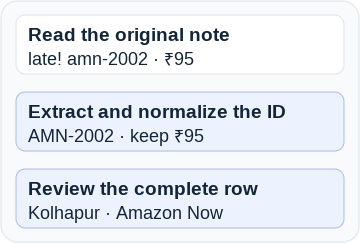
Follow one order into a grouped answer
Read the raw note
Row 3 contains lowercase amn-2002. Its numeric amount is 95.
Commit the normalized field
Extract and uppercase the key, preserving its original row.
Group by the needed categories
Kolhapur Amazon Now includes this order and the 150 order, giving 245.
Compare a separate control
Kolhapur total 375 equals the two platform amounts of 245 and 130.
Lab 2. Compare an optional time flag, a running sum and a row-level adjustment
Keep the eight original numeric Mins values. Use the LATEFLAG rule from the named LAMBDA lesson, or create the following workbook name if this is a fresh practice file. Choose workbook scope and give it a comment describing minutes, the optional limit and the strict boundary.
=LAMBDA(minutes,limit,IF(minutes>IF(ISOMITTED(limit),15,limit),"Late","On time"))- In a scratch cell call the inline version for 15 and an omitted slot. Expect On time. Use 16 and omission to get Late. Save only the named definition when both pass.
- On Notes enter
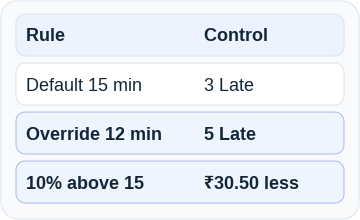
=LATEFLAG(E2:E9,)in H2. The comma makes the missing second slot visible. In I2 enter=LATEFLAG(E2:E9,12)for the supplied threshold. - Count Late in H2# and I2# with COUNTIF. The default 15-minute rule gives three, and the 12-minute override gives five. The 12-minute first note remains On time under both.
- Read the default late IDs: AMN-2002, BLK-2004 and AMN-2006. The override adds AMN-2005 and BLK-2008, whose times are 14 and 13.
Define limit as a normal parameter. The Microsoft example for ISOMITTED uses an explicit empty position in its invocation. If a workbook currently defines a different rule under that name, verify whether you need a separate practice name. Do not replace other workbook names without knowing their callers.
Find the cumulative amount after each original order
In G1 put Running amount. Enter the following in G2 with eight clear cells below and including its anchor. The source order is the sequence displayed on Notes. The first value is 180 and the second becomes 180 plus 95, or 275.
=SCAN(0,D2:D9,LAMBDA(totalSoFar,nextAmount,totalSoFar+nextAmount))The complete sequence is 180, 275, 695, 755, 1065, 1215, 1490 and 1620. It first exceeds 1,000 at the fifth source record, AMN-2005. The starting 0 is not another returned row. If a report needs transactions in time order, start from dates or sequence keys. A list of notes might not be chronological just because it has a visible order. Keep the IDs beside whatever ordered state the report shows.
Apply a fictional adjustment to each result independently
In J1 put Practice adjusted amount. The base exercise grants a 10% fictional adjustment to each order above 15 minutes. Each MAP call reads one aligned amount and time. This rule uses its own fixed threshold and does not automatically change when someone tries a different threshold in LATEFLAG.
=MAP(D2:D9,E2:E9,LAMBDA(orderAmount,minutes,IF(minutes>15,orderAmount*90%,orderAmount)))Expect amounts 180, 85.50, 420, 54, 310, 135, 275 and 130. The three adjusted rows originally sum to 305. The net amounts across the eight rows are ₹1,589.50, which is ₹30.50 less than the original 1,620. Check the difference using =SUM(D2:D9)-SUM(J2#). When trying both versions of the time flag, distinguish the count of slow orders from the amount of a chosen practice adjustment.
Check whether the key cleanup changed the report population
Run a deliberate invalid-note case
Save a practice copy. Replace the numeric zero in the ID part of the second note with an uppercase letter O, so it contains amn-20O2 instead of amn-2002. Leave the source City, Platform, Amount and Mins unchanged. The edited note is deliberately invalid because its serial part no longer contains four consecutive digits. Its F3 formula should return Review ID. The source Amount column still sums to 1,620. A missing key does not erase the recorded amount from the source.
Decide whether the city summary should include that unresolved row. For a workshop report using only reviewed keys, supply an aligned include array. Keep the raw rows for reconciliation. The following version uses the same note-derived key rows and source fields. It detects no accepted IDs before attempting a grouped result.
=LET(keys,Notes!F2:F9,keepRows,(keys<>"")*(keys<>"Review ID"),
     IF(SUM(keepRows)=0,"No reviewed order IDs",
GROUPBY(Notes!B2:B9,Notes!D2:D9,SUM,0,1,1,keepRows)))- Verify the excluded amount. F3 is the only rejected identity and its original amount is ₹95.
- Reconcile the reviewed city result. Overall it gives ₹1,525. Kolhapur falls from 375 to 280. Nagpur and Solapur stay unchanged.
- Apply a matching filter to a platform report. Amazon Now would drop from 555 to 460. Blinkit remains 1,065. Add those together to confirm 1,525. If the cross-tab is left unfiltered, label it as all source records.
- Check the other measures if they use a reviewed-only population. This rejected row took 17 minutes. The eligible default late count would fall from three to two. Its original adjusted amount was 85.50, so the adjusted reviewed subtotal is 1,504.00. Using 95 as the difference for both types of amount would mix different measures.
After the test restore the correct note and confirm zero Review ID entries and the original totals. This audit deliberately checks a contract based on ID shape in the fixture. For real data, a match could still belong to another order, and an ID could be duplicated. Where identity is important, verify against the authoritative order list rather than treating the regex rule as the final approval.
Test valid-looking duplicate or multiple IDs separately
In another copy replace BLK-2008 in the last note with BLK-2001. The notes now contain eight matches, but only seven distinct normalized keys. If using =ROWS(UNIQUE(F2:F9)), expect seven in this clean-match-only case. The original numeric subtotal still equals 1,620 since you changed text. Do not drop an entire row just to make key count agree. Decide whether it is a duplicated record, two lines for one order or a text correction.
For a single note containing two IDs, run an all-match extraction in a test region with enough space. For “Follow BLK-2001 and AMN-2002” the bounded pattern finds both. The first-match mode used in the original exercise takes just the first. If a business report needs one authoritative key per note, use an exception rule or another field where the writer explicitly chose the order. A reminder containing two IDs is not solved by uppercasing either one.
Separate a cross-tab percentage from a timing-adjustment percentage
Use the restored source for this extension. The manager needs to know how much of each city's amount comes from each platform. A share of the city total is a different denominator from a share of the entire source. The practice cross-tab already supplies the underlying numbers. Add the optional PERCENTOF setting for a row-based share in an unused sheet.
=PIVOTBY(Notes!B2:B9,Notes!C2:C9,Notes!D2:D9,PERCENTOF,0,1,1,1,1,,1)Nagpur Blinkit forms 600 out of Nagpur's 910, around 65.93%. Under a grand-total basis the same crossing would be about 37.04%, from 600 divided by 1,620. The final relative_to value 1 selects the row basis. A final value 2 chooses the grand basis. Do not leave the intended denominator implied by where the cell appears. Confirm one known part and total manually. The 10% practice adjustment is independently supplied and does not come from either ratio.
For another test, restrict the original amount cross-tab to times strictly above 15. Pass the aligned condition Notes!E2:E9>15 in the filter argument. The two qualifying Kolhapur notes have Amazon Now amounts 95 and 150, so that crossing is 245. Solapur has one qualifying Blinkit amount of 60. Nagpur has no included records. The subtotal 305 is the exact original population that receives a 10% adjustment.
Now try changing the MAP rule on a copy to use the 12-minute threshold too. Five original amounts qualify, totaling 745. Their 10% adjustment is 74.50, so the result totals 1,545.50. That is a new policy decision with a new financial magnitude in the fictional data. The original workbook rule still stays above 15. Recording the threshold next to both calculated outputs prevents a label from silently describing the wrong measure.
Grow the source, then check the identity and measure states
On a copy select Notes A1:F9 and create a Table with the raw note fields and the Order ID formula column. Name it tblPracticeNotes. Adapt the key formula to read the current row's [@Note], and verify each existing key stays unchanged. Use its named fields as inputs to the reports. Keep the grouped and array formulas outside the Table. For example, =GROUPBY(tblPracticeNotes[City],tblPracticeNotes[Amount],SUM,0,1,1) reads the aligned fields.
Add a new row with note “BLK-2010 exercise update”, City Nagpur, Platform Blinkit, numeric amount 200 and numeric duration 15. Confirm the Table includes it and the key formula produces BLK-2010. This value is exactly at the default threshold, so only the 12-minute report gains a late result. The original record counts and totals give useful checks.
- The source now has nine orders and total ₹1,820. The new identity is unique and the number of category groups stays three because Nagpur already existed.
- Nagpur's total rises from 910 to 1,110. Its Blinkit crossing rises from 600 to 800. The Amazon Now total remains 555 because its original population stayed the same.
- The default late count remains three. The override count goes from five to six. A 15-minute duration is not strictly greater than 15 but is greater than 12.
- The running amount now ends at 1,820 if the new row comes last in its input. There should be nine states. A fixed D2:D9 formula still misses the appended amount when used in the Table copy.
- The new order receives no deduction from the fixed 15-minute coupon rule. The adjusted total becomes 1,789.50 (the previous 1,589.50 plus the full 200). The adjustment difference remains 30.50.
Now change only the new duration to 16. The raw total and city sum stay unchanged. The default late count grows to four. The new order's adjusted amount becomes 180, and the new adjusted total 1,769.50. These controls show exactly which calculations respond to an edited source field. Reset to the original eight rows when done.
Expose invalid numeric fields before using the timing report
Suppose the second order's Mins value was imported as the text 17 min. It does not give a numeric reading to your threshold formula. In a copy use =ISNUMBER(E3) to confirm the data type. The original practice makes all eight values numeric. If your worksheet can accept exceptions, decide whether they are excluded with a reason or the report stops until they are resolved.
=MAP(D2:D9,E2:E9,LAMBDA(orderAmount,minutes,
     IF(NOT(AND(ISNUMBER(orderAmount),ISNUMBER(minutes))),"Check amount or time",
        IF(OR(orderAmount<0,minutes<0),"Check amount or time",
           IF(minutes>15,orderAmount*90%,orderAmount)))))
This version tests a pair of values. In the 17 min text test the second output is the check message. The other seven validated adjustments still display in their own rows. A SUM of the resulting spill may omit that text, so show an exception count instead of treating the adjusted subtotal as complete. Check truly empty cells directly in the original fields if that state is possible. Some array operations can present an empty source as a zero-like value, which you should not label a measured duration without a separate check.
Answer key for the original eight-record exercise
Use the unchanged Notes sheet and the exact formulas from the two labs. Before accepting the answer for any task, identify which source fields it reads. Open the answer after you have a control calculation or a known record to compare.
Which order IDs should the case-insensitive cleanup keep?
The eight IDs are all expected, in the original order from BLK-2001 through BLK-2008 with AMN labels in positions two, five and six. The second and sixth notes are lowercase and their normalized results should be AMN-2002 and AMN-2006. A lower-case match still needs a separate uppercasing operation if the output uses uppercase keys.
What are the original GROUPBY city amounts?
Kolhapur 375, Nagpur 910, Solapur 335. Check one against a SUMIF on the raw source and add the three amounts to get 1,620. The displayed grand total is a summary row and not an extra city.
What do the two platform columns and margins mean?
Amazon Now totals 555 and Blinkit totals 1,065. Solapur contributes 335, all from Blinkit. A cell where no source record matches both dimensions is a different condition from an observed zero. Add the platform totals once and compare to the city total.
How many times are marked late by each LATEFLAG call?
Three with the omitted limit of 15. Five with an explicit 12. The first order took exactly 12 and is On time under both, so it is a useful test for strict comparison. An explicit zero would be yet another limit.
Which running amount is visible at the fifth record?
1,065. The previous state was 755 and AMN-2005 adds 310. It is the first above 1,000. Check the last state of 1,620 against the independent plain sum.
Which rows receive the fixed practice deduction?
The 17-minute order of 95, the 21-minute order of 60 and the 16-minute order of 150. Together their pre-deduction amount is 305. Ten percent of that is 30.50. Subtract it from 1,620 to verify 1,589.50.
What proof is needed before a report excludes a failed ID?
Identify the original record, the reason it failed and the measure affected. In the test, the invalid ID on the 95 order is flagged separately. A reviewed-only amount becomes 1,525. The all-source sum is still 1,620, so the report should label which policy it used.
Verify the answers without depending on a single finished formula
Put the expected summary beside a simple formula on a new Audits sheet. This is useful when testing a new Excel edition. It also shows a beginner which stage introduced an error. For one city amount use SUMIF from the original City and Amount columns. For one crossing, use SUMIFS with both City and Platform. Those checks do not depend on the layout of the formula-driven reports.
- Use
=SUMIF(Notes!B2:B9,"Nagpur",Notes!D2:D9)and verify 910. - Use
=SUMIFS(Notes!D2:D9,Notes!B2:B9,"Kolhapur",Notes!C2:C9,"Amazon Now")and verify 245. Use the same source row numbers on all three fields. - Use
=COUNTIF(Notes!E2:E9,">15")and=COUNTIF(Notes!E2:E9,">12")to verify three and five for the clean numeric source. These confirm the intended rules independently of the named function. - Use
=SUMIF(Notes!E2:E9,">15",Notes!D2:D9)in the base copy to verify 305 before the adjustment. Multiply by 10% for 30.50, then subtract from the clean 1,620 source total. - Use a local copied running sum or trace the first two states manually. The second state should include the first two orders and equal 275, which is different from the second raw amount 95.
If GROUPBY or PIVOTBY is unavailable, a correctly configured PivotTable or an explicitly labeled SUMIFS grid can verify group membership. If the regex functions are unavailable, preserve the notes and use a separately approved key column for the calculation. Manually verifying the eight example keys is a control on this practice dataset, not a scalable parser. If someone needs a regularly refreshed import, establish whether the source can supply ID as a separate typed field.
For the timing analysis in an earlier edition, fill down a simple =IF(E2>15,"Late","On time") and compare it with the named function's default. The purpose of the independent formula is to prove the value, not to duplicate every optional setting. Keep the cutoff and unit label near the result so people can recreate it when the published workbook changes.
Fix the failing stage and rerun the controls
- A lowercase ID disappears. Verify the optional flags of REGEXEXTRACT. Return mode 0 means the first match. Case argument 1 allows lowercase. The UPPER step is what returns capitals.
- A grouped spill crosses another result. Move the separate reports to the suggested sheets or a region sized for the intended growth. A new report category can add a row or column. Keep formula inputs separate from all spills.
- The named LAMBDA gives an error for the default call. Check the exact Name Manager definition and the invocation. The parameter names are plain, and the invocation supplies minutes followed by an explicit empty limit slot. Test ordinary values first.
- The coupon total changes when only a flag threshold is supposed to change. Inspect whether the two formulas share a setting on purpose. In this workbook the adjustment always uses a strict 15-minute rule until deliberately edited.
- The report has correct totals but mismatched labels. Compare one source row and one known crossing. Grouped totals can prove amount coverage without proving that a particular named city has the right amount.
During a handoff write the source row count, valid key count, city total, one crossing and two timing counts. If the workbook changes, check whether the input state or rule changed before adjusting your expected results. A passing row and column grand total are useful, but they do not replace matched record IDs or the intended population definition.
Build a compact audit queue from normalized keys and the timing rule
Use the original eight Notes rows. A reviewer wants to see recognized records with numeric times above a chosen threshold. Put Time above in L1 and 15 in L2. The report should list the normalized ID, City, Platform, original Amount and Mins. It uses the row fields together as one array. This is an opportunity to practice combining the earlier chapter's filtering and sorting with the newer functions.
=LET(keys,F2:F9,quality,(keys<>"")*(keys<>"Review ID")*ISNUMBER(E2:E9),
     keepRows,quality*IF(ISNUMBER(E2:E9),E2:E9>$L$2,FALSE),
     records,HSTACK(keys,B2:B9,C2:C9,D2:D9,E2:E9),
     IF(SUM(keepRows)=0,"No reviewed records above the limit",SORT(FILTER(records,keepRows),5,-1)))
Put the formula in a region with five clear columns, for example N2:R9. Enter headings in N1:R1. The sort index is 5 because the constructed review records have Mins last. HSTACK reads the fields in the same source order. The two conditions require a recognized key and a valid duration above the entered limit. Start with a numeric threshold as in the worksheet's test agreement.
- At 15, the three rows in order are BLK-2004 at 21, AMN-2002 at 17, and AMN-2006 at 16. Their unchanged amounts are 60, 95 and 150. The numeric subtotal is 305. Verify the first row is Solapur and Blinkit.
- At 21, no record took strictly longer than the cutoff. The output becomes a single message. A subtotal should count no qualifying records, regardless of the message's occupied cell.
- Restore 15 and reproduce the invalid-ID test on the second note. The 17-minute row is flagged and the review queue now shows the 21- and 16-minute records, subtotal 210. The raw row with amount 95 is still present, so keep the Review ID reason visible beside it.
- Restore the key. If the reviewer requests only the top two for the original queue, take two rows from the sorted branch, leaving the no-data message separate. The first two amounts 60 and 95 add to 155. It is a selected subset of the three reviewed late records.
The word quality in this formula refers to two limited checks: the earlier ID treatment and a numeric input. It does not verify a recorded time was measured correctly. If the business wants to exclude negative durations or check approved order IDs, add those rules explicitly at their source. A complete report should also show how many valid source records did not exceed the cutoff, rather than confusing them with malformed inputs.
Experiment with the visible result and one independent matching count side by side. If the results disagree, review whether both use recognized keys, numeric times and the same threshold. A simple COUNTIF of the original time column will continue to count the invalid-ID row because it does not check identities. That difference explains the exercise. Use an isolated copy for these deliberate faults and restore the eight-record source before sharing the complete answer.
Preserve report order and raw order as different views
After setting the threshold to 20, the queue contains only the 21-minute Solapur record. The source still has eight entries and the running amount still ends at 1,620. This verifies that creating a selected queue did not reorder or delete the original source rows. A display record position is not a business key. If a colleague wants to see elapsed-time order and then amount order, each should be a deliberate view from the same source data.
When taking an export, give the view a title that includes its threshold, key-review policy and amount meaning. In the practice queue the amount is original, while J2 on Notes shows the separate fictional adjusted value. Copying the two columns together without labels could imply they are duplicate fields. Comparing the underlying amount and adjusted amount on one recognized record makes the distinction easy to see.
Restore the original controls after the handoff test. Confirm every source note is once again paired with its original standardized key and numeric values. Verify 15 and eight source records before checking the original answer key. This preserves a known reference point for the next person who opens the workbook.
The practice makes the relationships visible by using a small file. A real import can carry separate dates, statuses and approved keys. In that case define the report's population before designing its layout. Keep the raw data and a checked category mapping so the result can be traced when a future rule introduces another exception.
Quiz with explained answers
Which step produces uppercase AMN-2002 from the lowercase note?
Case-insensitive extraction finds amn-2002. UPPER makes the result uppercase. Changing the case option alone would still return characters from the original note. Preserve the note separately and use the standardized key for the worksheet calculations.
Which amounts contribute to the Nagpur Blinkit crossing?
180 and 420. Each row has both the City Nagpur and the Platform Blinkit. Their sum is 600. The 310 Nagpur order belongs to Amazon Now. Adding all three gives the city total of 910.
Why is there no observed amount for Solapur Amazon Now?
Neither of the two Solapur records uses that platform. The cross-tab still lists the platform because it appears elsewhere. Check the count of matching records before deciding whether this display position means missing observations or numeric zero.
Which state first crosses ₹1,000 in the running list?
The fifth state, 1,065. The first four amounts add to 755. The next order adds 310. The state is read with the corresponding source order rather than interpreting 1,065 as the amount of that one order.
Why does choosing a 12-minute flag still leave the default coupon total at 1,589.50?
The coupon formula independently checks for more than 15 minutes. It does not read the flag's override. Changing that logic to more than 12 would deduct more. Verify both measures against their own explicitly stated threshold.
How many records qualify under the default flag after adding a 15-minute order?
Three, as before. The new row is exactly at the limit. The 12-minute override gains it, so its count becomes six. Because the exact boundary matters, a row at 15 is useful in a regression fixture.
Interview questions you can answer from practice
How would you check inputs coming from messy text notes before aggregating?
I would preserve the raw note, extract a normalized key and flag missing or multiple tokens. Then I would confirm that each recognized key maps to its untouched amounts and dates. I would compare total source rows, recognized keys and unique keys. A separate control would document any excluded amount.
How do you verify a cross-tab matches a one-axis summary?
Check one crossing using the two source conditions. Then compare the row margins with the one-axis report under the same filters. Add each set of margins separately and compare with a raw source total. Keep the labels and remember details and margins reuse the same data.
Why is an explicitly supplied threshold different from a default?
An omitted slot asks the implementation to use its defined fallback. A supplied value, including zero, is an actual argument. I would test the default and an override on the same boundary case and write the decision next to both reported counts.
How does MAP differ from SCAN in this practice file?
MAP changes each amount based on the same-row duration and does not need previous rows. SCAN adds the amount to its previous state and returns that intermediate result. The worksheet shows eight rows in both cases, but the dependencies and meaning are different.
What would you report if an ID-validation failure changes the total?
Describe both totals and the changed population. For the deliberate ₹95 exception, 1,620 is the all-source total and 1,525 is the reviewed-key total. Name the excluded record and its reason. Reconcile other calculations using their own measure, such as the original adjusted value 85.50.
Revision cards
- Extract, then normalize. Case-insensitive matching and changing text case are distinct steps.
- Summarize aligned records. Choose the category for each axis and keep values on the same source rows.
- Verify margins once. Match one crossing, one row, one column and the grand total.
- Omit a slot deliberately. ISOMITTED recognizes the default path when the caller leaves the optional position empty.
- Read the correct state. SCAN shows the accumulated value after that source record.
- Test the business rule. A renamed threshold should not change a separate adjustment by accident.