9.20 Recursive LAMBDA and a Small Reusable Function Library
Repeat a calculation by passing a smaller remaining job
Rani receives three fictional price notes from a workshop modelled on grocery order reports. All three contain whole positive amounts in a particular old notation. She needs to remove a short list of known formatting characters. A different part of the workbook asks how many practice weeks are needed to reach a sales target under an assumed fixed growth rate. Both are examples of repeating a rule until a specific condition is met.
A recursive function calls the same function again with new arguments. The base case returns a result directly and makes no second call. A recursive step performs one small part of the work, changes at least one input so the remaining job gets closer to a stop, and calls the function again. You can make a recursive LAMBDA by defining a name and using that name in the body of its worksheet calculation.
Keep the base case separate from the repeated step
Think of a person checking a short list of instructions. If the first instruction is “nothing remains,” they return the work already done. Otherwise they do the first remaining task, remove its instruction, and ask for help with a shorter list. A recursive formula uses its own definition to process that shorter list. The order of the checks matters because each call needs the opportunity to stop.
- Give the function a name it can call. This lesson uses workbook-scoped names created deliberately in a practice workbook. A name in the body points to the same definition, so check it carefully.
- Test the input agreement. A counter intended to reach zero must receive values for which the rule can make progress. Use bounded whole-number steps where appropriate.
- Choose a stopping result. Return the finished text, an ordinary number or an explicit message at the base case. Define how the result should look before writing the recursion.
- Trace three very small examples. Ask what happens with no work, exactly one step and several steps. This often exposes an off-by-one error before you run the whole case.
Microsoft documents that too many recursive LAMBDA calls can give #NUM!. Do not rely on a universal number of available calls or deliberately run a non-stopping definition to learn the limit. Use small bounded examples. When a built-in function maps directly to the question, such as FACT for a factorial, it may be simpler than teaching recursion in a real reporting workbook. The examples here use recursive definitions as learning exercises.
Lab 1. Follow a short recursive text cleanup one call at a time
On TextTests enter the following three notes in A2:A4. These are controlled examples of whole positive amounts. The exact marker Rs. or Rs, the group comma and the trailing slash-hyphen marker carry no meaning in this specific input agreement. You will remove individual characters only to see how recursion works. Keep raw input text so results can be audited.
| Source row | Original text | Clean text | As a number |
|---|---|---|---|
| 2 | Rs. 1,299/- | 1299 | 1299 |
| 3 | Rs 64 | 64 | 64 |
| 4 | 1,299/- | 1299 | 1299 |
Define STRIPCHARS with workbook scope. On Windows use Formulas → Name Manager, or use Formulas → Define Name on Mac where available. In the Refers to field enter this formula. Save only the definition. Its second parameter is a text sequence of characters to remove. Use a short argument for this exercise.
=LAMBDA(sourceText,characters,
   IF(characters="",TRIM(sourceText),
STRIPCHARS(SUBSTITUTE(sourceText,LEFT(characters,1),""),MID(characters,2,LEN(characters)))))- In B2 use
=STRIPCHARS(A2,"Rs.,/- ")and fill down to B4. The text result for the first row is 1299. The space before the closing quote in the second argument belongs to the input. - In C2 use
=VALUE(B2)and fill down. This converts validated whole-number text to numbers. Verify the three values add to 2,662. The cleanup function alone returns text. - Try
=STRIPCHARS(" 1299 ",""). The character list is already empty, so there is no recursive call. The base case returns trimmed text 1299. - Try
=STRIPCHARS("AA-B","-"). One step removes the hyphen and the next call sees an empty character list. The result is AAB. This is a short control independent of the amounts.
Trace the first note without running a long calculation
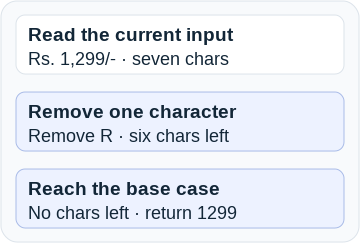
On the first call, LEFT returns R. SUBSTITUTE removes every uppercase R from the input, leaving the text s. 1,299/-. MID starts at character two and keeps the rest of the removal list, so the next call starts at s. Its work is smaller even if the current character was absent in the original text. The stopping rule depends on the instruction list, not on whether the text gets shorter each time.
After the second step s is gone. The third removes the literal period, leaving a leading space and 1,299/-. The fourth removes the comma, the fifth removes the slash and the sixth removes the hyphen. After the seventh step removes the ordinary space, the next call has an empty instruction list and returns 1299. There are seven work steps and one final base-case evaluation. Midway results can still contain punctuation and are not safe numeric inputs.
Track the smaller argument through the cleanup
Read the instruction list
It contains R, s, period, comma, slash, hyphen and one space.
Remove the first character
SUBSTITUTE removes R from the original text. MID leaves six instructions.
Hand off the shorter job
Each next call has one fewer instruction, whether or not that character occurred.
Return at the base case
With no instructions left, return clean text 1299. A separate conversion gives a numeric amount.
Keep this cleanup within its narrow source agreement
SUBSTITUTE is case-sensitive and removes every occurrence of the character where no occurrence number is specified. Applying this list to a measured decimal would remove its decimal point. For the note Rs. 1,299.50, a direct character strip would yield 129950, not the intended 1299.50. A negative value that uses a meaningful hyphen would also be changed incorrectly. Do not use the example as a general money parser. For a source accepting decimals, use the labelled amount pattern and numeric parser from the earlier regex lesson, or receive a typed amount field.
Lab 2. Stop a practice growth projection at a known target or an explicit limit
A fictional training report starts at 520 thousand rupees and tests what happens if a value grows by 5% each week. It asks for the first whole week at or above 700. The current amount becomes the next amount after being multiplied by 1.05. The result should count the number of transitions, with the original state labelled week zero. This is a mathematical scenario with an assumed constant rate.
A simple recursion that only checks the target can get stuck if the growth rate is zero. Add a second stopping condition based on a remaining budget of steps. Limit this exercise to twelve future weeks. The bound is a worksheet policy, not a statement about Excel's recursion limit. The base case checks the target first, so reaching it at exactly the twelfth step counts as success.
Define the worker that handles one projection step
Save WEEKS_GROWTH_STEP in Name Manager with the following definition. The public wrapper will call it only with validated inputs and a twelve-step budget. The worker uses −1 as a private signal that the limit expired before success. A negative week is not a result the report should present.
=LAMBDA(currentAmount,targetAmount,growthRate,remainingWeeks,
   IF(currentAmount>=targetAmount,0,
      IF(remainingWeeks=0,-1,
         LET(futureWeeks,WEEKS_GROWTH_STEP(currentAmount*(1+growthRate),targetAmount,growthRate,remainingWeeks-1),
             IF(futureWeeks=-1,-1,1+futureWeeks)))))
If the target has already been reached, no more steps are needed and the worker returns zero. If the limit has run out and the target is still unmet, it returns −1. Otherwise, the amount grows once and the step budget falls by one. During the return through the earlier calls, a success adds one for each completed step. The failure signal is passed back unchanged rather than accidentally converting it into zero or a positive count.
Define the worksheet-facing function with input checks
Use the workbook name WEEKSTOTARGET for the public calculation. The accepted sizes are positive start and target up to 1,000,000 in the stated unit, with rate from 0% through 100%. Small finite bounds make this training example predictable. In the following expression the first test checks types, then the next checks the numeric range. The sample uses one value per parameter.
=LAMBDA(startAmount,targetAmount,growthRate,
   IF(NOT(AND(ISNUMBER(startAmount),ISNUMBER(targetAmount),ISNUMBER(growthRate))),"Check numeric inputs",
      IF(OR(startAmount<=0,targetAmount<=0,startAmount>1000000,targetAmount>1000000,growthRate<0,growthRate>1),"Outside practice limits",
         IF(startAmount>=targetAmount,0,
            IF(growthRate=0,"No growth toward target",
               LET(answer,WEEKS_GROWTH_STEP(startAmount,targetAmount,growthRate,12),
IF(answer=-1,"Beyond 12 weeks",answer)))))))- Use
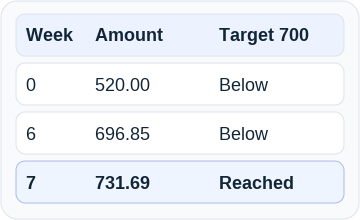
=WEEKSTOTARGET(520,700,5%)on Tests. Expect 7. At week six the amount is about 696.85, below target. At week seven it is about 731.69. - Use 330, 400 and 4% to model an invented Nashik case. Expect 5. At week four it is about 386.05 and at week five about 401.50, so the boundary is visible.
- Use 700, 700 and 0%. The target is reached at week zero. Use 520, 700 and 0% separately. The lower starting amount without growth produces the no-growth message.
- Use 520, 2000 and 5%. The amount is still below 2,000 at week twelve, so the result says Beyond 12 weeks. This means the practice horizon was exceeded, not that the target could never be reached.
- Check the exact final permitted step with start 1, target 4096 and rate 100%. Doubling twelve times reaches 4096, so the answer is 12. Change target to 4097 and expect Beyond 12 weeks.
- Try a negative rate and a nonnumeric rate on independent test cells. They trigger different checks before recursion. Restore the original inputs before comparison.
Cross-check a known successful result without recursion
For the first case you can calculate =520*(1+5%)^6 and the same expression with exponent 7. The two numbers fall on opposite sides of 700. For a positive growth rate and a target above the starting amount, =ROUNDUP(LN(700/520)/LN(1+5%),0) also gives 7 in this case. This algebraic calculation applies to a fixed-rate model. It does not supply the twelve-week policy or the input guard by itself. Compare the true boundary states as a separate test, especially when workbook rounding is involved.
Build a small library workbook with visible tests
Use a practice workbook called My Functions. Add a Tests sheet and a short Reference sheet. A library is a collection of named formulas with enough documentation for another person to call them. It can include recursive rules and ordinary formulas. The choice to store a function by name says nothing about whether it needs recursion.
| Name | Example | Expected | Depends on |
|---|---|---|---|
| LATEFLAG | =LATEFLAG(18,) | Late | ISOMITTED and the stated default |
| TOTALWITHPRACTICEFEE | =TOTALWITHPRACTICEFEE(500,) | 590 | ISOMITTED and the practice multiplier |
| PCTCHANGE | =PCTCHANGE(300,330) | 10% | Numeric old and new amounts |
| CITYTOTAL | =CITYTOTAL("Pune") | 544 | Table with the original order amounts and cities |
| RUNNINGTOTAL | =RUNNINGTOTAL(E2:E4) | 64, 334, 444 | SCAN and the three amount inputs |
| STRIPCHARS | =STRIPCHARS("Rs. 1,299/-","Rs.,/- ") | Text 1299 | Short agreed removal list |
| WEEKSTOTARGET | =WEEKSTOTARGET(520,700,5%) | 7 | WEEKS_GROWTH_STEP and its bounded input agreement |
To build CITYTOTAL, use the original ten-row Orders fixture from the optional-argument lesson. Create a Table called tblLibraryOrders from that data, including City and Amount headings. Save the following two separate definitions under CITYTOTAL and RUNNINGTOTAL. Enter 64, 270 and 110 in E2:E4 on Tests for the second example.
=LAMBDA(cityName,SUMIFS(tblLibraryOrders[Amount],tblLibraryOrders[City],cityName))
=LAMBDA(amounts,SCAN(0,amounts,LAMBDA(totalSoFar,nextAmount,totalSoFar+nextAmount)))
CITYTOTAL counts all statuses in its amount total. Verify 544 for Pune. In a copy of that Table, add a Pune order with amount 125. If the Table includes the new row, the result becomes 669. RUNNINGTOTAL receives a chosen range as its argument and returns all intermediate amounts. Verify the three displayed results in a clear column. These examples show two types of dependencies that matter when reusing a workbook name.
The formula definitions for LATEFLAG, TOTALWITHPRACTICEFEE and PCTCHANGE are in lesson 9.18. Use the documented explicit omitted slot to request a fallback. For the STRIPCHARS and growth methods, keep the exact definitions from these labs and note which one calls a second worker name. If the Tests sheet shows #NAME? for the growth function, check both the public name and the worker's workbook scope.
Make a new workbook copy that keeps its dependencies
- Save the working library under a distinct practice filename. Include the visible test sheet, names and any required Table. Include the receiving version or channel in the file's notes.
- For another workbook based on the library, make a copy of the complete working file and change only intentional inputs. This preserves the explicit formulas and their test data. Review source references before adding unrelated sheets.
- If adding a few names to an existing workbook instead, inspect existing names first. Define the required functions and any helper names intentionally, in the required scope. Verify each expected Table exists, and keep the tests with the new workbook.
- Open the new practice file on its own and verify the known calls. Check that there are no unexpected links to the old workbook. A copied sheet or apparently correct cached result does not prove every definition and source is available for recalculation.
Include a comment with each definition describing inputs, units, expected type and any limits. For a recursive name, include the stop rule and where a user-facing error message can appear. Save a known good copy before editing a shared worker. A later revision can change both its direct tests and the results of public names that call it. Review those dependencies before changing the worker name or deleting it.
Practice bounded recursion with small, verifiable results
Use a separate practice workbook or unique workbook names for the exercises. In each definition, the recursion ends when a stated value or condition is reached. Define what the function should accept before running a test. These short examples are for the specified small inputs.
Calculate a factorial without conflicting with Excel's built-in FACT
Define DEMOFACT using the following guarded example. Factorial of five multiplies 5, 4, 3, 2 and 1 to give 120. The empty product at zero gives 1. A negative, fractional or text input produces the check message, and this exercise limits the accepted count to 10.
=LAMBDA(terms,IF(NOT(ISNUMBER(terms)),"Check count",
   IF(OR(terms<0,terms>10,terms<>INT(terms)),"Check count",
      IF(terms<=1,1,terms*DEMOFACT(terms-1)))))
Sum the integers from one to a small whole number
For the domain of whole numbers 0 through 10, define DEMOSUMTO as =LAMBDA(terms,IF(NOT(ISNUMBER(terms)),"Check count",IF(OR(terms<0,terms>10,terms<>INT(terms)),"Check count",IF(terms=0,0,terms+DEMOSUMTO(terms-1))))). =DEMOSUMTO(10) returns 55. The numeric and domain checks reject a negative counter before it can move farther from zero on each subtraction. A direct check is 10 times 11 divided by 2.
Collapse repeated hyphens in a small code
Define CLEANDASH as =LAMBDA(sourceText,IF(ISNUMBER(SEARCH("--",sourceText)),CLEANDASH(SUBSTITUTE(sourceText,"--","-")),sourceText)) for short text inputs. PUN----01 becomes PUN--01, then PUN-01, then stops because no double hyphen remains. Each replacement actually reduces length. A code that already has one hyphen returns directly.
Grow a practice amount for three fixed steps
For whole months 0 through 10, define DEMOGROW as =LAMBDA(currentValue,months,IF(NOT(AND(ISNUMBER(currentValue),ISNUMBER(months))),"Check inputs",IF(OR(months<0,months>10,months<>INT(months)),"Check month count",IF(months=0,currentValue,DEMOGROW(currentValue*1.1,months-1))))). Starting from 1000, the sequence 1100, 1210 and 1331 gives final result 1331. This exercise stops after a count of months rather than finding the first target crossing.
Sum the decimal digits of a whole number
For a small nonnegative whole number, =LAMBDA(integerValue,IF(NOT(ISNUMBER(integerValue)),"Check integer",IF(OR(integerValue<0,integerValue>1000000,integerValue<>INT(integerValue)),"Check integer",IF(integerValue<10,integerValue,MOD(integerValue,10)+DIGITSUM(INT(integerValue/10)))))) is a definition for DIGITSUM. With 1299, take the last 9, another 9, then 2 and 1. The total is 21. A one-digit number is the base case and gives itself. Another report using a serial as text may need to preserve leading zeros instead.
Repeat a word three times under a stated small input contract
Use =LAMBDA(sourceText,repeatCount,IF(NOT(AND(ISTEXT(sourceText),ISNUMBER(repeatCount))),"Check inputs",IF(OR(repeatCount<0,repeatCount>5,repeatCount<>INT(repeatCount)),"Check repeat count",IF(repeatCount=0,"",IF(repeatCount=1,sourceText,sourceText&" "&DEMOREPEAT(sourceText,repeatCount-1)))))) as DEMOREPEAT on counts 0 through 5. =DEMOREPEAT("Pune",3) gives Pune Pune Pune with no trailing space. Zero gives empty text. The input check makes the small upper limit part of the definition. REPT is an available built-in for simpler repetition tasks.
Verify Nashik's first threshold week
With 330, 400 and 4%, WEEKSTOTARGET gives 5. Cross-check =ROUNDUP(LN(400/330)/LN(1.04),0) and inspect weeks four and five. The first is below 400 and the second is above. This is one bounded scenario, not a forecast guarantee.
Explain why the function needs a stop case
A repeat calculation needs a path that returns without another self-call. The repeated step also needs to reach it. Otherwise Excel may eventually stop the calculation with an error such as #NUM!. Trace one base-case input and one ordinary recursive input on paper instead of running an intentionally unbounded formula.
Read the results that travel back through earlier calls
Each call must return something to the call that came before it. In STRIPCHARS, the previous call simply passes the cleaned text back. When the instruction list is empty, the same final string comes back through every earlier step. In the growth worker, each successful earlier call adds one to the number of elapsed steps. The earlier calls still have work to do after they receive the result. This is why returning zero at the base case does not mean the full answer will be zero.
Trace a success in two steps
Use a small teaching case for the worker: starting amount 90, target 100, growth 10%, and a budget of two steps. At the first call, 90 is below the target and the budget is two. It asks the next call to work from 99 with one step left. That call grows once more to 108.9 with zero steps left. The target check happens first, so the result from 108.9 is zero elapsed future steps.
The earlier working call receives zero and returns one. The original call receives one and returns two. This shows where the two transitions come from. To check that the budget works, give the worker just one step for the same scenario. It reaches 99 with no steps left and returns −1. Its caller sees −1 and returns −1 unchanged. It never adds one to that sentinel. If it did, it could convert a failure into a plausible zero-week answer.
For the public worksheet function, a genuine zero is success at the start. A −1 is an internal signal and becomes Beyond 12 weeks. A good test sheet checks both states. A returned text status should be visible to a reader who adds numeric week counts. Use a separate status field if the next report expects a purely numeric column.
Build the same bounded path as visible worksheet states
For a viewer who wants every step, put the following in a free column on Tests. It uses SCAN to generate twelve successive amounts. The sequence gives the number of steps. The callback receives its index but needs only the current amount and fixed rate for this simple model. It returns the next amount in each state.
=SCAN(520,SEQUENCE(12),LAMBDA(currentAmount,stepIndex,currentAmount*(1+5%)))Assuming that spill starts in J2, =XMATCH(TRUE,J2#>=700,0) gives 7. The output starts after one step, so its seventh position corresponds to week seven. This example should only be used after checking the starting state, because it does not emit week zero. If no value meets the target, use an explicit no-match result. This approach makes all intermediate states visible and can be easier to troubleshoot than a self-call.
It is possible for a workbook to display a rounded amount that appears equal to the target even when the underlying value is lower. Decide whether the business rule compares underlying values or rounds on each step. These practice formulas multiply with the underlying value. Changing to round at each step would change the model and needs new boundary checks. The amount display can use two decimal places independently of the calculation.
Check a recursive rule before using it on many cells
- A base case cannot be reached. Check the argument that changes. A list should shrink or a budget should decrease by one. Reusing the original list in the self-call sends the same job back and may eventually cause a calculation error.
- A worker name is missing. Examine both workbook names and their scopes. A public definition can be correct while the recursive worker it references is absent in a new copy.
- One extra step is counted. Test a target already met at week zero, then the first time the next value reaches it. This exposes whether the formula grows before comparing or compares before growing.
- Text cleanup produced the wrong number. Compare the original and intermediate strings. The character may have meaning as a decimal separator, sign or code. Use a controlled source contract or a parsing rule that preserves the right characters.
- A function reads a lot of worksheet data. Try three or four known values first. A named function reused in many cells can magnify the effect of an expensive calculation or invalid branch. Choose a direct function for large repeated jobs when it fits the requirement.
Microsoft explains that Evaluate Formula cannot step into the LAMBDA in the usual way. For an explanation, use a separate trace table with one row per call on a very small case. Record the argument state, which condition applied and what returned. You can model the repeated update as a filled worksheet formula or use SCAN where the sequence size is known. Those simpler views supply evidence that the recursion produces the same result.
Create a small regression suite for the library
The Tests sheet should include outcomes a future change might accidentally break. A single ordinary result such as DEMOFACT with 5 doesn't test the base case or the entry guard. Write separate expected values in cells where they can be compared with formulas. A regression test repeats a previously verified behaviour after an edit. A limited suite of exact cases helps a reader check any changed candidate before sharing it. Keep the typed expectations beside the new results so an accidental change to the workbook cannot redefine what counts as passing.
- For DEMOFACT compare 0, 1 and 5. The outputs are 1, 1 and 120. Store a separate invalid input, such as 2.5, and verify Check count. A guard that accepts every positive number would miss that defect.
- For DEMOSUMTO compare 0 and 10. They return 0 and 55. Use 11 for the out-of-domain case and expect Check count. This distinguishes a requested action not covered by the name's contract from a calculation that never stopped.
- For CLEANDASH, compare PUN----01, PUN-01 and plain PUN01. The first two should both produce PUN-01. The last has no double hyphen and returns unchanged. One test is a multi-step case and two are immediate stops.
- For WEEKSTOTARGET, include start equal to target, zero growth below target, a known successful week and the one unit above the final doubling boundary. These show four different reasons for a returned value.
In a controlled copy, compare a changed base case for DEMOFACT. Returning zero instead of one when the count is one or less would invalidate the empty-product test. It would also make the recursive result for five zero, because one of its multiplied terms would be the new zero base result. You can see the problem on paper before running the edit. The original accepted result stays visible in the Tests sheet so a reviewer can tell which case regressed. Keep the working definition intact while exploring what would change.
Check for two sorts of dependency after copying
First test a numeric-only function such as PCTCHANGE on the independent copy. It can produce a ratio from two values without reading any Table. Then run CITYTOTAL and WEEKSTOTARGET. CITYTOTAL needs its Table and expected headings. WEEKSTOTARGET needs another name and supported LAMBDA evaluation. An error in just one of these checks can provide evidence about which dependency to inspect. It does not necessarily mean every formula in the file failed.
Try this test with the original My Functions source file closed. Change a known practice amount in the copy and verify CITYTOTAL reacts to that file's own Table. If it still reads the other file's figure, inspect the definition and workbook links. A library intended for reuse should have documented internal inputs or clearly approved external ones. If a name conflict exists, decide which definition belongs to the receiving workbook before replacing references.
Record the expected output type beside the check. STRIPCHARS returns text even when every character is a digit. The 1299 text and the number 1299 can look identical in a worksheet, but a formula summing the cleaned values needs the numeric result after verification. Add =ISTEXT(B2) and =ISNUMBER(C2) to the first text test. Both should be TRUE for their own output fields. This verifies another part of the contract that a visual inspection would miss.
Document assumptions for the date or unit used by any sample. WEEKSTOTARGET measures the number of transitions under one fixed growth rate and a twelve-week horizon. A saved label saying “first eligible week” is clearer than “target result.” If an analyst later asks for the amount reached in that week, the number of weeks is only an input to the new calculation. Keep the two results in separate cells and check their units.
Give a reusable example a practical size
Recursion is useful when seeing the shrinking argument makes the logic clear. It is harder to review if the definition chains several helpers, modifies reference structures and accepts arbitrary input all at once. Start with a small workbook rule with known dependencies. If another analyst only needs to compute factorials, tell them which built-in provides that calculation directly. If they need an entire scenario path, give them the visible step-by-step SCAN fixture. Choose a deliverable whose logic can be checked by the intended reader.
In the text case a new file with many thousand rows may be better served by a consistently typed source column or a documented transformation step. Confirm the meaning of the separators first. The best test remains one normal value and one that should be rejected before conversion. The training library is valuable because all its assumptions are visible and there is a simple check for each one.
Quiz with explained answers
What is the base case of STRIPCHARS?
The character instruction list is empty. Call no other recursive step and return the trimmed current text. This can happen immediately for an empty list, or after each character was processed and removed from the instruction list.
Why does STRIPCHARS still make progress if a listed character never appears?
The self-call uses a shorter instruction list even when the current text stays the same. Progress is measured by remaining instructions. If it were measured only by the visible text length, a missing character could make it seem that no step happened.
Why should the target test be checked before the zero-budget case?
A projection can reach the target at the last allowed step. For start 1, target 4096 and rate 100%, this happens at step 12. Checking the target first treats it as success. It preserves the stated boundary policy.
Why does the growth worker pass −1 back without adding one?
It is a private signal for the unmet target under the cap. Adding one could turn the failure into a zero-week answer and then into a positive count. Keep the signal unchanged through the returning calls and convert it into a readable message at the public boundary.
Why is the name DEMOFACT preferable to reusing FACT?
FACT already names a built-in worksheet function. A distinct practice name makes it clear which definition should run. The built-in can serve as an independent check of the exercise's 120 result.
How do the sixth and seventh states confirm the 520-to-700 result?
Week six is about 696.85, which is below 700. Week seven is about 731.69 and clears 700. With positive fixed growth, these two states show 7 is the first eligible whole week for the exercise, not merely a later successful week.
Interview questions you can answer from practice
How do you prove a recursive calculation stops?
State the base case and identify a quantity that moves toward it on every call. The text example has a shorter instruction list each time. The growth example has a numeric budget and a target check. Test the input domain so the decreasing argument can reach the intended stop.
How would you make repeated text cleanup safer for variable inputs?
Agree on which characters are decorations and which carry meaning. A short legacy whole-number fixture can use an explicit removal list. Decimal points, signs and letters in real codes may need a precise parsing pattern. Retain the raw text and verify both ordinary and rejected examples.
When would you use SCAN or a built-in calculation instead of recursion?
Use SCAN when you need each intermediate state over a known set of inputs. Use a direct function when it expresses the task more clearly, such as FACT for a factorial. Recursion can illustrate a repeated rule that needs an explicit stopping condition. Choose the simplest form that fits the report and app.
How do you check whether a library works in a different workbook?
Verify the workbook scope of each name, helper definitions, app support and required tables. Then open the receiving copy separately and run the documented test calls. Change one known input to verify recalculation. Check for unintended links instead of relying on saved result values.
What would you check if a recursive LAMBDA reports #NUM!?
Review whether every argument progresses toward its base case, then test a much smaller valid input. Check data types, count bounds and repeated self-calls. Microsoft documents that too many recursive calls can lead to this error. If the settled job needs more work than a small workbook can support, choose a suitable alternative.
Revision cards
- Base case. Return a result without another self-call.
- Smaller remaining job. A list shortens or a budget decreases every step.
- Carry back the result. Decide whether earlier calls return it directly, add counts or preserve a status.
- Bound the example. Use documented small inputs and an explicit limit.
- Record dependencies. Source tables and worker names must exist in the receiving workbook.
- Keep tests visible. Prove the base case, one step, boundaries and ordinary results before reuse.