Chapter 16: Capstone — Ship It End-to-End
16.5 CI/CD minimum bar
Why: the problem
Suppose an Instagram developer pushes code at 11 pm. Nobody runs the tests. Next morning the image on the server is broken, and nobody knows which commit made it. CI/CD fixes this. Every pull request runs tests automatically. Every merge to main builds an image tagged with the exact git commit (SHA). Netflix can always answer "which code is running?" because the tag says so. In this lesson you write that pipeline three ways: GitHub Actions for Node, a matrix for Python, and a Jenkinsfile for teams that use Jenkins.
What we will build
A complete .github/workflows/ci.yml that tests every PR and pushes badge-api:<sha> to GitHub Container Registry on main; a Python matrix workflow testing 3.10–3.12; and a full declarative Jenkinsfile doing the same for a Spring Boot build.
What: every term in plain English
- CI — Continuous Integration: test every change automatically.
- CD — Continuous Delivery: build and ship a ready image automatically.
- Workflow — A YAML file in .github/workflows that GitHub Actions runs.
- Job / step — A job is a group of steps on one runner machine. A step is one command or action.
- SHA — The unique ID of a git commit, like 3f2a1c9…
- Registry — A store for images, such as GHCR, Docker Hub or Amazon ECR.
- GITHUB_TOKEN — A short-lived token GitHub creates per run. No secret to store yourself.
How: step by step
-
Create the workflow file
mkdir -p .github/workflows && nano .github/workflows/ci.yml # paste Example 1What it does: Adds the pipeline to the repo.
Output
(no output) -
Let the Dockerfile accept a version
printf 'ARG APP_VERSION=dev\nENV APP_VERSION=$APP_VERSION\n' >> DockerfileWhat it does: Bakes the SHA into the image so /health shows it.
Output
(no output) -
Push a branch and open a PR
git switch -c ci && git add . && git commit -m "add ci" && git push -u origin ciWhat it does: Triggers the test job only.
Output
remote: Create a pull request for 'ci' on the remote... -
Watch the run
gh run watchWhat it does: Follows the run live in the terminal (GitHub CLI).
Output
✓ ci · test in 41s -
Merge to main
gh pr merge --squashWhat it does: Main push triggers test + image.
Output
✓ Squashed and merged pull request #1 -
See the image
docker pull ghcr.io/<you>/badge-api:mainWhat it does: Downloads the image CI built.
Output
main: Pulling from <you>/badge-api
Status: Downloaded newer image
Example 1: GitHub Actions for Node: test on PR, push image on main
Stack. GitHub Actions, Node 20, GHCR
Goal. GitHub Actions for Node: test on PR, push image on main.
.github/workflows/ci.yml
# .github/workflows/ci.yml — test on PR, build + push image on main
name: ci
on:
  pull_request:
  push:
    branches: [main]

permissions:
  contents: read
  packages: write

jobs:
  test:
    runs-on: ubuntu-latest
    steps:
      - uses: actions/checkout@v4
      - uses: actions/setup-node@v4
        with:
          node-version: 20
          cache: npm
          cache-dependency-path: app/package-lock.json
      - run: npm ci
        working-directory: app
      - run: npm test
        working-directory: app

  image:
    needs: test
    if: github.ref == 'refs/heads/main'
    runs-on: ubuntu-latest
    steps:
      - uses: actions/checkout@v4
      - uses: docker/login-action@v3
        with:
          registry: ghcr.io
          username: ${{ github.actor }}
          password: ${{ secrets.GITHUB_TOKEN }}
      - uses: docker/build-push-action@v6
        with:
          context: .
          push: true
          build-args: APP_VERSION=${{ github.sha }}
          tags: |
            ghcr.io/${{ github.repository_owner }}/badge-api:${{ github.sha }}
            ghcr.io/${{ github.repository_owner }}/badge-api:main
What each line does
on: pull_request / push: branches: [main]— Run on every PR and every push to main.permissions: packages: write— Lets this run push to the registry. Nothing else.actions/checkout@v4— Downloads your code onto the runner.cache: npm— Reuses downloaded packages to save time.working-directory: app— Runs the command inside app/.needs: test— image job waits for tests; if tests fail, no image.if: github.ref == 'refs/heads/main'— Only main builds images; PRs just test.secrets.GITHUB_TOKEN— Built-in short-lived token; you store nothing.build-args: APP_VERSION=${{ github.sha }}— Passes the commit SHA into the image.tags: ...:${{ github.sha }}— Unique tag per commit. Rollback = run an older SHA.
Green output
test   ✓ Set up job
       ✓ Run actions/checkout@v4
       ✓ Run npm ci
       ✓ Run npm test  (Tests: 3 passed)
image  ✓ Login to ghcr.io
       ✓ Build and push
         pushed ghcr.io/ravi/badge-api:3f2a1c9e...
         pushed ghcr.io/ravi/badge-api:main
Expected result. Every merge produces an image tagged with its commit.
Example 2: Test the Python version on three Python versions with a matrix
Stack. GitHub Actions, Python
Goal. Test the Python version on three Python versions with a matrix.
.github/workflows/python.yml
name: python
on:
  pull_request:
    paths: ["python/**"]
jobs:
  test:
    runs-on: ubuntu-latest
    strategy:
      fail-fast: false
      matrix:
        python: ["3.10", "3.11", "3.12"]
    steps:
      - uses: actions/checkout@v4
      - uses: actions/setup-python@v5
        with:
          python-version: ${{ matrix.python }}
          cache: pip
      - run: pip install -r python/requirements.txt pytest
      - run: pytest -q
        working-directory: python
What each line does
paths: ["python/**"]— Only run when Python files change.strategy: matrix: python: [...]— Creates three jobs, one per version.fail-fast: false— If 3.10 fails, still finish 3.11 and 3.12 so you see everything.${{ matrix.python }}— The version for this copy of the job.
Green output
python / test (3.10)  ✓ 7 passed
python / test (3.11)  ✓ 7 passed
python / test (3.12)  ✓ 7 passed
Expected result. Three green jobs prove the code works on three Python versions.
Example 3: Do the same in Jenkins with a full declarative Jenkinsfile for Spring Boot
Stack. Jenkins, Java 21, Maven
Goal. Do the same in Jenkins with a full declarative Jenkinsfile for Spring Boot.
Jenkinsfile
pipeline {
  agent any
  options { timestamps(); timeout(time: 20, unit: 'MINUTES') }
  environment {
    IMAGE = "registry.example.local/badge-api"
    TAG   = "${env.GIT_COMMIT.take(7)}"
  }
  stages {
    stage('Test') {
      steps { dir('java') { sh './mvnw -B test' } }
      post { always { junit 'java/target/surefire-reports/*.xml' } }
    }
    stage('Package') {
      steps { dir('java') { sh './mvnw -B -DskipTests package' } }
    }
    stage('Image') {
      when { branch 'main' }
      steps {
        withCredentials([usernamePassword(credentialsId: 'registry-creds',
                         usernameVariable: 'REG_USER', passwordVariable: 'REG_PASS')]) {
          sh '''
            echo "$REG_PASS" | docker login registry.example.local -u "$REG_USER" --password-stdin
            docker build -t $IMAGE:$TAG -f java/Dockerfile java
            docker push $IMAGE:$TAG
          '''
        }
      }
    }
  }
  post {
    success { echo "Built ${IMAGE}:${TAG}" }
    cleanup { sh 'docker image prune -f || true' }
  }
}
What each line does
agent any— Run on any free Jenkins agent.timeout(time: 20 ...)— Kill the run if it hangs.TAG = GIT_COMMIT.take(7)— Short commit SHA as the tag.junit ...— Shows test results in the Jenkins UI.when { branch 'main' }— Only main builds images (multibranch job).withCredentials(...)— Reads the registry login from Jenkins credentials; it is masked in logs.--password-stdin— Passes the password through stdin, not the command line.post { cleanup ... }— Always removes dangling images to save disk.
Green output
[Pipeline] stage (Test)
[INFO] Tests run: 3, Failures: 0
[Pipeline] stage (Image)
+ docker push registry.example.local/badge-api:3f2a1c9
3f2a1c9: digest: sha256:8d1f... size: 1789
Built registry.example.local/badge-api:3f2a1c9
Finished: SUCCESS
Expected result. Jenkins tests, packages and pushes a SHA-tagged image.
Verify: did it work?
-
Check the run
gh run list --limit 3What it does: Shows the latest runs.
Output
completed success add ci ci main push 2m -
Check the version inside the image
docker run -d -p 3000:3000 --name v ghcr.io/<you>/badge-api:main && sleep 2 && curl -s localhost:3000/healthWhat it does: The version must be the SHA.
Output
{"status":"ok","version":"3f2a1c9e8b..."}
When it is red 1
denied: installation not allowed to Create organization package
Cause. The workflow token cannot write packages.
Fix, step by step
- Add permissions: packages: write to the workflow.
- In repo Settings → Actions → General, allow read and write for workflow permissions if your org blocks it.
- Re-run the job.
When it is red 2
npm ERR! The `npm ci` command can only install with an existing package-lock.json
Cause. package-lock.json was never committed.
Fix, step by step
- cd app && npm install
- git add package-lock.json && git commit -m "lock file"
- Push again.
When it is red 3
ERROR: Could not find credentials entry with ID 'registry-creds'
Cause. The Jenkins credential ID does not exist.
Fix, step by step
- Manage Jenkins → Credentials → add Username with password.
- Set ID registry-creds exactly.
- Rebuild.
Cleanup
-
Stop the test container
docker rm -f vWhat it does: Removes the container from the verify step.
Output
v -
Delete old images in GHCR
# Packages page → badge-api → Package settings → delete old versionsWhat it does: Keep the last few SHAs for rollback; delete the rest.
Output
(done in the web page)
Ravindra Bagale's Tip
Do not trust the image tag latest. A SHA tag tells you exactly which commit is running.
Image tag latest वर भरोसा नको. SHA tag = कोणत्या commit चा code चालू आहे ते नक्की समजते.
Image tag latest पर भरोसा मत करो. SHA tag = कौन सा commit चल रहा है ये पक्का पता चलता है.
Practice tasks
Easy Add ci.yml
Why: Doing it once with your own hands makes it stick.
What to do: Create the workflow.
- Paste Example 1.
- Commit.
Check: File in .github/workflows.
Easy Open a PR
Why: Doing it once with your own hands makes it stick.
What to do: Push a branch.
- git push -u origin ci
Check: Test job runs.
Easy Read logs
Why: Doing it once with your own hands makes it stick.
What to do: Open the npm test step logs.
- gh run view --log
Check: 3 passed in logs.
Easy Merge
Why: Doing it once with your own hands makes it stick.
What to do: Merge the PR.
- gh pr merge --squash
Check: Image job runs.
Medium Pull the image
Why: Doing it once with your own hands makes it stick.
What to do: Pull :main.
- docker pull ...:main
Check: Download works.
Medium Check the SHA
Why: Doing it once with your own hands makes it stick.
What to do: Run it and curl /health.
- docker run ...
- curl
Check: Version = SHA.
Medium Break CI
Why: Doing it once with your own hands makes it stick.
What to do: Make a test fail and push.
- Change a test.
- Push.
Check: Image job is skipped.
Medium Matrix
Why: Doing it once with your own hands makes it stick.
What to do: Add python.yml.
- Paste Example 2.
- Push a python change.
Check: 3 jobs.
Hard Jenkins pipeline
Why: Doing it once with your own hands makes it stick.
What to do: Create a multibranch job using Example 3.
- Add registry-creds.
- Scan the repo.
Check: SUCCESS on main.
Hard Add trivy
Why: Doing it once with your own hands makes it stick.
What to do: Add a scan job.
- Write the job.
- Push.
Check: Scan results visible.
Homework: try at home
Try at home
Add a third job scan that runs docker run --rm aquasec/trivy image ghcr.io/<you>/badge-api:${{ github.sha }} after the image job, and make it fail on CRITICAL findings with --exit-code 1 --severity CRITICAL.
Recap
- CI tests every PR; CD builds and ships images on main.
- Images are tagged with the commit SHA.
- GITHUB_TOKEN avoids storing secrets.
- Matrix runs many versions at once.
- Jenkins can do the same with a Jenkinsfile.
FAQ
GitHub Actions or Jenkins?
Both work. Actions is simpler for GitHub repos; Jenkins suits self-hosted control.
Is GHCR free?
Public images are free; private ones have limits by plan.
Can I use Docker Hub instead?
Yes. Store DOCKERHUB_USERNAME and DOCKERHUB_TOKEN as repo secrets.
Why not push on every PR?
PR images pile up and may come from untrusted forks.
What is gh?
The GitHub CLI. It lets you watch runs from the terminal.
Interview questions
-
Walk me through your CI/CD pipeline.
PR: install, test. Main: test, build image tagged with SHA, push, then deploy.
-
How do you keep secrets out of pipelines?
Platform secret stores, short-lived tokens, masked logs, no secrets in YAML.
-
What is the difference between CI and CD?
CI integrates and tests changes; CD delivers a deployable artifact.
-
How do you speed up CI?
Caching, parallel jobs, path filters and small images.
-
How do you roll back with SHA tags?
Deploy the previous good SHA tag.
Quick quiz
Q1. Why tag images with the git SHA?
Each image maps to one exact commit, so you know what runs and can roll back.
Q2. What does needs: test do?
The image job waits and is skipped if tests fail.
Q3. Why use GITHUB_TOKEN?
It is short-lived and created per run; nothing to store.
Q4. What does a matrix do?
Runs one job across several versions.
Q5. In Jenkins, how do you use a registry password safely?
withCredentials plus --password-stdin.
Did you understand? Let us try it once more.
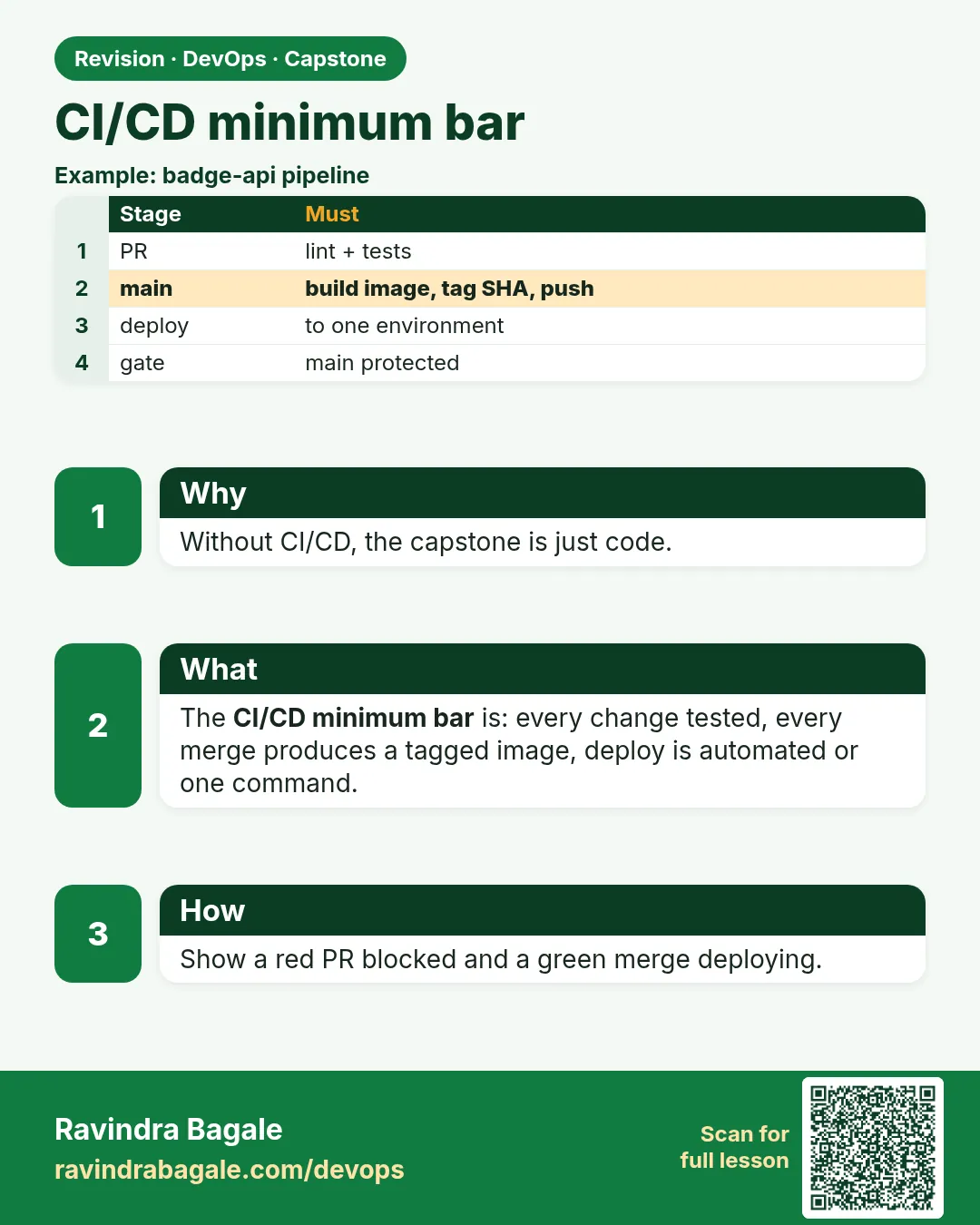 Revision card
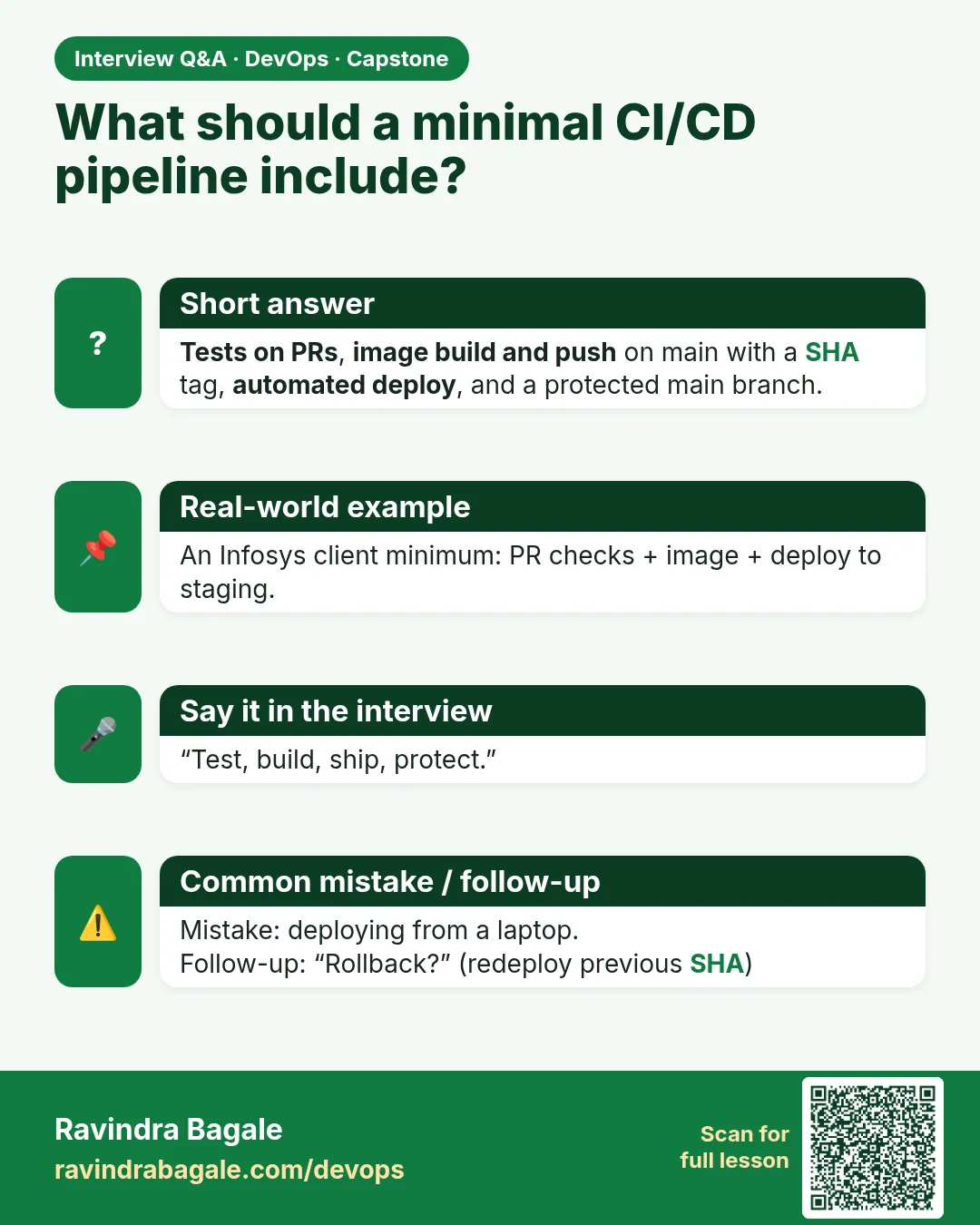 Interview card