Power BI Service Practice with Answer Key
Suppose we are handing over the Blinkit Maharashtra report on Friday. On Monday at 9 am IST, Shraddha must open it with Sunday's data and see only Nashik.
Exercise (one under the other):
- Create a workspace
Blinkit MH Reports(needs a work or school account and the right licence). - Publish your practice .pbix there.
- Open the semantic model Settings. Enter Data source credentials.
- Turn on a daily refresh at 7:00 AM, time zone (UTC+05:30). Tick failure e-mails.
- Create an app. Add Shraddha's test account to the audience.
- On the semantic model Security page, add her to the
City Managerrole. - Next day, open Refresh history and the app as Shraddha (or Test as role).
Expected result:
| Check | You should see |
|---|---|
| Workspace items | 2 items with the same name: a semantic model and a report |
| Refresh history | Status Completed, start time about 07:00 IST |
| Shraddha's app view | Nashik only |
| Shraddha's workspace role | None (she uses the app) or Viewer |
About this data: This table uses columns: Check, You should see. This table uses columns: What you see, Why, Fix. Values shown are the lesson examples already on this page (not a new dataset).
Answer key (open after you try)
- Publishing a .pbix creates two items: the semantic model (data + measures) and the report (pages).
- Time zone matters: 7:00 in UTC is 12:30 pm in India. Choose (UTC+05:30) Chennai, Kolkata, Mumbai, New Delhi.
- A file on
C:\or an on-premises SQL Server needs an on-premises data gateway. A file on SharePoint or OneDrive does not. - In a Pro (shared capacity) workspace you can schedule up to 8 refreshes a day.
Common mistakes:
| What you see | Why | Fix |
|---|---|---|
| "Scheduled refresh is disabled" / credentials error | Credentials never entered or expired | Settings › Data source credentials › Edit credentials |
| Refresh at lunch time, not morning | Time zone left as UTC | Pick UTC+05:30 |
| Shraddha sees all cities | She was added as Member | Remove; use app audience or Viewer |
| Colleagues cannot open the report | Report in My workspace | Publish to a team workspace |
Samajla ka? Publish is not the finish line. The finish line is Monday 9 am, fresh data, right person, right rows.
Thodkyaat sangaycha tar (quick recap)
Publish to a team workspace, give viewers the Viewer role, keep refresh failure notifications on, and do not e-mail the PBIX to share it. Now let us move on to security – RLS!
Team workspace मध्ये publish करा, viewers ना Viewer role द्या, refresh failure notifications चालू ठेवा, आणि sharing साठी PBIX e-mail करू नका. आता पुढे जाऊया security कडे – RLS!
Team workspace में publish कीजिए, viewers को Viewer role दीजिए, refresh failure notifications चालू रखिए, और sharing के लिए PBIX e-mail मत कीजिए. अब आगे बढ़ते हैं security की ओर – RLS!
Deepen this topic (Why / What / How)
Fictional Maharashtra example. Numbers and workspace names below are practice data only.
Why: Scattered practice without an end-to-end path leaves Service skills half-finished.
What: Use this practice page, then complete the Ch 44 capstone: publish, secure, refresh, share.
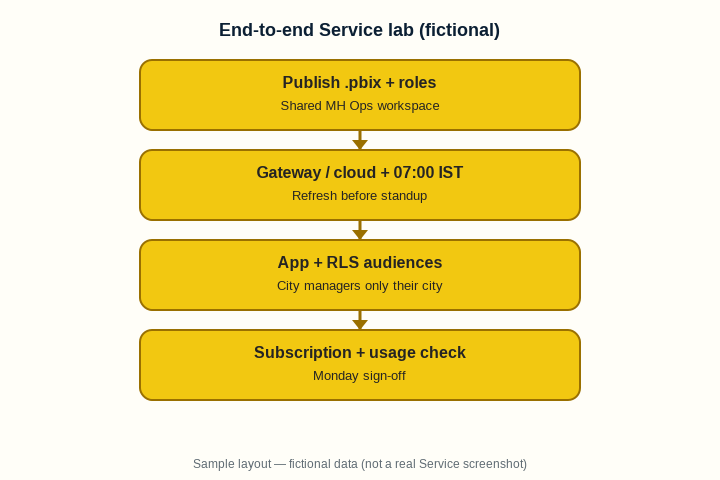
How — finish the Service loop:
Vertical steps (one under another)
- Publish a practice .pbix to a shared workspace.
- Set a role and a Viewer test user.
- Schedule refresh (or document why Import credentials are pending).
- Share via App or workspace — not Publish to web.
- Follow Ch 44 checklist end to end.
Tiny example: Fictional: complete Lab → green refresh → Viewer opens App Page 1.
Ravindra Bagale's Tip
Friends, the capstone is where overview knowledge becomes interview proof.
Ravindra Bagale's Tip – मराठी
मित्रांनो, capstone मध्ये overview → interview proof होते.
Ravindra Bagale's Tip – हिंदी
दोस्तों, capstone में overview → interview proof बनता है।
Go deeper next
This Chapter 25 page is the overview. For the full Service deep lesson, open Ch 44 · Capstone: Publish, Secure, Refresh, Share. Chapters 37–44 are the deep Service series; Chapter 44 is the publish–secure–refresh–share capstone.
Quiz (5 questions)
1. Capstone Ch 44 asks you to practise:
2. Before sharing widely:
3. Viewer test means:
4. Overview chapter for the map:
5. Deep series start:
Practice tasks (12) — hints only, no full answers
- Task. Write the business question this practice and answer key publish share and page answers in one sentence.
Hint: Name the user and the decision. - Task. List three mistakes learners make with practice and answer key publish share and.
Hint: Use Fix common mistakes as a seed. - Task. Draw a 5-box flow on paper for practice and answer key publish share and (fictional MH Ops).
Hint: Photo counts as artefact. - Task. Explain practice and answer key publish share and to a friend in 60 seconds using Why/What/How.
Hint: Record voice memo if you can. - Task. Open the linked deep chapter and write three new facts not on this overview page.
Hint: Cite section titles only. - Task. Create a checklist of 7 ticks before you call practice and answer key publish share and “done”.
Hint: Include a verify step. - Task. Invent fictional refresh/share/role data that fits practice and answer key publish share and.
Hint: Keep IST times. - Task. Map who is Admin / Member / Contributor / Viewer for a fictional workspace using practice and answer key publish share and.
Hint: Least privilege. - Task. Write an interview STAR story that uses practice and answer key publish share and.
Hint: 45–60 seconds. - Task. Find one unused habit you will stop (e.g. My workspace for team content) related to practice and answer key publish share and.
Hint: Be specific. - Task. Link practice and answer key publish share and forward to the correct Ch 37–44 lesson and say why.
Hint: One sentence why. - Task. Teach practice and answer key publish share and back using Marathi or Hindi tip language once.
Hint: Keep English terms for product UI.