Chapter 92: GitLab CI Deep Dive
92.8 Services — a real database for tests
Story (fictional teaching scenario). At a fictional hotel-booking company in Udaipur, tests used a fake in-memory database and passed, but production on PostgreSQL failed on a date query. Chen from Taipei added a service: a PostgreSQL container that starts next to the test job, only for that job. Now tests run against the same kind of database as production, and the container is thrown away afterwards.
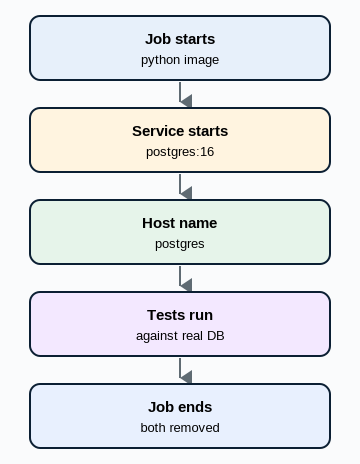
Why
Testing against the real kind of database catches bugs that fakes hide.
What
- services — Extra containers started for a job, like a database or cache.
- alias — The host name the job uses to reach the service. By default it comes from the image name, like
postgres. - Service variables — Settings the service image reads, like
POSTGRES_DBandPOSTGRES_PASSWORD. - Services need a runner with the Docker or Kubernetes executor.
How
- Add the service image under
services:. - Set the variables the image expects.
- Connect from your tests to the alias host name.
- Use a throwaway test password only; it is not a real secret because the database lives for minutes.
Example 1: PostgreSQL for one job
db-test:
  image: python:3.13-slim
  services:
    - name: postgres:16
      alias: db
  variables:
    POSTGRES_DB: "booking_test"
    POSTGRES_USER: "tester"
    POSTGRES_PASSWORD: "throwaway-test-only"
    DATABASE_URL: "postgresql://tester:throwaway-test-only@db:5432/booking_test"
  script:
    - pip install psycopg[binary]
    - python -c "import psycopg, os; c = psycopg.connect(os.environ['DATABASE_URL']); print(c.execute('select 1').fetchone())"
Line by line: services: starts postgres:16 with the host name db. The three POSTGRES_ variables tell the image to create a database and user. DATABASE_URL is how the test code finds it. The script installs a driver and runs one query. The password is a throwaway value for a database that exists only during this job.
Output (illustrative — pipeline not run)
$ python -c "import psycopg, os; ..."
(1,)
Job succeeded
What it means: The job reached the database at host db and got the answer (1,). The image tags are examples.
Ravindra Bagale's Tip
Services are for tests. Never point a CI test job at a shared or production database.
Services tests साठी आहेत. CI test job कधीच shared किंवा production database कडे point करू नका.
Services tests के लिए हैं. CI test job को कभी shared या production database पर point मत करो.
Did you understand? Let us try it once more.