Chapter 92: GitLab CI Deep Dive
92.13 Troubleshooting pipelines
Story (fictional teaching scenario). At a fictional dairy-tech startup in Anand, Nadia from Casablanca's pipeline would not start at all after a change. No red job, just nothing. The cause was a YAML indent error, shown by the pipeline editor's validation. The next week a job stayed pending forever — no runner had the tag it asked for. Most GitLab CI problems fall into a few families.
Why
Knowing the family of a problem tells you where to look first.
What
- Pipeline editor / CI Lint — In GitLab under Build → Pipeline editor. Validates the file and shows the merged result.
- Pending job — Waiting for a runner. Usually tags do not match, or no runner is online.
- Stuck MR "Checking pipeline status" — The docs note this can happen when "Pipelines must succeed" is on but
workflow:rulescreate no pipeline. - Job log — Read from the bottom up; the last command shown is the one that failed.
- CI_DEBUG_TRACE — Very detailed logs. GitLab warns it can reveal variable values, so use it only on safe branches and never with real secrets.
How
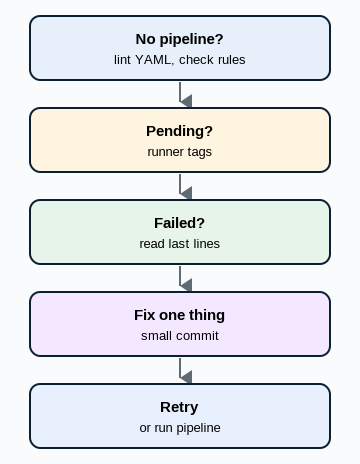
- No pipeline: open the pipeline editor and check the validation message, then check
workflow:rules. - Pending: compare the job's
tagswith your runners' tags. - Failed: read the last 20 lines of the log, run the same command locally if you can.
- Change one thing per commit.
Example 1: Validate YAML before you push
python3 -c "import yaml,sys; yaml.safe_load(open('.gitlab-ci.yml')); print('YAML OK')"
Output (tested locally — the job's script was run on a practice computer, not in a GitLab pipeline)
YAML OK
What it means: This only checks that the file is valid YAML on your own computer (it was run on the lab file). It does not check GitLab keywords — the pipeline editor does that.
Example 2: A pending job
Output (illustrative — pipeline not run)
This job is stuck because you don't have any active runners online or available with any of these tags assigned to them: deploy-arm
What it means: The job asks for tag deploy-arm and no runner has it. Fix the tag or register a runner with it.
Example 3: Undefined command in a job
Output (illustrative — pipeline not run)
$ pytest -q
/bin/sh: 1: pytest: not found
ERROR: Job failed: exit code 127
What it means: Exit code 127 means "command not found". The image does not have pytest; install requirements in before_script or use python -m pytest after installing.
Ravindra Bagale's Tip
When a pipeline does not appear at all, suspect workflow:rules before anything else.
Pipeline दिसतच नसेल तर सगळ्यात आधी workflow:rules वर संशय घ्या.
Pipeline दिख ही न रहा हो तो सबसे पहले workflow:rules पर शक करो.
Did you understand? Let us try it once more.