Chapter 92: GitLab CI Deep Dive
92.4 rules and workflow:rules — when jobs and pipelines run
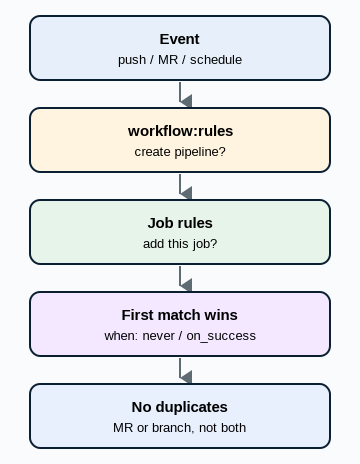
Story (fictional teaching scenario). At a fictional property-listing site in Navi Mumbai, every push to a branch with an open merge request started two pipelines: a branch pipeline and a merge request pipeline. Compute minutes doubled. Joseph from Nairobi added three lines of workflow:rules from the GitLab docs. Now a branch gets a branch pipeline until a merge request opens, then only merge request pipelines.
Why
Without rules, jobs run in places they should not — deploys on feature branches, or two pipelines for one push.
What
- rules — A list of conditions on a job. GitLab checks them top to bottom; the first one that matches decides.
- if — A condition using variables, like
$CI_COMMIT_BRANCH == $CI_DEFAULT_BRANCH. - changes — Match only when certain files changed.
- when — What to do on a match:
on_success(default),manual,never,always,delayed. - workflow:rules — Same idea, but for the whole pipeline. Checked before any job.
- CI_PIPELINE_SOURCE — Why the pipeline started:
push,merge_request_event,schedule,web, and others. - CI_OPEN_MERGE_REQUESTS — Set on branch pipelines when the branch has an open merge request.
How
- Add the duplicate-stopping
workflow:rulesat the top. - Give deploy jobs a rule for the default branch only.
- Use
changes:for jobs that only matter for some folders. - Remember: once a job has
rules, it only runs when a rule matches.
Example 1: Stop duplicate pipelines (from the GitLab docs)
workflow:
  rules:
    - if: $CI_PIPELINE_SOURCE == "merge_request_event"
    - if: $CI_COMMIT_BRANCH && $CI_OPEN_MERGE_REQUESTS
      when: never
    - if: $CI_COMMIT_BRANCH
Line by line: Rule 1: merge request event → create the pipeline. Rule 2: a branch push while a merge request is open → never, so no extra branch pipeline. Rule 3: any other branch push → create it. Anything else (for example a tag) matches nothing, so no pipeline.
Output (illustrative — pipeline not run)
Push to feature/coupon (no MR yet)   -> 1 branch pipeline
Push to feature/coupon (MR !57 open) -> 1 merge request pipeline
What it means: Exactly one pipeline per push, whichever type fits.
Example 2: Deploy only from the default branch, docs changes skip tests
unit-test:
  stage: test
  script: ["python -m pytest -q"]
  rules:
    - changes:
        - "**/*.py"
        - requirements.txt

deploy-staging:
  stage: deploy
  script: ["echo deploy"]
  rules:
    - if: $CI_COMMIT_BRANCH == $CI_DEFAULT_BRANCH
Output (illustrative — pipeline not run)
MR changing only README.md  -> unit-test not added, deploy-staging not added
Merge to main changing app.py -> unit-test runs, deploy-staging runs
What it means: Each job decides for itself. CI_DEFAULT_BRANCH is usually main.
Merge requests from forks — a safety note
GitLab's docs say pipelines for fork merge requests do not get the parent project's CI/CD variables by default. But if a maintainer runs the pipeline in the parent project for a fork merge request, all variables become available to it. Read every .gitlab-ci.yml change in the merge request before you click that button.
Ravindra Bagale's Tip
Copy the duplicate-pipeline workflow rules from the official docs into every new project on day one.
Duplicate pipeline थांबवणारे workflow rules official docs मधून पहिल्याच दिवशी प्रत्येक नवीन project मध्ये टाका.
Duplicate pipeline रोकने वाले workflow rules official docs से पहले ही दिन हर नए project में डालो.
Did you understand? Let us try it once more.