Chapter 92: GitLab CI Deep Dive
92.5 stages vs needs, artifacts and dependencies
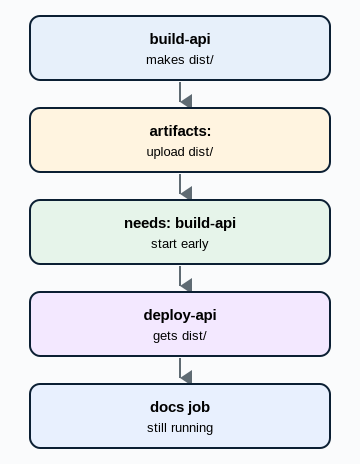
Story (fictional teaching scenario). At a fictional e-learning company in Bhopal, the pipeline had a slow 12-minute docs job in the build stage. The deploy-api job waited for it, even though it did not need the docs. Grace from Dublin added needs: [build-api]. Now deploy-api starts as soon as build-api finishes. She also used artifacts to hand the built files from one job to the next.
Why
Stages are simple but slow: every job waits for the whole previous stage. needs makes a graph (a DAG — directed acyclic graph) so jobs start the moment their real inputs are ready.
What
- needs — List of jobs this job waits for. It can start before the rest of its stage's previous stage is done.
- DAG — The picture of which job depends on which. GitLab shows it on the pipeline page.
- artifacts — Files a job saves after it finishes. Later jobs can download them.
- expire_in — How long artifacts are kept, like
1 week. - dependencies — Which earlier jobs' artifacts to download.
dependencies: []downloads none. Withneeds, a job downloads artifacts from its needed jobs by default.
How
- Save build output with
artifacts: paths:. - Set
expire_inso storage does not grow forever. - Add
needs:to jobs that only depend on one or two earlier jobs. - Use
dependencies: []on jobs that need no files, to save time.
Example 1: Build, save, use
build-api:
  stage: build
  script:
    - mkdir -p dist
    - echo "api build $CI_COMMIT_SHORT_SHA" > dist/version.txt
  artifacts:
    paths:
      - dist/
    expire_in: 1 week

docs:
  stage: build
  script: ["sleep 5", "echo docs built"]

deploy-api:
  stage: deploy
  needs: ["build-api"]
  script:
    - cat dist/version.txt
Line by line: build-api writes a file into dist/ and saves that folder for one week. docs is a slow neighbour in the same stage. deploy-api needs only build-api, so it starts without waiting for docs, and it gets dist/ automatically.
Output (illustrative — pipeline not run)
$ cat dist/version.txt
api build 3f9c2a1d
What it means: The file made in one job, on one runner, arrived in another job. The short commit id is an example.
Example 2: A job that needs nothing
notify:
  stage: deploy
  needs: []
  script: ["echo pipeline started"]
Output (illustrative — pipeline not run)
notify passed (started at pipeline start, before the test stage finished)
What it means: needs: [] means "wait for nothing". The job runs right away even though it is in the last stage.
Ravindra Bagale's Tip
If your pipeline feels slow, open the needs graph view. Most waiting comes from stages, not from slow jobs.
Pipeline slow वाटत असेल तर needs graph view उघडा. बहुतेक वाट stages मुळे लागते, slow jobs मुळे नाही.
Pipeline slow लगे तो needs graph view खोलो. ज़्यादातर इंतज़ार stages की वजह से होता है, slow jobs से नहीं.
Did you understand? Let us try it once more.