17. Interview Questions and Answers
17.8 Scenario-Based Questions
A good scenario answer states what you would clarify, shows a small working example and names the evidence for success. These final interview questions cover a daily file, a disputed total, retention, targets, safe distribution and elapsed hours.
Q63. Make a daily cleaning process that someone can rerun
Find the meaning of one source row before cleaning values
Imagine a fictional Blinkit-style team receives daily orders from several sites. Some city labels contain spaces, an export can include an accidental retry, and the report needs a controlled date and currency range. Ask which field is the official Order ID and whether each file contains new transactions or a full snapshot. If the export has one row per order, repeated IDs require inspection. If it has one row per line item, the same Order ID can legitimately appear on many rows. Keep the raw files, source period and relevant source identity intact.
Create an approved city mapping with known canonical labels. Normalize ordinary outer spaces using the allowed text rules and match exact approved keys. Keep unrecognised labels for review. A change from " pune " to Pune can alter which group contains an order while preserving both the original record and its amount. Parse dates with their documented source convention and amounts with agreed types and units. Do not automatically combine exports with different currencies or tax rules because both Amount fields look numeric.
Explain how the workflow verifies a new run
Power Query in a client that supports the source can store import, transformation, append and load steps. Keep the folder restricted to its expected files or explicitly filter the intended entries. Normalize each input using verified schema and source metadata. When a new file appears, check whether it is inside the selected source, whether the transforms succeeded, and whether the intended output actually contains a known new key. Then check report filters and refresh independently. A refresh action that leaves an old result or duplicate batch is detectable by known keys, row counts and source period. Record which rows were rejected and why.
- Record the source name, export period, expected headers, record grain and unique key.
- Keep raw and canonical labels as separate fields while comparing them.
- Require a documented rule for duplicates and conflicts. A repeated key and a repeated transaction can imply different outcomes.
- Reconcile overall and known grouped amounts before letting a newer file replace the accepted result.
Q64 and Q65. Reconcile two reports and compare customer membership
Lab one. Produce two useful answers from the same exercise
Make a disposable worksheet called Orders. Use the following fictional order records in A1:F7. Enter chronological dates as genuine Excel dates. The ISO strings in the table label the intended calendar dates; if your client may interpret text differently, use DATE with the separate numbers as year, month and day. Amounts are numeric and in one training currency. Customer codes are synthetic identifiers, with one order per source row. For this exercise, an ordering customer is a customer with at least one accepted order record, including records that subsequently became cancelled or returned. Other business definitions might restrict this to successful deliveries.
| Order | Date | City | Customer | Status | Amount |
|---|---|---|---|---|---|
| O801 | 2026-09-01 | Pune | C01 | Delivered | 100 |
| O802 | 2026-09-02 | Mumbai | C02 | Cancelled | 220 |
| O803 | 2026-09-03 | Pune | C01 | Delivered | 150 |
| O804 | 2026-09-30 | Mumbai | C03 | Returned | 90 |
| O805 | 2026-10-01 | Mumbai | C02 | Delivered | 300 |
| O806 | 2026-10-04 | Pune | C04 | Delivered | 80 |
=SUMIFS(F2:F7,B2:B7,">="&DATE(2026,9,1),B2:B7,"<"&DATE(2026,10,1))
=SUMIFS(F2:F7,B2:B7,">="&DATE(2026,9,1),B2:B7,"<"&DATE(2026,10,1),E2:E7,"Delivered")- Write the two reports' definitions. For the exercise finance lists all recorded September amounts, while the operations chart includes delivered September records. Use an inclusive start and an exclusive end at October 1, which also works for September timestamps that use the same time basis. No real financial rule is claimed for the fictional amounts.
- Check that the first formula returns 560 across four September orders and the second returns 250 from O801 and O803. The 310 difference is O802 at 220 and O804 at 90. Check that O805 on October 1 is outside both September calculations.
- In a separate copy add an accidental export retry for O801 at the same amount and verified payload. If it entered the report without deduplication, all recorded September would be 660 and Delivered 350. The difference is still 310. Write an independently confirmed key or count check to detect the problem.
- For the customer question first create unique lists based on both date windows. September ordered customers are C01, C02 and C03. October ordered customers are C02 and C04. Repeated September orders for C01 still describe one customer in the requested output. Row counts alone cannot produce the membership comparison.
- Put the September keys in H2:H4 and October keys in I2:I3. Use
=ISNA(MATCH(H2,$I$2:$I$3,0))in J2 and copy to J4. Expect TRUE for C01 and C03 only. Check that the opposite-direction result is C04 alone. These practice IDs are simple alphanumeric keys. If the real key permits wildcard characters, use a verified literal-match scheme. - In a supported Power Query workflow use a left anti join with the unique September list on the left and October list on the right. The unmatched result should have exactly C01 and C03. If either input includes row duplicates, inspect the output grain because a left anti join can keep several unmatched source rows for the same key.
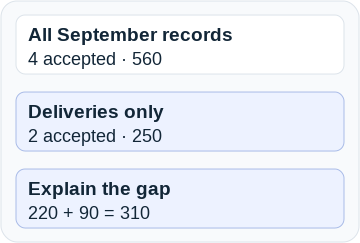
Explain the mismatch without changing a source value
Read the full amount
The control includes all four original September order records and gives 560.
Read the report scope
Two of the September orders are Delivered. Their amounts sum to 250.
Trace the gap
Cancelled O802 contributes 220 and Returned O804 contributes 90 to the control only.
Confirm another control
Verify four unique September keys. An accidental retry could leave the gap at 310 while both sums become wrong.
Respond when the report owner meant something else
If finance and operations intended to measure the same activity, agree the numerator and allowed records, confirm the exact time zone and date cutoff, and rerun both against comparable input. The example closes a specific 310 gap because the business scope is intentionally different. Other differences can come from batches being at different times, adjustments, taxes, currencies or record-level duplication. Use grouped controls to narrow investigation and inspect actual keys before approving a correction. Keep both original report results available while confirming the agreed business definition.
If the customer question instead requires a completed delivery in September, C01 is the only distinct customer from the supplied September delivered rows. October deliveries include C02 and C04. C01 remains the only September-only result under that narrower rule. C03 drops because its only September status is Returned. This is a different eligible population, even though the October list happens to stay the same. Phrase the result accurately and avoid claiming that absence in one period proves a customer's reason or future activity. They may have ordered through another source not represented. Discard each changed copy after observation and retain the documented assumptions alongside any comparison.
Q66. Highlight a qualified decline and show what happens at ten percent
Build the condition from the amount and its baseline
Suppose a fictional Amazon-style catalog is tracking comparable sales totals for the same product in consecutive months. Previous value is in column C and current value in D. The request is a drop of strictly more than 10 percent, using only verified nonnegative current amounts and positive previous amounts in this exercise. A prior zero cannot support relative growth or decline using ordinary division. A negative previous value can require another definition. A blank means the period input needs review. Compare the underlying values regardless of appearance and document currency, comparable date windows and business scope.
=IF(AND(ISNUMBER($C2),ISNUMBER($D2)),AND($C2>0,$D2>=0,$D2<$C2*0.9),FALSE)Test the expression in a helper for a simple TRUE or FALSE before assigning it as a formula-based conditional format. Then apply the rule on the scratch range starting on row two, such as A2:D6, using the relative row and fixed C and D columns. The formula reads the same amount fields for each formatted cell in the row. Use a separate visible text review status for missing or invalid comparisons. The color highlights matching declines; it does not explain why another row is unavailable. A reader following the report without color should still have a textual way to understand the category.
| Product | Previous | Current | Highlight |
|---|---|---|---|
| Tea | 200 | 179 | Yes |
| Rice | 200 | 180 | No |
| Oats | 200 | 181 | No |
| Juice | 0 | 0 | No |
| Salt | 200 | Missing | No |
Tea's change is minus 21 over 200, a 10.5 percent decline. Rice's exact 10 percent does not meet the strict rule. Oats declined by 9.5 percent. Juice has no valid positive comparison base, and Salt is pending. Displayed percentage precision can round values near a threshold. Use the specified rounding policy if the condition must be based on a rounded business metric. In the original integer practice, inspect all five cases and verify which row is highlighted when copied. Restore the fixture after testing.
Q67. Prevent predictable mistakes and still audit shared inputs
Design a target sheet with defined cells for edits
Imagine a fictional Swiggy-style area planner lets a supervisor enter the number of orders planned for each city in a week. Define allowed city codes with an approved list. A practice target field should accept only whole numbers from zero through 200 per city. Give the column an explicit period and unit. Put the actual output formulas in separate protected cells when the workbook uses that protection. Present input notes near the fields so someone can understand the constraints before entering a value.
In a scratch workbook, use Data Validation to restrict city to the approved list and target to the specified integer range where the client supports it. Configure a Stop alert if direct invalid entry must be rejected. Try entering 180, 180.5 and 201. The first is valid, the second lacks the required whole-number representation and the third is above the maximum. A numeric zero can be an approved operational choice. A blank target can mean it is still missing. Choose whether a missing value is allowed during editing and what downstream reporting should require.
Excel data validation can help direct entry. Copying, filling, pasting or formula-driven changes can introduce states the normal alert does not catch. Microsoft's guidance notes these limitations. Protecting a sheet helps reduce accidental edits but is a separate control from account or file access. Add an independent review check for every row before using the targets. Confirm a known valid city and value, out-of-range number, decimal and truly blank input. Compare against the expected row count and access scope when a new city is added.
Suppose Pune has a valid target 180 and Mumbai remains blank. A plain sum might show 180, while a capacity planner could mistake it for a complete total. Add a missing-count or text status that says one city is awaiting input. If Mumbai later supplies zero, the total still reads 180. Completeness changes from one of two to two of two confirmed targets. Verifying only the sum would miss the difference.
- Use a control list and an explicit per-field definition.
- Test a typed valid value and a deliberately rejected value.
- Test incoming pasted values with separate auditing rather than relying on alert visibility.
- Reconcile expected city membership and missing entries before publishing an agreed total.
Q68. Prepare only the data each authorized recipient can see
Rehearse local preparation with fictional recipients
Clarify the exact time window, approved fields and authorization for every named recipient. In the September practice, a fictional Pune manager may be allowed order and amount fields for Pune only. That dataset would contain O801 and O803 with amounts 100 and 150 and total 250. A fictional Mumbai manager may be allowed O802 and O804 with amounts 220 and 90 and total 310 under the same all-record definition. If an actual role allows seeing Delivered only, the Mumbai set in September is empty. Document whether an empty period gets a no-activity report or requires review under the business rule, and verify the expected rows before delivery.
Prepare a separate new file with only approved fields and matching rows. In this local practice use no actual contact list and do not send anything. Starting with an empty workbook and writing only approved values reduces the chance of carrying an unrelated data sheet, query, link, PivotTable cache or metadata into the deliverable. Old sheets hidden by an analyst and filtered rows may remain in the underlying file. A pivot's report page or screenshot needs review as well. A PivotTable cache can retain data outside the visible report. Microsoft documents that the Document Inspector can detect certain caches, and that the inspector cannot simply remove such caches in the workbook without affecting functionality.
To practise, first create the two local fictional outputs on authorized scratch copies and review them as a recipient would. Read the city or recipient marker, verify each row meets the scope and compare the row count and sum to an independent list. The Pune output must never contain O802 or O804. If you see a hidden sheet or an external formula dependency referencing the source, prepare a fresh minimal file rather than relying on the viewer overlooking it. If an approved workflow delivers a PDF, review its actual pages and metadata under the same rules. Use a second-person or approved automated check where required and keep a record of what was authorized and verified.
In an interview say how you would handle a missing authorization mapping, a renamed city or an ambiguous recipient. Stop the corresponding export for review and keep its data inside the authorized process. Automation can prepare multiple files, but it does not establish who has permission to receive them. If an Excel workbook is insufficient for a multi-user secure view, discuss the organization's supported access and sharing system with its administrators, then test access as each intended role. Inspect model or dashboard filters separately from true access controls.
Q69. Calculate hours from complete recorded timestamps
Lab two. Separate a date boundary, a break and a fictional threshold
For a fictional delivery roster, the practice sources provide full local date and time values on a single agreed time basis plus unpaid break minutes. An elapsed time is the difference between the two timestamps. Excel represents date-time computations in days, with a fraction for the time of day. A time-only shortcut using MOD can handle a simple overnight case under an explicit assumption of a shift shorter than one day and a valid departure. It can also wrap a negative or reversed observation into a positive result. For an interview example that must identify an invalid date or support longer intervals, use full timestamps and a diagnostic.
Put the next table in A1:D5 as input, with genuine date-time values in B and C and numeric break minutes in D. Use the expected result columns only as a check, not as inputs. The numeric practice model expects date-time entries recorded to minute precision. To create a timestamp without relying on local date parsing, use DATE plus TIME. For example the first start is =DATE(2026,10,5)+TIME(21,0,0). Choose a date-time number format showing both parts. In this fictional math exercise the working-hours threshold is nine per accepted shift. A real attendance, payroll or overtime calculation depends on the organization's approved rules, jurisdiction and actual recorded circumstances.
| Shift | In | Out | Break min | Paid hours | Over threshold |
|---|---|---|---|---|---|
| P11 | 2026-10-05 21:00 | 2026-10-06 07:30 | 30 | 10 | 1 |
| P12 | 2026-10-05 08:00 | 2026-10-05 17:00 | 60 | 8 | 0 |
| P13 | 2026-10-05 08:00 | Missing | 30 | Review | Review |
| P14 | 2026-10-05 10:00 | 2026-10-05 09:00 | 0 | Review | Review |
In E2 use the first formula. It checks that B2:D2 contain three numeric values, that departure does not precede arrival, and that break minutes are nonnegative whole minutes within the elapsed time. The rounding to a whole minute matches the exercise's source precision and avoids tiny errors from fractional-day numeric arithmetic around comparisons. In F2 use the second formula to show how many paid hours exceed the fictional nine-hour threshold. Fill each formula down through row five. A numeric type check is a practical first guard; verify that dates really came from the agreed input fields and that real values follow their expected ranges.
=IF(COUNT(B2:D2)<>3,"Review",IF(OR(C2<B2,D2<0,D2<>INT(D2),D2>ROUND((C2-B2)*1440,0)),"Review",(ROUND((C2-B2)*1440,0)-D2)/60))
=IF(ISNUMBER(E2),MAX(0,E2-9),"Review")- Trace P11 across midnight. Three hours pass from 21:00 to midnight and another seven and a half before departure. The elapsed total is 10.5 hours. Subtract half an hour to give ten paid; the result above nine is one.
- Check P12's nine elapsed hours and one-hour break. It yields eight paid and zero overtime under the example rule. Inspect the display in numeric hours, because an Excel duration format uses a different storage representation.
- Test missing P13 and reversed P14. Each must show Review. Converting them to an automatic time wrap could turn a bad entry into a plausible hour count. Record the source rows needing correction.
- On a separate copy set P12's break to 541 minutes, one more than the 540-minute measured interval. It should show Review. At exactly 540 with this arithmetic policy, the result is zero paid and zero over threshold. An operation may require a separate policy about plausibility, so confirm long breaks before treating such data as final.
- Change P11's departure to next day 06:30 and keep the half-hour break. Elapsed is 9.5 hours, paid is nine, and overtime becomes zero. This tests the boundary and the date arithmetic together.
- Restore or discard the variants. Check that the two valid original inputs sum to 18 paid hours and one hour above threshold and that two further rows require review. State those incomplete results honestly before calculating totals by person or week.
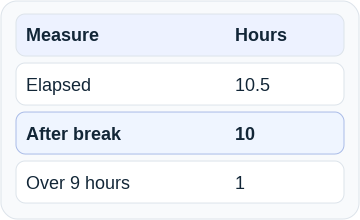
When summarising by person and week, verify the week definition and how to assign a shift crossing midnight or a period cutoff. An elapsed number represents one recorded shift under the practice rules. A real organisation may split hours across days, use weekly thresholds or handle rounding and breaks differently. Time zones and clock changes can also affect elapsed arithmetic. Keep actual timestamps and agree the time basis before interpreting them. In this lab the two accepted shifts use one agreed time basis and aggregate only after validation. If a colleague claims the total is wrong, show the individual minutes, accepted hours and unresolved records so each piece can be checked.
Q70. Explain a project with claims you can prove
Use one practice project as honest evidence
STAR is a way to organise a project answer into Situation, Task, Action and Result. For this training experience, start by saying the work used fictional delivery data. The situation is a reported difference between finance and an operations total. The task was to explain the gap and check the source. You preserved the original order data, described the distinct reporting scopes, used the same September date interval for both and independently checked exact IDs. The results were 560 recorded, 250 delivered, and a gap of 310 traced to a cancelled and a returned order. No claim about real company operations or professional experience is required.
Describe how you tested for a second error. When the practice adds a repeat of O801, the difference remains 310 while both reports gain 100. Comparing distinct Order IDs or validated row counts catches a bug that comparing only the gap would miss. Then present your correction rule and any data expectation. A project description that only says "built a dashboard and improved reporting" gives no way for the interviewer to assess your contribution. A reproducible number and named test show how you thought.
- Situation. Stakeholders saw two different amounts for an apparently similar period.
- Task. Identify their definitions and reconcile the displayed figures to the six-record practice source.
- Action. Use an inclusive September start and an exclusive October start, examine accepted order IDs and compare the Delivered condition.
- Result. Explain a 310 difference with two exact known records, and show why a retry changes both totals without changing their difference.
Rehearse answering an unexpected follow-up
If the interviewer asks for one thing you would do next on a new export, say which verification matters. "I would run the same keyed check on the new period and confirm a known boundary record, then compare the scoped totals before distributing them." If asked how long the process saved, give a real measurement only if performed. Describe a measurement design otherwise, with the same files and repeated runs. A changed business decision, supported workflow and independent verification are each stronger project claims than a guessed improvement percentage.
Quiz. Read the rule and predict the evidence
Which two original records explain the September amount difference?
O802 is Cancelled with 220 and O804 is Returned with 90. Both contribute to the 560 recorded total and neither to 250 Delivered. Verify their dates, statuses and currency within the agreed period.
Why can an accidental duplicate leave the same difference?
A second O801 adds 100 to both scopes, producing 660 and 350. The difference stays 310. Independent key uniqueness, correct row counts and known source contributions are needed.
Which customers occur in September and do not occur in October under the practice definition?
C01 and C03. C01 is counted once despite two orders. C02 is present in both months. C04 belongs only to October. Under a delivered-only requirement C03 would be excluded from the September candidate list.
Should an amount of 180 highlight when the previous amount is 200?
The decrease is exactly 10 percent, so it fails the strictly-more-than rule. At 179 the decrease is 10.5 percent and qualifies. Keep earlier zero and missing inputs in their own review states.
What must you check if a worksheet was filtered to Pune before sharing?
Verify the recipient and approved scope, then prepare and inspect a fresh minimal output containing only permitted data. Filtering can leave other cities inside the workbook. In the example only O801 and O803 belong to the Pune September output.
How many paid hours and hours over threshold appear for the original overnight record?
Ten paid hours and one above the fictional threshold. Full timestamps establish 10.5 elapsed hours, and the break removes 0.5. Both working hours and the threshold need the same unit.
Model answers for a final practice round
How would you automate cleaning a file with inconsistent names?
I preserve the raw file and verify the record grain, source type and date convention. I map names with an approved list and flag conflicting repeats. I test the workflow with a deliberate new batch, then verify loaded keys and controls before reporting.
How would you reconcile two sets of metrics?
I start with period, currency, row grain and scope. I compare accepted source amounts and find the keys that explain the difference. In the practice the 310 gap is entirely two status exclusions. I also check for duplicated records that can move both totals.
How would you design a safe shared target sheet?
I define the expected city and numeric rules then apply validation and protect formula areas as appropriate. I check a direct invalid entry, a pasted case and incomplete values in the independent review. The submitted sheet must meet the business input contract before totals are used.
How would you model overnight attendance reliably?
I use full start and end timestamps from one verified time basis and explicit break units. I validate missing and reversed inputs, convert elapsed minutes to hours and apply the agreed threshold. I check both a midnight crossing and an exact boundary before publishing.
What part of an Excel project answer makes it credible?
I say what I personally did, explain the source and definition and give a result with a reproduced check. I distinguish a course exercise and its fictional figures from real work. I can trace any changed outcome to a specific input and rule.
Recall cards
Start at the source
Identify grain, key, period and expected types before transformation or aggregation.
Explain a gap
Reconcile differences to verified records and check that both totals are correct independently.
Distinct membership
Build eligible unique customer lists before comparing one month against the other.
Strict threshold
Test the equality point, the adjacent values and a missing or zero baseline.
Approved output
Make separate minimal recipient files and inspect what they actually contain.
Full timestamp
Use complete dates and times for overnight shifts and reject reversed or missing observations.
Official references
Check a revised status without changing the source definition
Separate a confirmed correction from an open discrepancy
Return to the original September orders in a disposable copy. Suppose an authorised source owner confirms that O802 was delivered and the export's Cancelled status was incorrect. Preserve the underlying recorded amount of 220 and the original source row. Update only its confirmed status in an approved result stage. Record the batch and reason. Predict the total before running. Finance's all-record control stays 560. Operations Delivered becomes 470 because it now includes O802. The gap shrinks to 90, explained wholly by O804 at Returned. The distinct September order count remains four and the delivered count grows to three. This variant tests whether your data process applies an update without appending a second copy of the source record.
Check the customer follow-up as well. Original September Delivered represented only C01. The updated September Delivered set contains C01 and C02. Because C02 appears as a delivered customer in October, it does not become a September-only match. The narrow September-only set remains C01 even after one candidate joins the September set. Verify the memberships independently before reporting either metric. A different scenario changes the September amount while leaving the customer outcome stable. A count or a single declaration that "the dashboard updated" does not establish all resulting relationships.
Specify what happens if the current export is incomplete
Without a confirmed October export, using a blank October list would incorrectly classify every September customer as absent. Ask what proves the relevant month and sources are complete. For example, record the approved file name, covered dates and expected site list, then check a known October row O805. Distinguish a single site failing to submit from a confirmed zero-order month. If any critical source is missing, mark the comparison pending rather than claiming the team has a drop in customers. A valid zero can be reported only after checking the complete intended population.
The same principle applies to amounts. If a catalog owner sends an October field that combines gross and net measures, income can seem to decline simply because the definition changed. Verify amounts come from comparable periods and rules. On the five-product fixture somebody may ask to include credits or returns as negative current values. Discuss the business meaning of a negative amount before changing the comparison. The practice intentionally sends invalid numeric states for separate review; its conditional format does not show why a line had no color. A review label can say Missing current amount, No previous base or Valid comparison. Build one of those controls and compare each value to the source.
Distinguish a corrected time entry from an invented overnight shift
P14 records a start at 10:00 and an end at 09:00 on the same date. It might be a reversed entry or an end date entered incorrectly. Ask the source owner to verify the actual timestamps. If an approved correction establishes that departure was next day at 09:00, the duration would become 23 hours. That number may need a separate long-shift review under a real system policy. The training formula detects invalid ordering, missing values and invalid break arithmetic. It does not certify that a 23-hour shift was possible or authorised. A receiving reader needs both the calculation and the limits of its validation.
Use a conflict example for grouping by week. Suppose the same person has one shift crossing from Sunday night into Monday morning. One report may assign the entire shift to the date it began, while another allocates actual hours to both days. Even with correct timestamp arithmetic they can disagree on weekly totals. Request the intended allocation convention and time basis before comparing the weekly summaries. A grouping keyed only on the start date follows the first policy by construction. If the organization has a different labour or payroll rule, use its approved process and test a period cutoff before the result affects people.
Explain when to return an answer and when to return a review state
Scenario interviews can reward knowing what information is sufficient for an answer. If the scope difference is verified, give the two amounts and the exact reason. If the date convention is unresolved, show a clearly tagged pending record. If a distribution recipient has no documented approval, stop the preparation for that person. If a shift has a missing end time, leave its pay-related values unresolved. Each state keeps the uncertain source visible for someone who can resolve it while avoiding invented results.
Finish by naming one acceptance condition for each scratch rehearsal. The September report explains its 310 gap without duplicates. Its retention list contains exact permitted customer codes. The amount condition distinguishes 179 from 180. The clean recipient copies contain only expected keys and fields. The attendance report shows 18 paid hours for two accepted shifts with two review states. These are practical facts a colleague can reproduce from the fixture. They also keep your answer brief when the interviewer asks about only one stage.
For a final handoff exercise, restore the original source and rerun one case from start to finish. Observe the actual input you restored and the expected returned value. For example, change O802 back to Cancelled and check that operations returns to 250 while the record count remains four. This catches a version left in the wrong source state before the next learner uses it.
Continue practising: explore the existing Excel Task Hub for additional exercises.