Practice and Answer Key: Cleaning a Messy Export
Clean two messy exports and defend the result
A new analyst at an order operations team receives two fictional exports. The first looks like an order snapshot with one repeated download row. The second has separate order lines, a negative amount, several unresolved inputs, and a pair of disagreeing events. A supervisor wants a table with known values and a short exception list. They will also ask how you counted, which words controlled the release, and which original rows still need a decision.
Use these exercises to practise the kinds of Excel checks that could arise around delivery apps such as Blinkit or Amazon Now. The scenario and all input figures are synthetic. Start with the original five-row practice and then apply the same skills to a different source grain. The second lab is designed to expose a case where removing duplicates on order ID would discard a valid line.
- Before testing. Create a scratch workbook. Give the raw records fixed source IDs, keep raw formats and set up separate Review and Report areas.
- Before cleaning. Name the source grain and allowed formats. Describe what one row in the released table should represent.
- Before publishing a result. Check the named rows, visible exceptions and signed amount coverage. Use evidence for a replay or an update.
- After verifying. Compare with the disclosed answer key. Explain one changed and one protected raw value out loud.
Set up a clean workspace for both labs
- Keep Raw unchanged after entry. Work in a separate copy or through helper formulas. Record the original source-row count, intended amount type and row grain.
- Use explicit cell types for the fixture. Format amount strings and line IDs as Text before entry. Leave explicitly missing cells empty. The first lab deliberately places all raw amounts in text so you can detect what SUM covers.
- Read spaces in the table. The symbol
␠shows an ordinary space that you should type. Do not type the marker itself. If a pasted field loses those spaces, recreate the specified inputs in the scratch sheet before running the key tests. - Build an approved CityMap. Put Alias and Report City in A1:B1. Use PUNE → Pune, NASHIK → Nashik, NAGPUR → Nagpur and KOLHAPUR → Kolhapur in A2:B5. A bare case change is only part of those confirmed mappings. The practice owner initially confirms no other aliases.
- Record evidence only where given. Letters such as EV and BV identify source events. The exercise describes which repeated event is verified and which pair remains in dispute. Do not infer a newer event solely from the letters or position.
Keep the raw source fields, helper candidates and disposition in view for review. You can prepare a separate report sheet once you know which IDs and measurements are eligible. If a downstream person receives a cleaned static copy, retain the raw and formula-driven audit workbook as the evidence for that release.
Lab 1 · Rebuild the original order-level practice
Goal. Preserve five raw records, find one confirmed replay and make a numeric total for the verified unique orders. In a sheet Original Raw set A1:E1 to Order ID, City, Amount, Source Row and Event. Format column C as Text and type the five rows. Add these same fields to a working sheet Original Review. This source covers one row per original order snapshot, with a replay possible.
| Order ID | City | Amount text | Source row | Event |
|---|---|---|---|---|
| ␠blk-2201 | pune␠ | 64 | P01 | EV01 |
| BLK-2201 | Pune | 64 | P02 | EV01 |
| BLK-2202 | NASHIK | 270 | P03 | EV02 |
| AMN-2203 | ␠nagpur | 240 | P04 | EV03 |
| BLK-2204 | Kolhapur␠␠ | 232 | P05 | EV04 |
Build the worksheet candidates before revealing the solution
- Count raw and numeric values separately. Record how many source row IDs are present. Run a count for numeric raw amounts and compare it with the visible amount cells. If a total seems implausible, check the field's underlying type before changing the records.
- Prepare the expected ID form. Use dedicated helper cells. Ignore permitted case and surrounding ordinary space differences, while keeping hyphens and all source prefixes.
- Prepare city and amount candidates. Use the approved map and interpret the raw numbers from the confirmed text format. Capture an unrecognised value explicitly if the map does not contain it. Do not edit the actual raw labels.
- Compare a likely replay. P01 and P02 share EV01. The owner has verified that P02 is a repeat of the same event, with the same real city and value. Mark P01 as the included original and P02 as the replay under this controlled rule. Check whether any other key repeats.
- Produce a small table for the four accepted order snapshots. Store each verified order ID, report city, numeric amount and source ID. Confirm the number of rows, candidate numbers and both amount totals using independent calculations.
Before opening the answer, prepare three values: the initial SUM on the raw amount range with text, the total of all converted candidates and the total approved for the unique-order table. Explain which step caused each change. Show the replay amount as an explicit reconciliation component even if the final report does not include it.
Hint · the same amount can appear for two different reasons
Both rows can legitimately record 64 in the raw file. Their confirmed source event makes one a replay. Two equal amounts in different events would not be enough to mark a row replay.
Hint · find a good comparison key
TRIM removes the permitted surrounding ordinary spaces in the practice ID, and UPPER prepares the feed's approved comparison form. Keep the raw text nearby for evidence.
Answer key · formulas and expected counts for the original lab
In Original Review put Order Key in F1, Report City in G1, Amount Candidate in H1, Candidate Match Count in I1 and Disposition in J1. Enter F2:I2 as shown, starting each formula at its leading equals sign and using your installation's argument separators. Fill through row 6. Mark J3 Replay for P02. Mark every other row Ready after the source check.
F2 =UPPER(TRIM(A2))
G2 =IFNA(VLOOKUP(UPPER(TRIM(B2)),CityMap!$A$2:$B$5,2,FALSE),"Review city")
H2 =IF(C2="","",IFERROR(NUMBERVALUE(C2,".",","),""))
I2 =IF(F2="","",COUNTIF($F$2:$F$6,F2))
Ready amount =SUMIF(J2:J6,"Ready",H2:H6)
The five raw amount strings contribute zero to a simple SUM of C2:C6 because this fixture intentionally stores them as text. The five numeric candidates sum to ₹870. The replay is ₹64. The four unique ready orders sum to ₹806. The expected report is BLK-2201 Pune 64, BLK-2202 Nashik 270, AMN-2203 Nagpur 240 and BLK-2204 Kolhapur 232. The raw count reconciles as four Ready and one Replay. The matching key count is 2 in the first two rows and 1 otherwise.
Recover and verify. If numeric conversion appears to have no effect, check whether the Original Raw cells were already numeric while entering the example. If a reported city still contains the display marker, replace that marker with actual spaces in the raw practice fixture and verify. If the ready output still contains both copies of the confirmed event, inspect J and its stated filter. Keep the validated original exercise separate from the more complex lab.
Lab 2 · Prepare an order-line export with a real conflict
Goal. Retain one legitimate second line, recognise one confirmed replay and keep unresolved cases out of a dated release. Create a separate Line Raw worksheet. Put the nine fields from the table in A1:I1. Keep Line ID, Raw Date and Raw Amount as text. Leave the requested missing date truly empty. Preserve the minus sign in A05 as shown. Build a working copy in a new sheet named Line Review.
| Source row | Order ID | Line ID | Event | Raw date | Layout | City | Amount text | Status |
|---|---|---|---|---|---|---|---|---|
| A01 | ␠blK-5101 | 01 | BV1 | 14.03.2026 | DMY | Pune | ₹120.50 | Delivered |
| A02 | BLK-5101 | 02 | BV2 | 14.03.2026 | DMY | Pune | 50 | delivered |
| A03 | BLK-5101 | 01 | BV1 | 14.03.2026 | DMY | Pune | ₹120.50 | Delivered |
| A04 | BLK-5102 | 01 | BV3 | 03/14/2026 | MDY | Naskik | 125 | Delivered |
| A05 | BLK-5103 | 01 | BV4 | 15-03-2026 | DMY | Nagpur | −30.25 | Returned |
| A06 | BLK-5104 | 01 | BV5 | 15-03-2026 | DMY | Kolhapur | Pending | Delivered |
| A07 | BLK-5105 | 01 | BV6 | 15-03-2026 | DMY | Pune | 0 | Cancelled |
| A08 | BLK-5106 | 01 | BV7 | Leave empty | DMY | Nashik | 200 | Delivered |
| A09 | BLK-5107 | 01 | BV8 | 31-02-2026 | DMY | Nashik | 75 | Delivered |
| A10 | BLK-5107 | 01 | BV9 | 15-03-2026 | DMY | Nashik | 80 | Delivered |
Read the full source contract
This feed represents one row per recorded order-line event. Order IDs are case-insensitive in the practice contract. Line 01 is a text code whose leading zero should be preserved. For an analysed current line, Order ID and Line ID identify the subject. Event identity and review evidence tell you whether a row is a replay, an older snapshot or an unresolved conflict. Actual customer or phone details are unnecessary for this report.
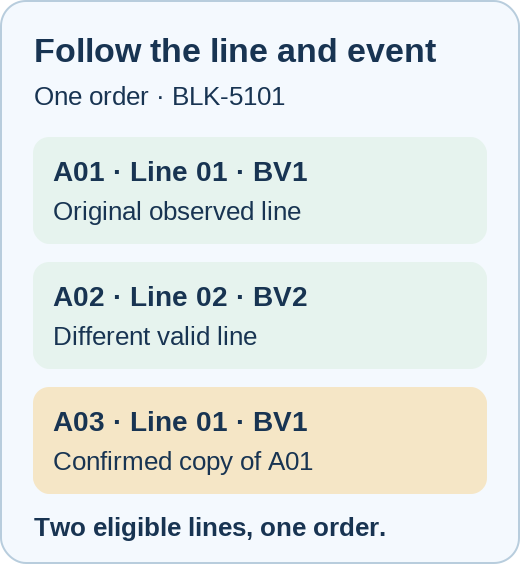
- A01 and A03. The source confirms the same line event replayed. Include one measured copy and keep the replay evidence.
- A02. This is another valid line from the same order. It participates separately in a line-based report once verified.
- A09 and A10. The same line has two different events with different values. The fictional owner has not said which event is authoritative. Hold both for now. Record the date failure on A09 as an additional check.
- Amount meaning. The sign on A05 is a documented credit in the exercise. Preserve it. The 0 on A07 is a recorded measurement. Pending on A06 supplies no numeric amount.
- City meaning. Naskik is initially unapproved. Similar spelling is an instruction to investigate, even when you expect it could be Nashik.
Build the audit and compare your outputs
- Prepare identifiers. Keep separate Order Key and Line Key fields. Build a composite key for the comparison. Count how many raw rows share each key.
- Prepare valid dates and amounts. Parse from the confirmed layouts and use a component check for dates. An impossible date can roll to another month, so display the quality check separately. Preserve currency and sign meaning.
- Prepare approved city and status values. Use the approved map and controlled labels. There are three recognised statuses in this exercise: Delivered, Cancelled and Returned.
- Assign release roles. Ready rows must have approved city and status, a verified source date and typed numeric amount, and an event resolved under the intended line policy. Keep a reason for all Hold or Replay rows.
- Reconcile both money and row coverage. Count Ready, Replay and Hold. Sum each bucket's known amounts. Count source rows with no numeric amount and report them separately. Identify how many Ready and Delivered lines and distinct orders the same filter produces.
- Keep the answer reproducible. Compare one valid repeated order, one extra replay and one conflict. If your amounts match only after changing a source value without a reason, restore the original and retest.
Hint · similar order keys do not imply the same row grain
Start with order ID and line ID because the intended report covers a line. Then inspect Event. Two events can differ even when they relate to the same line.
Hint · keep a known subtotal distinct from the number of valid records
The amount for A06 cannot be measured yet. A07 has a definite 0. Keep one unknown and one known zero instead of treating both as equal numeric amounts.
Rehearse an exception review on the order-line data
Find the physical source row
Locate A09. The amount is 75 and the specific line identity includes BLK-5107 and line 01. Preserve the recorded event BV8 and the original calendar text.
Read all candidate issues
A09 contains an impossible day-month combination. It also shares a subject line with A10. The next event has a different amount and a valid-looking date. The data includes both records for review.
Wait for an authoritative event decision
Use the known source amounts in the raw audit. Hold both rows in the initial verified report. A different amount and later row number do not establish which version is current.
Check the transition after evidence
When the source specifies an authoritative event, record the prior and new decision side by side. Verify the output scope and reconcile the raw amounts again.
Check your extended solution and recording method
Use the disclosed worksheet instructions or your own equivalent helpers. Keep the prepared field names readable and the candidate outputs separate from disposition. The format of a column label matters less than whether a reviewer can follow a raw value, a validated candidate and the final row decision.
Answer key · build and inspect the candidate formulas
In Line Review put Order Key, Line Key, Amount Text, Amount Candidate, City Candidate, Date Candidate, Date Check and Status Candidate in J1:Q1. Use the formulas below from their leading equals sign and fill J2:Q2 through row 11. Record Disposition at R1, Reason at S1 and Line Match Count at T1.
J2 =UPPER(TRIM(B2))
K2 =IF(OR(J2="",C2=""),"",J2&"|"&C2)
L2 =IF(LEFT(TRIM(H2),1)="₹",TRIM(MID(TRIM(H2),2,LEN(H2))),IF(LEFT(TRIM(H2),1)=UNICHAR(8722),"-"&MID(TRIM(H2),2,LEN(H2)),TRIM(H2)))
M2 =IF(L2="","",IFERROR(NUMBERVALUE(L2,".",","),""))
N2 =IFNA(VLOOKUP(UPPER(TRIM(G2)),CityMap!$A$2:$B$5,2,FALSE),"Review city")
O2 =IF(E2="","",IFERROR(IF(F2="DMY",DATE(RIGHT(E2,4),MID(E2,4,2),LEFT(E2,2)),IF(F2="MDY",DATE(RIGHT(E2,4),LEFT(E2,2),MID(E2,4,2)),"")),""))
P2 =IF(E2="","Missing",IF(NOT(ISNUMBER(O2)),"Review date",IFERROR(IF(AND(YEAR(O2)=VALUE(RIGHT(E2,4)),MONTH(O2)=VALUE(IF(F2="DMY",MID(E2,4,2),LEFT(E2,2))),DAY(O2)=VALUE(IF(F2="DMY",LEFT(E2,2),MID(E2,4,2)))),"Components agree","Review date"),"Review date")))
Q2 =IF(OR(LOWER(TRIM(I2))="delivered",LOWER(TRIM(I2))="cancelled",LOWER(TRIM(I2))="returned"),PROPER(TRIM(I2)),"Review status")
T2 =IF(K2="","",COUNTIF($K$2:$K$11,K2))
The date formulas expect the synthetic fixed-length DMY or MDY layout. Format Date Candidate visibly as a date and compare its parts to the source. A09's components fail even if O contains a rolled calendar value. A08 shows Missing. The exact city map deliberately leaves A04 unresolved. A06 has no numeric amount, and A07 is numeric zero.
The currency and Unicode minus handling is scoped to this fixture. A05's raw first character is Unicode U+2212. If UNICHAR is unsupported, use an approved separate text helper to verify the exact signed candidate. The source uses either a leading rupee label or a negative sign in these controlled rows. Review unexpected prefixes or separators before extending it. K assumes neither approved ID field contains the pipe delimiter.
Answer key · exact decisions and how to verify the total
| Source row | Amount candidate (₹) | Disposition | Evidence or pending action |
|---|---|---|---|
| A01 | 120.50 | Ready | Approved line 01 |
| A02 | 50.00 | Ready | Approved separate line 02 |
| A03 | 120.50 | Replay | Confirmed repeat of A01 |
| A04 | 125.00 | Hold | Verify city alias |
| A05 | −30.25 | Ready | Verified signed amount |
| A06 | Unknown | Hold | Await numeric amount |
| A07 | 0.00 | Ready | Verified zero under Cancelled |
| A08 | 200.00 | Hold | Await order date |
| A09 | 75.00 | Hold | Resolve date failure and line-event conflict |
| A10 | 80.00 | Hold | Resolve line-event conflict |
Put dispositions in R2:R11 and reasons in S2:S11 in the stated order. Use =COUNTIF($R$2:$R$11,V2) with a status in V2. =SUMIF($R$2:$R$11,V2,$M$2:$M$11) gives the status bucket's known amount. =SUMPRODUCT(--($R$2:$R$11=V2),--ISNUMBER($M$2:$M$11)) counts that bucket's numeric candidates, including numeric zero. The difference between the status count and number count can identify how many of the bucket's rows still lack a numeric result.
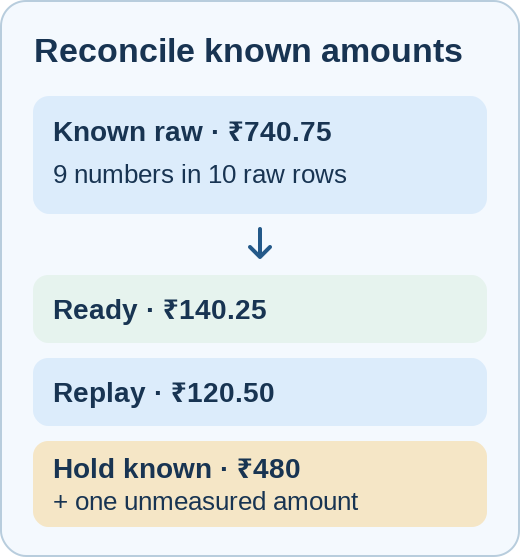
Ready has four lines and ₹140.25. Replay has one line and ₹120.50. Hold has five raw rows with four measured amounts totalling ₹480 and one unknown amount. The three known sums add to ₹740.75. Ready and Delivered covers A01 and A02 for ₹170.50, and their two lines share one underlying order ID. The credit and cancelled zero are not in that named status scope.
Troubleshoot from the first inconsistent control
- Line key shows a one instead of 01. The ID may have been typed in a numeric format. Restore the documented text value from Line Raw. Formatting a changed numeric value after conversion does not restore the original text in a reliable source audit.
- Unexpected zero in the amount coverage. Check whether a fallback used zero for Pending. A06 should still have its original source text and an unknown numeric outcome.
- Delivery count is unexpectedly high. Inspect both release disposition and status. A row can be Delivered in the source and still need review before the report includes its amount.
- Source event conflict disappears. Review the key criteria and whether a duplicate operation discarded a valid or conflicting row. Restore the source scratch copy and verify the separate event IDs.
- Possible lookup or formula error. Check the source range, argument separator and case-normalisation rule. Some spreadsheet editions may need equivalent functions or a manual verification route. Compare exact candidate values before checking totals.
Cleanup. Save the two exercise versions separately if you want to revisit the answer. Remove optional edits to the scratch fixtures, or close the workbook. Keep your original export copies, rule notes and supplied decisions available for the release exercise.
Read every denominator before giving a result
Reconcile input rows, distinct orders and distinct line subjects
Use the raw source-row ID to count physical input records. Then report how many distinct orders and order-line subjects those records represent under the declared key contract. A01, A02 and A03 are three source rows. They represent one order, two line subjects and two known distinct events. A04 has another order and line. Similar counting across the ten rows gives seven distinct order IDs and eight distinct line subjects. Some subjects still have two entries and pending review.
To rehearse a count without an advanced function, copy the prepared Order Key values into a separate scratch list and identify each distinct value. Compare it with a scratch list of combined Line Key values. For the report by disposition, apply the same explicit filter to the full review fields first, then compare distinct IDs from just that eligible group. Distinct counts over the raw source and over Ready measures answer different questions.
Two Ready and Delivered lines in the initial result share BLK-5101. In the same group there is one distinct order. If a supervisor wants count of completed order lines, use two. If they want number of distinct confirmed orders represented by those lines, use one. If they want confirmation that the entire order was completed, check all required line statuses in the authoritative order record. The line filter alone cannot establish whole-order completion.
Explain a negative contribution in the same unit
The Ready group's positive amounts are 120.50 and 50, or ₹170.50. The negative amount is −₹30.25, and its certified fourth number is zero. Combined they give ₹140.25. This arithmetic explains why a signed ready amount can be lower than a delivered-only amount. That does not mean the filter is broken. It combines different business scope under the definitions printed with the exercises. Keep a signed amount and an actual refund-report interpretation separate in other datasets.
Check the identity of a negative input before deciding to treat it as a credit. The sign convention is explicitly documented in the practice. A value below zero may have a different interpretation in another source, such as a cancellation adjustment or a measurement error. Taking absolute values would hide a meaningful sign. Storing or displaying the number with parentheses still needs a source-specific conversion rule if it arrives as text.
For the initial audit, the recorded Ready counts cover four eligible numeric rows. Hold has five records but four numeric candidates. These two numbers can both be correct. Compare them before publishing any rate or average and state which denominator you used. Your workbook should not need to add an invented zero just to include an unknown record in a count.
Re-run the controls after two authorised evidence changes
Now imagine a data owner responds with two unrelated facts. You will make one controlled change at a time in a copy and explain exactly which scope changed. Preserve the raw rows even when the report-ready version no longer uses one of their amounts.
Change one approved mapping
The owner confirms A04's actual city is Nashik and says Naskik is an approved alias for this specific batch. Add NASKIK → Nashik to a separate, versioned copy of CityMap, then extend the lookup range through the added row. Verify the neighbouring known city mappings still return their original results. A04's recorded 125, documented MDY date and Delivered status were already suitable, so the one-city fix makes that row ready.
Check the new source disposition groups before looking at the answer. Does the known amount pool change? Which source row moves? Which independent count should change? Does an updated string become available in Line Review only after the exact new map range includes it?
Answer key · approved A04 alias only
Ready becomes five lines and ₹265.25. Hold becomes four rows with known ₹355 and one unknown. Replay remains one row and ₹120.50. Ready and Delivered becomes three lines across two source orders with ₹295.50. The source amount audit remains ₹740.75 because one known record moved between buckets.
Record the selected version of a conflicting line
Next the source owner provides evidence that BV9 is the authoritative replacement for BV8 at the same order and line. Keep A09 in its original raw form, including the impossible date and amount 75. Record its new archival disposition Superseded in the scratch review, with documented reason. Add the superseded bucket to the reconciliation. A10 previously had a valid candidate date, city and measured amount. The evidence now makes it eligible.
Check that no new physical row was added. This is a version decision about a source already in the workbook. A report that tracks current approved order lines includes A10 and excludes A09. A raw-source history can show both. Count the two separately in the original source control even though the current report includes a single value for that line subject.
Answer key · alias approved and authoritative line selected
Ready covers six lines and ₹345.25. Replay remains one and ₹120.50. Hold has two records, known ₹200 and one unknown. Superseded contains one record and ₹75. All ten source rows and the ₹740.75 known raw total still reconcile. Ready and Delivered has four line rows across three orders and ₹375.50. Neither A08 nor A06 has new evidence.
A person reading the later report needs to know whether today's totals changed because of a clean definition, additional source rows or new source verification. In this exercise they changed because existing rows became eligible and a historical candidate was superseded. Describe the transition rather than attributing the increase to newly placed orders.
Build a one-day report from the verified dates
A supervisor asks for the delivered amount on 14 March 2026. You need three independent conditions: the row is Ready, the status is Delivered and the verified order date is the specified calendar day. A text label that merely looks like a date cannot safely satisfy the worksheet comparison. Use the date candidates only after the separate date and eligibility checks have passed.
Construct the date criterion from three numbers
In an unused scratch cell enter the report date with =DATE(2026,3,14). Format it to show the full calendar day and confirm the value. Use the numeric candidate range O2:O11, amount range M2:M11, status Q2:Q11 and disposition R2:R11 from Line Review. One controlled line-date query is =SUMIFS(M2:M11,R2:R11,"Ready",Q2:Q11,"Delivered",O2:O11,DATE(2026,3,14)). Use the same criteria ranges in COUNTIFS without the amount range to check the number of matching rows.
This fixture stores calendar dates without times. With real timestamps, equality to the date by itself can miss events later in the day. A date window from the day's beginning up to the start of the next day is often appropriate when the business time zone is known. Decide which date or timestamp represents the report and use a consistent scope. Here the three suggested conditions suffice only after date interpretation and verification.
- Check the base version. Identify the Ready and Delivered source rows dated 14 March and calculate their amount by hand. A verified replay for this same day should appear in the original review and stay outside the report.
- Check the alias upgrade. Flip only the approved city for A04 and inspect the same date scope. Its event has the MDY layout. Record whether its typed calendar date matches the DMY rows included in the initial release.
- Check the independent event decision. Use the version confirming A10 and inspect both 14 March and 15 March. The new entry belongs to only one of those days.
- Compare a signed scope. Repeat the 15 March check for all Ready line statuses. The Return and Cancelled entries may explain the difference from the delivered result.
Answer key · daily filtered amounts
Initially 14 March includes A01 and A02 (₹170.50). The approved alias adds A04 for ₹295.50. A10 belongs to 15 March, so the 14 March amount remains ₹295.50 after the conflict is resolved. On 15 March the resulting Ready and Delivered amount is ₹80. Ready across all three allowed statuses is ₹49.75 after including the verified −30.25 credit and recorded zero.
Keep the numbered row list and the control formula side by side. If the amount differs, identify which row failed the filters before rebuilding the formula. For example, consider whether the report uses raw status text, unreviewed date or an unmatched city mapping. Verify that the query and the manual approach use the same source revision and that the criterion day comes from the same calendar definition.
Give each row one disposition and as many review reasons as needed
A status such as Hold tells a reader whether the row is eligible now. A reason shows what needs action. A09 has two separate reasons: an invalid calendar input and two competing line events. A10 has the event conflict alone. Separating those meanings lets you count both open records and open issue signals without double-counting the amount.
Map distinct owner actions
| Record | Question | Expected evidence |
|---|---|---|
| A04 | Which approved location does this spelling refer to? | An authoritative alias entry for this feed |
| A06 | Is an actual measured amount available for this order line? | Verified numeric amount, units and event identity |
| A08 | Which order date belongs to this event? | A dated order record and its documented layout |
| A09 and A10 | Which event is authoritative for this line subject? | Current-event or history contract with raw event IDs |
| A09 | Does the old event's date need a source-history correction? | Authoritative calendar entry, even if it does not enter a current report |
The list has five kinds of questions. The event-conflict question applies to two records. Across the five held records the current practice annotations can describe six affected-row issue signals. Those signals do not add more rows to the Hold bucket. A workspace that keeps separate boolean issue columns should keep amount reconciliation at the original row scope. If the reviewer instead records several issue rows in a linked log, do not sum repeated order amounts over that log.
Try this on paper before building a larger data quality report. Record A09's source row once with 75 on the main review sheet. Write two lines about it in a separate issue register. If an issue table displayed the same amount on both lines, its observed amount should not turn into a new sum of 150. A count of issue messages and a sum of source measurements have different grains.
Test a measured zero arriving later
Create a separate scratch branch from the initial lab where the source owner verifies that A06's signed amount is exactly zero. Keep the raw Pending row and the original empty candidate in your saved audit. Beside it put the new confirmed numeric amount, approval date and source reference. Recalculate counts for a new version which uses approved numeric values, and leave the other rows unchanged. A confirmed zero can change coverage without changing the sum.
For this branch, A06 now meets the date, city, status and event rules. The accepted Ready row count rises from four to five and the known sum remains ₹140.25. All ten source records now have a known or confirmed number for the new version's candidate-ready check. The initial raw numeric profile still contains one unknown. If a report revision calls the original source ready merely because its eventually verified value was zero, the audit should distinguish the time of the confirmation.
Compare the same experiment with a separately confirmed amount of 55. Save that as a different branch and verify the new known total and ready amount. The known raw candidate pool for the original still remains ₹740.75. The revised known version contains ₹795.75, and Ready becomes ₹195.25. Five Ready rows are present in either revised branch. This demonstrates that count and total are independent measures of the change.
Make your work easy to check after the workbook is closed
Score the evidence before polishing the formatting
- Original data retained. Both input sheets keep all source rows. The cases, spaces and amount text can still be inspected. Document how fixture types were entered.
- Grain stated. Name one order snapshot in the first exercise and one order-line event in the second. Compare the source identity with the intended current line identity.
- Candidate types separated. A verified numeric zero, an unresolved amount, an impossible date and an approved status should remain distinguishable when you filter or copy the data.
- Eligibility stated. The visible report should identify its version, allowed statuses, date meaning and verified conditions. Checked replay or previous snapshot evidence remains in the audit.
- Counts and exact amounts agree. The source count equals the sum of mutually exclusive dispositions. Reconcile known amounts separately from the count of unresolved records. Check a source row and an exception when the totals match.
- Handoff works. Give each held record an action someone can take. The new reader should be able to recreate one normal row and any disputed row by following its source record ID.
If you miss a check, fix the earliest affected stage and recalculate the later stages. For example, a new approved alias belongs in a versioned map. A date validity problem belongs with the source date and candidate. A report scope error can often be fixed by adjusting a selected condition without changing a verified raw number. Record which distinction made your initial answer wrong.
Check report membership as well as arithmetic
Test each ready report row against the complete current line key and the original source handle. A line can be counted twice while another is omitted. The visible report may show the expected total number of rows even after such a mistake. The correctness check should verify that every included source handle appears exactly once for the intended role and that every excluded handle has a reason.
As an exercise, take a scratch version of the first report. Replace the ready P01 row with P02 while keeping its prepared order, city and amount the same. The report still has four rows and the same total. The audit now points at the extra replay rather than the documented original source selection. Compare the actual source IDs to the approved selection and restore P01. This distinction matters when an export contains repeating events, especially if another analyst later needs to inspect exactly which record was retained.
Then try replacing one worked line with a different approved line of the same amount in a future controlled fixture. A sum check still cannot verify membership. Keep the approved list of keys and check each visible output against it. Even a correct arithmetic result needs the source and identity checks used in the review.
Explain one failure mode in a teammate's proposed shortcut
Suppose someone presents four uniquely named orders from the first lab and says, "I removed duplicates from the raw export because that output looks right." Ask what makes one row a genuine replay. In this exercise it was the owner-confirmed EV01. Ask what stays readable after the operation and whether the source workbook could reproduce it. If removing duplicates using an Excel interface, make any destructive operation in a separate scratch copy after reviewing the real key and keeping all intended fields together.
For the line export, consider the same suggestion again. A single order ID can cover multiple item lines, so removing on the first matching order would lose the valid A02. An operation that keeps only one of A09 or A10 without a documented preference could also choose an unverified record or erase evidence. Helper flags between raw and report keep these decisions reviewable. Even a script or query that repeats perfectly can carry forward the wrong business rule.
Finish with a brief release note. In a few sentences name the fixture, count the input rows, list the reported eligible lines and explain a known missing amount. Use a simple scope label, such as "Known amount from approved order lines in the stated period." Include the approval stage for the city and event changes. A useful explanation lets you regenerate the same summary from the original values and recorded rules a week later.
Check your understanding
1. Why can SUM of the original raw amounts return zero?
A. All orders have a zero price. B. The referenced raw amounts were intentionally typed as text. C. Every row was removed.
Answer B. A SUM of that range ignores the stored text. Inspect numeric coverage, then convert according to the approved source format.
2. What evidence permits you to keep A02?
A. Its line ID differs from A01 under the declared grain. B. Its order ID differs from A01. C. Its amount is negative.
Answer A. Both are eligible line measurements for the same order. A subject key built from order and line distinguishes them.
3. How is a real zero different from Pending?
A. They both count as numeric measurements. B. Pending is also a zero. C. Zero is a supplied number and Pending is unresolved.
Answer C. The amount might add nothing while still increasing numeric coverage. A text placeholder cannot be reported as a supplied measure.
4. Why keep both A09 and A10 on hold initially?
A. Their event fields show two potentially different versions of one line, with no authoritative choice yet. B. Excel prevents two rows from sharing a key. C. Their statuses are both Cancelled.
Answer A. Inspect the rule for current membership and preserve both amounts in the raw audit. The date problem on A09 is separate evidence.
5. Why can Ready and Delivered be larger than the full Ready signed amount?
A. The filter adds an extra order. B. The signed Ready amount also includes the verified negative credit. C. COUNT converts positive values to text.
Answer B. The delivered scope excludes the negative Returned credit, so its sum can be larger despite fewer rows.
6. What happens to the original source amount when a known row changes bucket?
A. Its original stored value is overwritten. B. The amount is always zero. C. Its original value remains, and the reconciliation records the new category.
Answer C. Confirming a city or event can change report eligibility without changing the raw candidate amount.
Interview questions with worked answers
- How do you identify a duplicate in an unfamiliar file?
I first learn what one row means and what the agreed key is. I find candidate matches but compare source IDs, line identities and event evidence before deciding. I keep legitimate separate lines and hold unresolved changes.
- What balances should a data cleaning review include?
I reconcile physical row counts by disposition and compare known signed amounts under the same scope. I also count records with an unknown amount and record any confirmed correction separately.
- How would you confirm a normalised value actually represents the right entity?
I compare the intended key and the raw value with the authoritative reference. The approved mapping helps prepare the reporting label. If an alias could refer to different entities, I use other confirmed information or hold it.
- What would you report if a correct date was confirmed after release?
I retain the original raw cell and add documented verified evidence in a new version. I check the date-specific population, move the approved line to the correct scope and reconcile the published change.
- How do you spot a problem in a nicely formatted cleaning workbook?
I check the underlying types and count the expected source records. I trace one measured zero, one replay and one held case through the calculations. I compare the reported number to an independent subset before relying on format.
Quick recall cards
- Copy first
Keep the raw record and use helpers for intermediate candidates.
- State the grain
Write down whether each source row represents an order, a line or an event.
- Check identity
The same key can identify a legitimate second event. Read the complete subject and evidence.
- Preserve zero and sign
A measured zero is a number. A confirmed credit keeps its negative direction.
- Compare the scopes
Known raw, ready and ready delivered amounts describe different groups.
- Keep the review path
Document one current disposition per source row and a specific next action for each unresolved reason.
With the audit verified, continue to the chapter on Excel tables, sorting and filtering. The same clean key and status fields make it easier to confirm exactly which records each filter selects.
Official Microsoft references
- Preserve a backup and prepare data with separate transformations
- Compare filtering and removing duplicate values
- DATE, date serials and calendar adjustments
- NUMBERVALUE with documented separators
- UNICHAR for a deliberate Unicode minus fixture
- COUNTIF criteria and case behaviour
- COUNTIFS with aligned conditions
- SUMIFS for an explicit report population
- Count distinct values in the selected population
Continue practising: explore the existing Excel Task Hub for additional exercises.