91.8 Loops, conditions and register
Story (fictional teaching scenario). At a fictional media company in Chennai, Ben from Melbourne had to create folders for five teams. He wrote five almost-identical tasks. Kavya showed him loop: one task, a list of five names. Then they needed a step only on Linux servers — when. Finally they wanted to use a command's output in the next step — register.
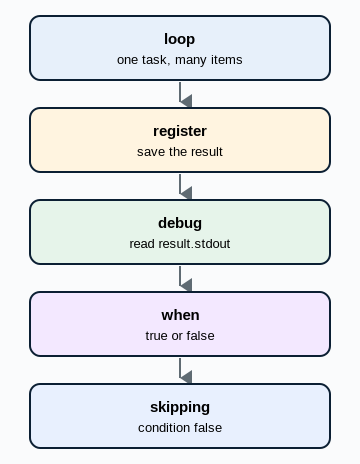
Why
Copy-paste tasks drift apart. Loops, conditions and registered results keep one clear task for each idea.
What
- loop — Runs the task once per item. The current item is
{{ item }}. - when — A condition. The task runs only if it is true. No
{{ }}needed insidewhen. - register — Saves the task's result into a variable, such as
du_result. - result.stdout — The text the command printed.
How
- Put the list under
loop:. - Use
iteminside the task. - Add
register:to save output. - Use
when:with facts or registered values.
Example 1: All three together
- name: Loops, conditions and register
  hosts: web1
  gather_facts: true
  tasks:
    - name: Make one folder per team
      ansible.builtin.file:
        path: "out/teams/{{ item }}"
        state: directory
      loop:
        - billing
        - search
    - name: Check disk usage of out
      ansible.builtin.command: du -sh out
      register: du_result
      changed_when: false
    - name: Show the result
      ansible.builtin.debug:
        msg: "Usage is {{ du_result.stdout }}"
    - name: Only on Linux hosts
      ansible.builtin.debug:
        msg: "This is {{ ansible_facts['system'] }}"
      when: ansible_facts['system'] == "Linux"
    - name: Only on Windows hosts
      ansible.builtin.debug:
        msg: "never on this lab"
      when: ansible_facts['system'] == "Windows"
Output (tested on ansible-core 2.22.0, local practice lab)
TASK [Make one folder per team]
changed: [web1] => (item=billing)
changed: [web1] => (item=search)
TASK [Check disk usage of out]
ok: [web1]
TASK [Show the result]
ok: [web1] => {
    "msg": "Usage is 32K\tout"
}
TASK [Only on Linux hosts]
ok: [web1] => {
    "msg": "This is Linux"
}
TASK [Only on Windows hosts]
skipping: [web1]
PLAY RECAP
web1  : ok=5  changed=1  unreachable=0  failed=0  skipped=1
What it means: The loop ran twice, once per item. register saved the du output and the next task printed it (\t is a tab). The Linux task ran, the Windows task was skipped, and the recap counts that skip.
Ravindra Bagale's Tip
Write when conditions without curly braces: when: x == 1, not when: "{{ x }}" == 1.
when condition मध्ये curly braces नको: when: x == 1 असं लिहा, when: "{{ x }}" == 1 असं नाही.
when condition में curly braces मत लगाओ: when: x == 1 लिखो, when: "{{ x }}" == 1 नहीं.
Did you understand? Let us try it once more.