91.4 Modules, ad-hoc commands, playbooks and YAML
Story (fictional teaching scenario). At a fictional grocery app in Thane, Noah from Cape Town needed to check if all web servers were alive, right now, once. He used an ad-hoc command. The next day he needed the same five setup steps on every new server, every time. He wrote a playbook. Ad-hoc is a quick one-off question. A playbook is a saved recipe.
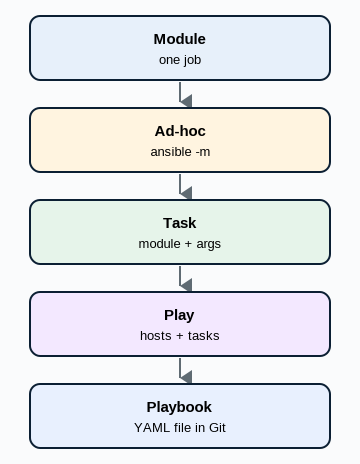
Why
Knowing when to use a quick command and when to write a file stops you from typing the same thing a hundred times, and stops you from writing a file for a one-time question.
What
- Module — A small program that does one job, like
ping,copy,fileorpackage. - FQCN — Fully qualified collection name, like
ansible.builtin.copy. It says exactly which module you mean. - Ad-hoc command —
ansible <pattern> -m <module> -a "<args>". Runs one module once. - Task — One module call with a name, inside a playbook.
- Play — A set of tasks for a set of hosts.
- Playbook — A YAML file with one or more plays. Run with
ansible-playbook. - YAML — The file format. Indentation with spaces matters. A
-starts a list item.key: valueis a setting.
How
- For a quick check, use ad-hoc.
- For anything you will repeat, write a playbook.
- Use FQCN module names in playbooks.
- Run
--syntax-checkbefore the first real run.
Example 1: Ad-hoc ping
ansible web -m ansible.builtin.ping
Output (tested on ansible-core 2.22.0, local practice lab)
web2 | SUCCESS => {
    "changed": false,
    "ping": "pong"
}
web1 | SUCCESS => {
    "changed": false,
    "ping": "pong"
}
What it means: Ansible reached both web hosts and Python worked there. ping here is not network ping; it is an Ansible module test. Hosts may answer in any order.
Example 2: Ad-hoc command
ansible web1 -m ansible.builtin.command -a "echo hello"
Output (tested on ansible-core 2.22.0, local practice lab)
web1 | CHANGED | rc=0 >>
hello
What it means: rc=0 is the exit code (0 = success). It says CHANGED because Ansible cannot know if a raw command changed anything, so it assumes yes.
Example 3: The smallest playbook
- name: Make app folder
  hosts: web
  gather_facts: false
  tasks:
    - name: Create folder
      ansible.builtin.file:
        path: /opt/menu-app
        state: directory
        mode: "0755"
Line by line: Line 1 - name: starts a play and names it. hosts: web picks the group. gather_facts: false skips collecting server facts to save time. tasks: starts the list. The task uses the file module: path is the folder, state: directory means "it must exist as a folder", mode: "0755" sets owner full and others read/enter. The mode is quoted so YAML keeps the leading zero.
Example 4: Catch a YAML mistake early
ansible-playbook bad.yml --syntax-check
Output (tested on ansible-core 2.22.0, local practice lab)
[ERROR]: YAML parsing failed: Colons in unquoted values must be followed by a non-space character.
Origin: /tmp/anslab/bad.yml:4:27
What it means: Line 4 was indented wrongly, so YAML read it as a broken value. The error gives the file, line and column. Fix the spaces and run the check again.
Ravindra Bagale's Tip
If you type the same ad-hoc command a third time, turn it into a playbook.
तोच ad-hoc command तिसऱ्यांदा type करताय? मग त्याचा playbook बनवा.
वही ad-hoc command तीसरी बार type कर रहे हो? तो उसका playbook बनाओ.
Did you understand? Let us try it once more.