91.7 Packages, templates and handlers
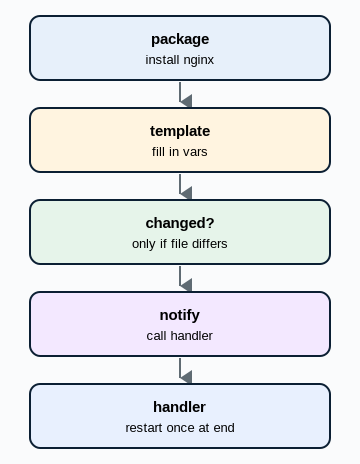
Story (fictional teaching scenario). At a fictional ticket-booking site in Kolkata, Ama from Accra changed the Nginx port by editing files on each server. Two servers ended up different. She switched to a template: one Jinja2 file with {{ app_port }} inside, filled in per server. A handler restarted the service only when the file really changed. No change, no restart.
Why
Config files are where most outages start. Templates keep them the same everywhere. Handlers avoid needless restarts.
What
- package module —
ansible.builtin.packageinstalls or removes software using the server's own package manager. - Template — A
.j2file. Ansible fills in{{ variables }}and writes the result to the server. - notify — On a task, names a handler to run if that task changed.
- Handler — A task that runs only when notified, once, at the end of the play (or when flushed).
How
- Install the package with
state: present. - Keep the config as a template in
templates/. - Add
notify: Reload appto the template task. - Define the handler under
handlers:with the exact same name.
Example 1: Template file
# templates/app.conf.j2
# managed by Ansible
port = {{ app_port }}
owner = {{ site_owner }}
Line by line: The comment warns humans not to edit by hand. {{ app_port }} and {{ site_owner }} are replaced with each host's values.
Example 2: Template task plus handler
- name: Configure web lab
  hosts: web
  gather_facts: false
  tasks:
    - name: Write config from template
      ansible.builtin.template:
        src: app.conf.j2
        dest: "out/{{ inventory_hostname }}/app.conf"
        mode: "0644"
      notify: Reload app
  handlers:
    - name: Reload app
      ansible.builtin.debug:
        msg: "reloading app on {{ inventory_hostname }}"
Output (tested on ansible-core 2.22.0, local practice lab)
TASK [Write config from template]
changed: [web2]
changed: [web1]
RUNNING HANDLER [Reload app]
ok: [web1] => {
    "msg": "reloading app on web1"
}
ok: [web2] => {
    "msg": "reloading app on web2"
}
What it means: The file was new, so the task changed and the handler ran. In this practice lab the handler only prints a message. On a real server it would be ansible.builtin.service with state: reloaded. inventory_hostname is the host's name from inventory.
Example 3: Install a package (real server shape)
- name: Install nginx
  ansible.builtin.package:
    name: nginx
    state: present
  become: true
Output (illustrative — not run on a real server)
changed: [web1]      (first run)
ok: [web1]           (second run)
What it means: state: present means "make sure it is installed". Second run finds it installed and does nothing.
Ravindra Bagale's Tip
The notify name and the handler name must match exactly, letter for letter.
notify मधलं नाव आणि handler चं नाव अगदी अक्षर अक्षर सारखं हवं.
notify का नाम और handler का नाम बिल्कुल अक्षर अक्षर एक जैसा होना चाहिए.
Did you understand? Let us try it once more.