91.3 SSH connection and privilege escalation (become)
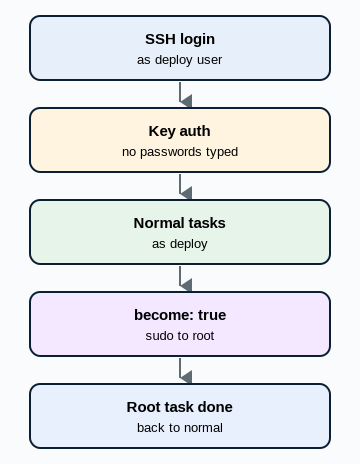
Story (fictional teaching scenario). At a fictional school-app company in Indore, Hana from Osaka could log in to servers as deploy, but installing packages needs root. Her first playbook failed with "permission denied". Root login over SSH was disabled, which is good. The fix was become: log in as the normal user, then use sudo only for the tasks that need it.
Why
Logging in as root is risky. Logging in as a normal user and raising rights only for some tasks keeps the door smaller.
What
- ansible_user — The SSH user Ansible logs in as.
- SSH key — A key pair used instead of a typed password. The private key stays on the control node.
- become — Ansible's word for "run this task as another user", usually root, usually through
sudo. - become_user — Which user to become. Default is
root. - -K / --ask-become-pass — Ask for the sudo password at the start if sudo needs one.
How
- Create a normal user on the lab VM and add your public SSH key to it.
- Test with
ansible all -m pingas that user. - Add
become: trueonly on tasks or plays that need root. - Never turn on root SSH login just to make Ansible work.
Example 1: Connection settings in inventory
[web]
web1 ansible_host=192.0.2.11 ansible_user=deploy ansible_ssh_private_key_file=~/.ssh/lab_key
Line by line: ansible_user=deploy sets the login user. ansible_ssh_private_key_file points at your private key file on the control node. The key name is an example; never paste the key itself into a file in Git.
Example 2: Become only for one task
- name: Install and check
  hosts: web
  tasks:
    - name: Install nginx (needs root)
      ansible.builtin.package:
        name: nginx
        state: present
      become: true
    - name: Who am I (no become)
      ansible.builtin.command: whoami
      register: me
      changed_when: false
Output (illustrative — not run on a real server)
TASK [Install nginx (needs root)]
changed: [web1]
TASK [Who am I (no become)]
ok: [web1]
Line by line: become: true on the first task runs it through sudo as root. The second task has no become, so whoami would return deploy. changed_when: false tells Ansible that just reading whoami never changes the server.
Ravindra Bagale's Tip
Put become on the task, not the whole play, until you know every task needs root.
सगळ्या play ला become लावू नका. फक्त ज्या task ला root लागतं तिथेच लावा, जोपर्यंत सगळ्यांना लागतं हे नक्की कळत नाही.
पूरे play पर become मत लगाओ. सिर्फ जिस task को root चाहिए वहीं लगाओ, जब तक पक्का न हो कि सबको चाहिए.
Did you understand? Let us try it once more.