91.6 Variables, facts and which value wins
Story (fictional teaching scenario). At a fictional cab company in Bengaluru, Diego from Mexico City set app_port: 8080 for the web group. During an urgent test, Shreya passed -e app_port=7000 on the command line. The test servers used 7000, and nobody edited a file. They also used facts — details Ansible collects from each server, like the OS family — to choose the right package manager.
Why
The same playbook must work for staging and prod. Variables hold the differences. Facts tell you about each server.
What
- Variable — A named value, used as
{{ name }}(Jinja2 template syntax). - group_vars/web.yml — A file of variables for every host in group
web. - host_vars/web1.yml — Variables for one host.
- Facts — Information Ansible gathers at the start of a play (
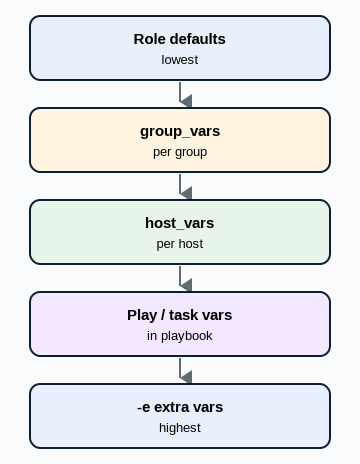
gather_facts), stored inansible_facts. - Precedence — The order that decides which value wins when the same name is set in many places. The full list has over 20 levels; for daily work, remember: role defaults are weakest, inventory group then host vars are stronger, play and task vars stronger again, and
-eextra vars win over everything.
How
- Put safe defaults in role
defaults/. - Put environment differences in
group_vars/. - Use
host_vars/only for true one-off hosts. - Use
-efor quick tests, not as your normal config.
Example 1: Group variable file
# group_vars/web.yml
app_port: 8080
site_owner: Priya
ansible web1 -m ansible.builtin.debug -a "var=app_port"
Output (tested on ansible-core 2.22.0, local practice lab)
web1 | SUCCESS => {
    "app_port": 8080
}
What it means: web1 is in group web, so it got app_port from group_vars/web.yml automatically. No import line was needed.
Example 2: -e wins
ansible web1 -m ansible.builtin.debug -a "var=app_port" -e app_port=7000
Output (tested on ansible-core 2.22.0, local practice lab)
web1 | SUCCESS => {
    "app_port": "7000"
}
What it means: The extra var won over the group var. Notice the quotes: values from -e key=value arrive as text. Use -e '{"app_port": 7000}' if you need a number.
Example 3: Read one fact
ansible web1 -m ansible.builtin.setup -a "filter=ansible_os_family"
Output (tested on ansible-core 2.22.0, local practice lab)
web1 | SUCCESS => {
    "ansible_facts": {
        "ansible_os_family": "Debian"
    },
    "changed": false
}
What it means: The lab machine is from the Debian family. In a playbook you read it as ansible_facts['os_family'].
Ravindra Bagale's Tip
When a value surprises you, print it with debug before you change any file. Then find where it came from.
Value अनपेक्षित आली तर file बदलण्याआधी debug ने print करा. मग ती कुठून आली ते शोधा.
Value अजीब आए तो file बदलने से पहले debug से print करो. फिर पता करो कहाँ से आई.
Did you understand? Let us try it once more.