91.10 Ansible Vault — encrypted values
Story (fictional teaching scenario). At a fictional insurance firm in Mumbai, Tom from Boston saw a database password in plain text in group_vars/db.yml, pushed to Git. They changed the password the same day. Then they used Ansible Vault so the value in Git is encrypted, and only people or CI jobs with the vault password can read it.
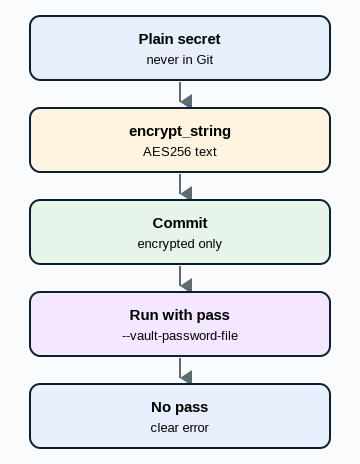
Why
Anything in Git is copied to every laptop and CI runner. Encrypting secrets makes a leaked repo much less harmful.
What
- Ansible Vault — Built-in encryption for whole files or single values.
- ansible-vault encrypt_string — Encrypts one value and prints YAML you can paste into a vars file.
- !vault — The YAML tag that marks an encrypted value.
- Vault password — The key that unlocks it. Keep it out of Git (a password manager, CI secret, or a local file with tight permissions).
- --vault-password-file / --ask-vault-pass — How you give the password at run time.
How
- Encrypt the value with
encrypt_string. - Paste the output into
group_vars/db.ymland commit. - Add your vault password file name to
.gitignore. - Run playbooks with
--vault-password-file(or--ask-vault-pass). - Use
no_log: trueon tasks that would print the secret.
Example 1: Encrypt one practice value
ansible-vault encrypt_string --vault-password-file .vault_pass 'not-a-real-db-pass' --name db_password
Output (tested on ansible-core 2.22.0, local practice lab)
db_password: !vault |
          $ANSIBLE_VAULT;1.1;AES256
          63363665373461623436663739646133376537313633666134323564613863383263346235326136
          ...
What it means: The value became long encrypted text. 1.1;AES256 is the format and cipher. The value here is a fake practice string. Never put a real password in a lesson or a ticket.
Example 2: Use it with the password
ansible db1 -m ansible.builtin.debug -a "msg={{ db_password | length }}" --vault-password-file .vault_pass
Output (tested on ansible-core 2.22.0, local practice lab)
db1 | SUCCESS => {
    "msg": 18
}
What it means: Ansible decrypted it in memory and we printed only its length (18 characters), not the value. That is a safe way to prove it works.
Example 3: Forget the password
ansible db1 -m ansible.builtin.debug -a "var=db_password"
Output (tested on ansible-core 2.22.0, local practice lab)
"msg": "Task failed: Error while resolving `var` expression: Error rendering expression: Attempt to use undecryptable variable: Attempting to decrypt but no vault secrets found."
What it means: Without the vault password, Ansible refuses. The error tells you exactly what is missing.
Ravindra Bagale's Tip
Vault protects the value in Git. It does not stop a task from printing it. Add no_log: true where a secret could appear in output.
Vault Git मधली value वाचवतो. पण task ती print करणार नाही असं नाही. Secret output मध्ये येऊ शकतं तिथे no_log: true लावा.
Vault Git वाली value बचाता है. पर task उसे print नहीं करेगा ऐसा नहीं. Secret output में आ सकता है वहाँ no_log: true लगाओ.
Did you understand? Let us try it once more.