Reading Log in Excel: Pages per Day, % Done and Expected Book Finish Date
Priyanka Shinde in Pune wants to finish a 420-page book by the end of October. Some days she reads 30 pages, some days none. Will she make it? This sheet answers the question every evening: it takes her average so far, works out the days still needed and shows an expected finish date next to her goal.
What you'll learn on this page
- A daily log with a running total
- % done and pages left
- Average pages per day
- Days still needed with ROUNDUP
- Expected finish date and pages per day needed for a goal
- An On track / Behind check and a REPT progress bar
Download the template: reading-log-tracker-template.xlsx: example data with real formulas. Yellow cells are inputs you can type over; green cells hold formulas; blue rows are headers and totals. Replace the example data with your own and everything recalculates.
Made-up data: every name, amount, shop and date on this page is made up for practice. Cities are used only to make the examples feel real.
1. The example
Priyanka's log from 1 to 16 October 2026 (made-up values, 420 pages, goal 31-10-2026):
| Value | |
|---|---|
| Pages read so far | 305 |
| % done | 72.6% |
| Pages left | 115 |
| Average pages per day | 19.1 |
| Days still needed | 7 |
| Expected finish | 24-10-2026 |
| Pages per day needed for the goal | 8.2 |
| On track? | On track |
She skipped 2 days and her best day was 10 October (35 pages). At her usual pace she finishes a week before the goal.
Figure 1. Daily pages build a running total and % done; average pages per day gives days needed with ROUNDUP; today + days gives the expected finish date, compared with the goal.
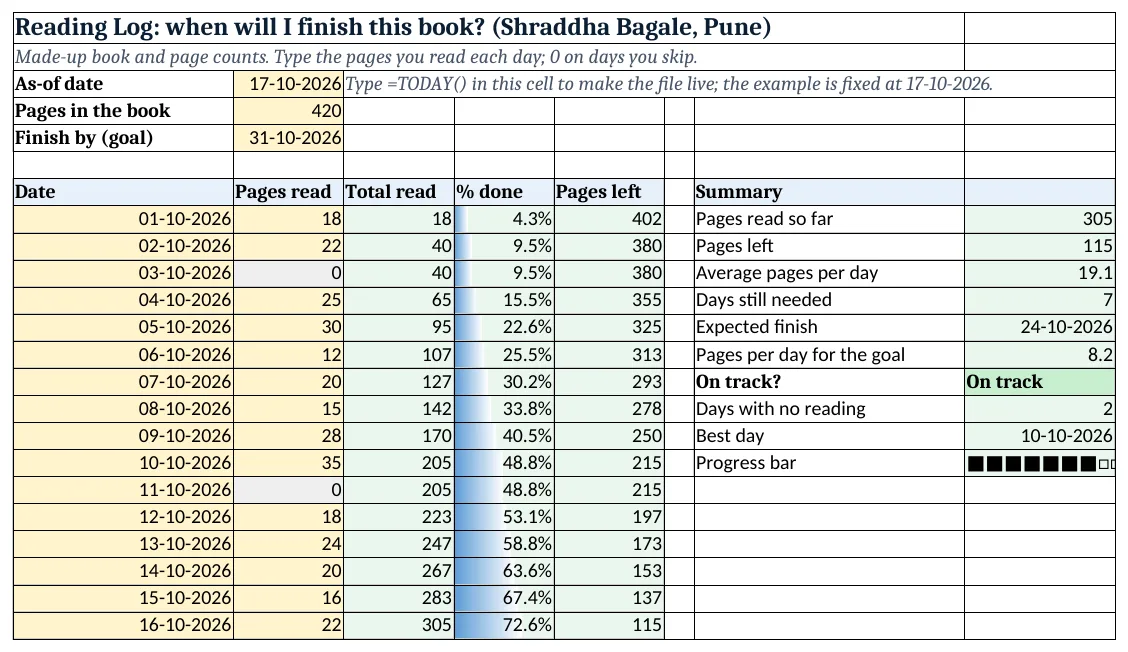
Figure 2. The template sheet, recalculated with its example data. Download it above and replace the yellow cells with your own numbers.
2. Build it step by step
Step 1. Book and goal
- In B3 type the as-of date (
=TODAY()in your copy), in B4 the pages in the book (420) and in B5 your goal date.
Step 2. Daily log
- In A7:E7 type Date, Pages read, Total read, % done, Pages left. Type 0 on days you do not read.
- Select B8:B200 > Data > Data Validation > Whole number between 0 and 500 (data validation).
Step 3. Running total
- In C8 type
=SUM($B$8:B8): the range grows as you copy down (mixed references). - In D8 type
=C8/$B$4as % and in E8=$B$4-C8. Copy down.
Step 4. Average and days needed
- In H8 type
=SUM(B8:B23)and in H9=B4-H8: 115 pages left. - In H10 type
=AVERAGE(B8:B23): 19.1 pages a day (the 0 days count, which is honest). - In H11 type
=ROUNDUP(H9/H10,0): 115 ÷ 19.06 = 6.03, rounded up to 7 days (ROUND family).
Step 5. Finish date and goal
- In H12 type
=B3+H11: 24-10-2026. - In H13 type
=H9/(B5-B3): 8.2 pages a day are enough for 31 October. - In H14 type
=IF(H12<=B5,"On track","Behind").
Step 6. Progress and colours
- In H17 type
=REPT("■",INT(H8/B4*10))&REPT("□",10-INT(H8/B4*10))for a 10-block bar (REPT and joining text). - Add a data bar on D8:D23 with maximum 1, a grey rule for 0 in column B, and green/red for H14 (data bars).
Ravindra Bagale's Tip
Set a small daily target, like 10 pages. Small and steady finishes more books than big and rare.
Ravindra Bagale's Tip – मराठी
रोजचं छोटं target ठेवा, जसं 10 पानं. थोडं पण रोज वाचलं तर मोठ्या पण कधीतरीपेक्षा जास्त पुस्तकं संपतात.
Ravindra Bagale's Tip – हिंदी
रोज़ का छोटा target रखो, जैसे 10 पन्ने. थोड़ा पर रोज़ पढ़ने से ज़्यादा किताबें खत्म होती हैं.
3. Formulas used
| Cell | Formula | What it does |
|---|---|---|
| C8 | =SUM($B$8:B8) |
Total read so far |
| D8 | =C8/$B$4 |
% done |
| H10 | =AVERAGE(B8:B23) |
Average pages per day |
| H11 | =ROUNDUP(H9/H10,0) |
Days still needed |
| H12 | =B3+H11 |
Expected finish |
| H13 | =H9/(B5-B3) |
Pages per day for the goal |
| H14 | =IF(H12<=B5,"On track","Behind") |
On track? |
| H16 | =INDEX(A8:A23,MATCH(MAX(B8:B23),B8:B23,0)) |
Best day |
| H17 | =REPT("■",INT(H8/B4*10))&REPT("□",10-INT(H8/B4*10)) |
Progress bar |
Every formula above is written in the template, so you can click a cell and see it in the formula bar. All values on this page were recalculated in the file.
4. Common mistakes
- Leaving skipped days blank. AVERAGE ignores blanks, so the pace looks better than it is. Type 0 for honest numbers.
- Using ROUND instead of ROUNDUP. 6.03 days rounds to 6, but you need part of a 7th day. ROUNDUP gives 7.
- Fixing both ends of the running range.
$B$8:$B$8would not grow. Only the start is fixed. - Typing the total pages each day. Type the pages read that day; column C adds them up.
- Goal date before the as-of date. H13 would divide by a negative number. Set a goal date in the future.
Ravindra Bagale's Tip
When the sheet says Behind, check H13 first. Often only two or three extra pages a day fix it.
Ravindra Bagale's Tip – मराठी
Sheet "Behind" दाखवत असेल तर आधी H13 बघा. बऱ्याचदा रोज दोन-तीन पानं जास्त वाचली की झालं.
Ravindra Bagale's Tip – हिंदी
Sheet "Behind" दिखाए तो पहले H13 देखो. अक्सर रोज़ दो-तीन पन्ने ज़्यादा पढ़ने से काम बन जाता है.
5. More real examples
Example 1: Isha's school reading. One sheet per book; a summary sheet lists each book with its finish date.
Example 2: Revision for an exam. Use chapters or practice questions instead of pages; the same formulas give a finish date.
Example 3: Listening instead of reading. Use minutes listened instead of pages and the book's total minutes in B4.
Quick revision cards
Quick revision
Each card shows formulas from this page, each with an example and its answer from the template. Scan the QR code on a card to open this lesson. All names and numbers are made up for practice.
झटपट उजळणी
प्रत्येक card वर या page मधले formulas, त्यांचं example आणि template मधलं उत्तर आहे. Card वरचा QR code scan केला की हा lesson उघडतो. सगळी नावं आणि आकडे सरावासाठी काल्पनिक आहेत.
झटपट दोहराई
हर card पर इस page के formulas, उनका example और template का उत्तर है. Card का QR code scan करें तो यह lesson खुलेगा. सभी नाम और आंकड़े अभ्यास के लिए काल्पनिक हैं.
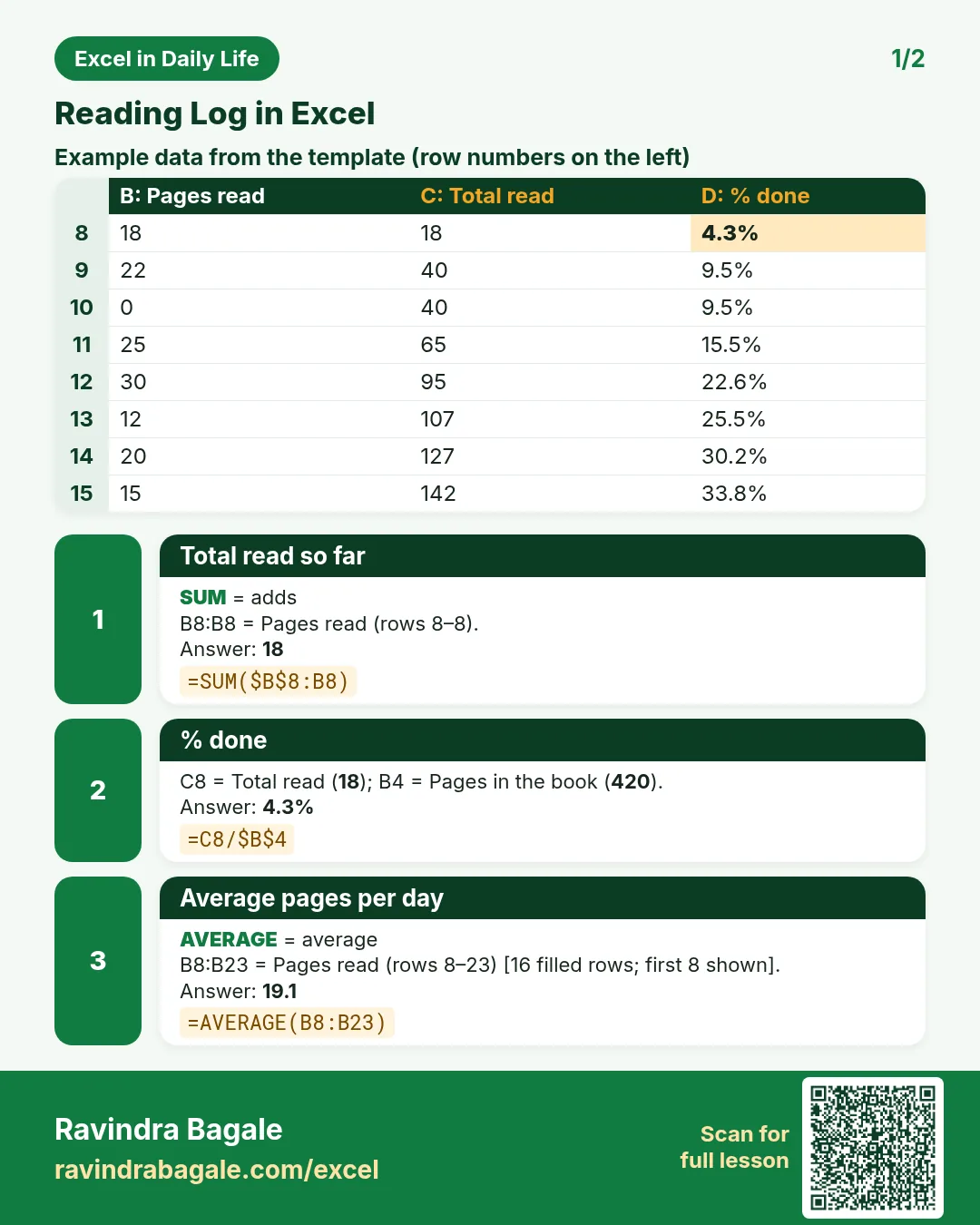

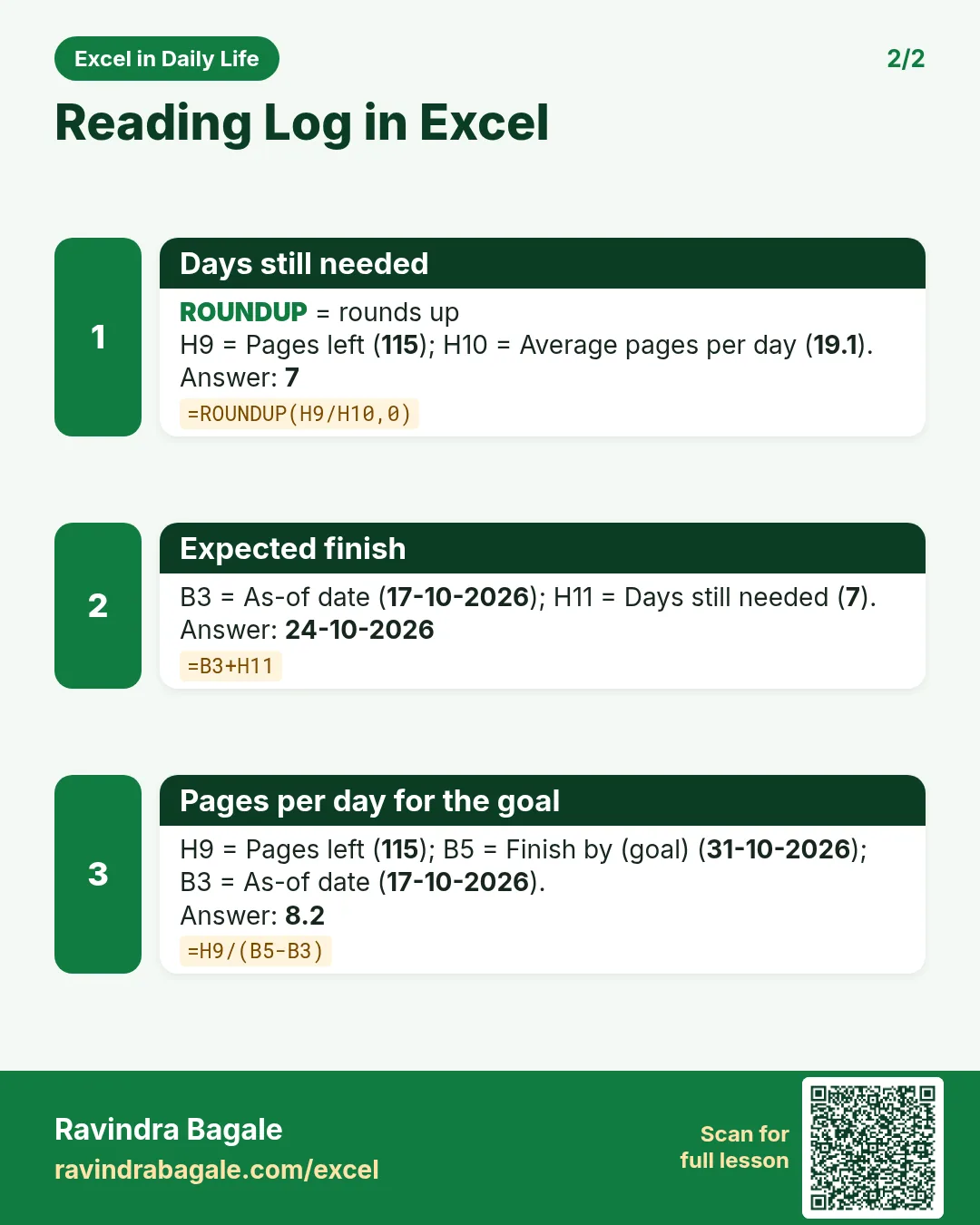

More cards: Ravi Sir's Cards.
6. Frequently asked questions
How do I calculate when I will finish a book in Excel?
Days needed = ROUNDUP(pages left ÷ average pages per day, 0). Finish date = today + days needed.
How do I show a running total?
Use =SUM($B$8:B8) and copy down; the end of the range moves with each row.
How many pages a day do I need for my goal?
Pages left ÷ days until the goal: =H9/(B5-B3).
Why ROUNDUP and not ROUND?
A part day is still a day of reading. ROUNDUP always rounds up to the next whole number.
How do I make a progress bar without a chart?
Use REPT to repeat a block symbol: =REPT("■",INT(done*10))&REPT("□",10-INT(done*10)).
7. Quick quiz
Ten questions on this page. Sign in to save your score.
Loading practice tasks...
- Total pages read (Easy): Add up Pages read in D2:D11. (sheet "Data")
- Average pages/day (Easy): Average of Pages/day in F2:F11, rounded to 1 decimal. (sheet "Data")
- Self-help books (Easy): How many rows have Genre "Self-help"? (sheet "Data")
- Longest book (Easy): The largest value in Total pages C2:C11. (sheet "Data")
- Total days logged (Easy): Add up Days so far in E2:E11. (sheet "Data")
- Pages in Self-help (Medium): Total of Pages read where Genre is "Self-help". (sheet "Data")
- Fiction pages left (Medium): Total pages minus pages read for Fiction books: SUMIF Total pages − SUMIF Pages read. (sheet "Data")
- Pages of Sapiens (Medium): Total pages for Book "Sapiens". (sheet "Data")
- Finished? row 2 (Medium): "Done" if D2>=C2 else "Reading". (sheet "Data")
- Share Self-help read (Hard): Self-help pages read / all pages read, 3 decimals. (sheet "Data")
- Fast readers (Hard): How many books have Pages/day > 15? (sheet "Data")
- Left on Atomic Habits (Hard): C2 minus D2. (sheet "Data")