Insurance Policy Renewal Tracker in Excel: Next Premium Due Date with EDATE and Yearly Cost
Abhishek Shinde in Pune pays six insurance premiums: health, term, car, bike, home, and a monthly health cover for Rani. Some are yearly, one is half-yearly, one is monthly, and the renewal dates are spread across the year. This sheet works out every next due date on its own, counts the days left and tells him how much money he needs in the next 30 days.
What you'll learn on this page
- One row per policy with premium and how often it is paid
- Months between payments with a nested IF
- Next due date with EDATE
- Days left and a Due soon / Overdue status
- Yearly cost for any payment frequency
- Money needed in the next 30 days with SUMIFS
Download the template: insurance-policy-renewal-tracker-template.xlsx: example data with real formulas. Yellow cells are inputs you can type over; green cells hold formulas; blue rows are headers and totals. Replace the example data with your own and everything recalculates.
Made-up data: every name, amount, shop and date on this page is made up for practice. Cities are used only to make the examples feel real.
1. The example
Abhishek's policies on 17 October 2026 (made-up values):
| Policy | Premium | Paid every | Last paid on | Next due | Days left | Yearly cost | Status |
|---|---|---|---|---|---|---|---|
| Health floater | ₹24,500 | Yearly | 05-11-2025 | 05-11-2026 | 19 | ₹24,500 | Due soon |
| Term plan | ₹6,900 | Half-yearly | 12-06-2026 | 12-12-2026 | 56 | ₹13,800 | OK |
| Car insurance | ₹11,800 | Yearly | 28-10-2025 | 28-10-2026 | 11 | ₹11,800 | Due soon |
| Bike insurance | ₹1,850 | Yearly | 09-10-2025 | 09-10-2026 | −8 | ₹1,850 | Overdue |
| Home insurance | ₹3,600 | Yearly | 20-02-2026 | 20-02-2027 | 126 | ₹3,600 | OK |
| Health cover for Rani | ₹2,350 | Monthly | 01-10-2026 | 01-11-2026 | 15 | ₹28,200 | Due soon |
Total premium per year: ₹83,750, about ₹6,979 a month to set aside. ₹38,650 is needed in the next 30 days, and the bike policy is already 8 days past its due date.
Figure 1. Last paid date + months (12, 6, 3 or 1) gives the next due date with EDATE; next due − today gives days left; IF gives Overdue, Due soon or OK; premiums are converted to a yearly cost.
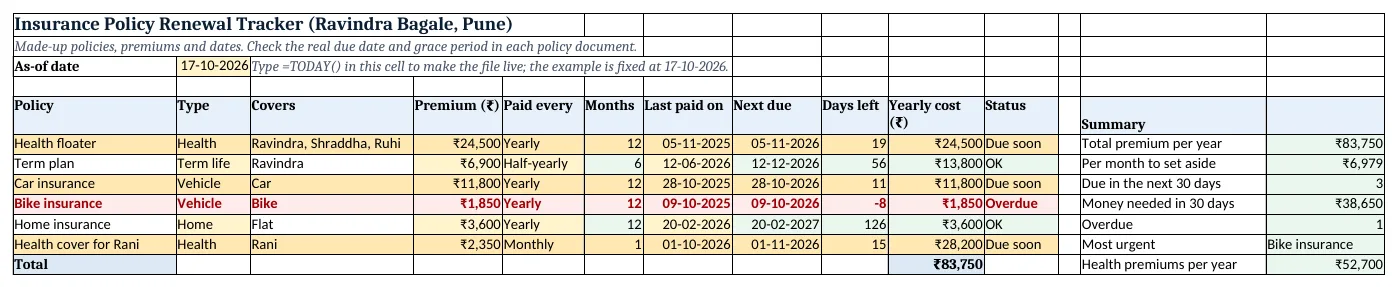
Figure 2. The template sheet, recalculated with its example data. Download it above and replace the yellow cells with your own numbers.
2. Build it step by step
Step 1. List the policies
- In A5:K5 type Policy, Type, Covers, Premium, Paid every, Months, Last paid on, Next due, Days left, Yearly cost, Status.
- Select B6:B50 > Data > Data Validation > List:
Health,Term life,Vehicle,Home,Other. Do the same for E6:E50 withYearly,Half-yearly,Quarterly,Monthly(drop-down lists).
Step 2. Months between payments
- In F6 type
=IF(E6="Yearly",12,IF(E6="Half-yearly",6,IF(E6="Quarterly",3,1)))(nested IF).
Step 3. Next due date with EDATE
- EDATE(start_date, months) returns the same day a number of months later. In H6 type
=EDATE(G6,F6): 05-11-2025 + 12 months = 05-11-2026. - Format H6 as a date. EDATE is also used in the warranty tracker.
Step 4. Days left and status
- In B3 type the as-of date (
=TODAY()in your copy). In I6 type=H6-$B$3: 19 days. - In K6 type
=IF(I6<0,"Overdue",IF(I6<=30,"Due soon","OK")).
Step 5. Yearly cost
- In J6 type
=D6*12/F6. A monthly ₹2,350 becomes ₹28,200 a year; a half-yearly ₹6,900 becomes ₹13,800. - In J12 type
=SUM(J6:J11): ₹83,750. In N7 type=N6/12for the monthly amount to set aside.
Step 6. Summary and colours
- In N9 type
=SUMIFS(D6:D11,I6:I11,">=0",I6:I11,"<=30"): ₹38,650 due in the next 30 days (SUMIFS). - In N11 type
=INDEX(A6:A11,MATCH(MIN(I6:I11),I6:I11,0)): Bike insurance is the most urgent. - Select A6:K50 > New Rule > Use a formula:
=$K6="Overdue"red,=$K6="Due soon"amber (formula rules).
Ravindra Bagale's Tip
Look at this sheet on the 1st of every month. Anything Due soon is a payment you plan this month.
Ravindra Bagale's Tip – मराठी
दर महिन्याच्या 1 तारखेला ही sheet बघा. जे "Due soon" आहे ते याच महिन्यात भरायचं.
Ravindra Bagale's Tip – हिंदी
हर महीने की 1 तारीख को यह sheet देखो. जो "Due soon" है, वह इसी महीने भरना है.
3. Formulas used
| Cell | Formula | What it does |
|---|---|---|
| F6 | =IF(E6="Yearly",12,IF(E6="Half-yearly",6,IF(E6="Quarterly",3,1))) |
Months between payments |
| H6 | =EDATE(G6,F6) |
Next due date |
| I6 | =H6-$B$3 |
Days left |
| J6 | =D6*12/F6 |
Yearly cost |
| K6 | =IF(I6<0,"Overdue",IF(I6<=30,"Due soon","OK")) |
Status |
| N7 | =N6/12 |
Per month to set aside |
| N9 | =SUMIFS(D6:D11,I6:I11,">=0",I6:I11,"<=30") |
Money needed in 30 days |
| N11 | =INDEX(A6:A11,MATCH(MIN(I6:I11),I6:I11,0)) |
Most urgent policy |
| N12 | =SUMIF(B6:B11,"Health",J6:J11) |
Health premiums per year |
Every formula above is written in the template, so you can click a cell and see it in the formula bar. All values on this page were recalculated in the file.
4. Common mistakes
- Adding 365 days instead of using EDATE. Adding 365 drifts by a day in a leap year, and monthly premiums need months, not days. EDATE adds calendar months.
- Forgetting to update Last paid on. After you pay, type the new payment date in column G, or the policy keeps showing Overdue.
- Comparing monthly and yearly premiums directly. ₹2,350 a month looks small next to ₹24,500 a year, but it is ₹28,200 a year. Compare the Yearly cost column.
- Relying on the grace period. Grace periods differ by policy and insurer. Check the policy document and pay before the due date.
- Typing the policy start date for every year. Use the date of the last payment, so EDATE always points to the next one.
Ravindra Bagale's Tip
Keep the policy number and helpline in two extra columns. When you need to claim, everything is in one place.
Ravindra Bagale's Tip – मराठी
Policy number आणि helpline दोन जास्तीच्या columns मध्ये ठेवा. Claim करायची वेळ आली की सगळं एका जागी मिळतं.
Ravindra Bagale's Tip – हिंदी
Policy number और helpline दो extra columns में रखो. Claim के वक्त सब एक जगह मिलेगा.
5. More real examples
Example 1: Vehicle policies only. A small business with three bikes can list each vehicle and sort by Days left.
Example 2: Policies for Rani and Isha. Use the Covers column and SUMIF by person to see what each person's cover costs per year.
Example 3: Save monthly for premiums. Put N7 (₹6,979) into a separate savings account every month, so the big yearly premiums never hurt.
Quick revision cards
Quick revision
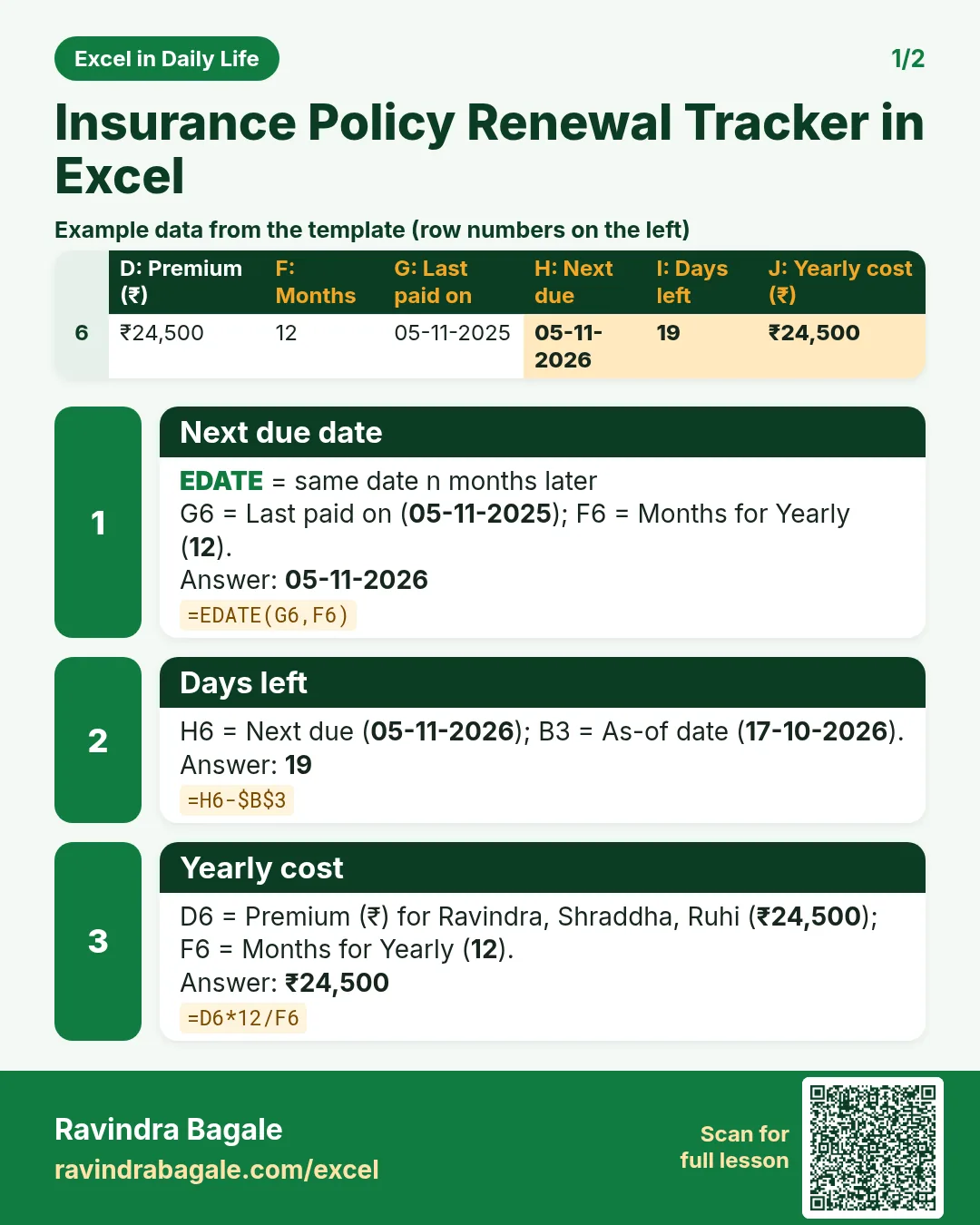
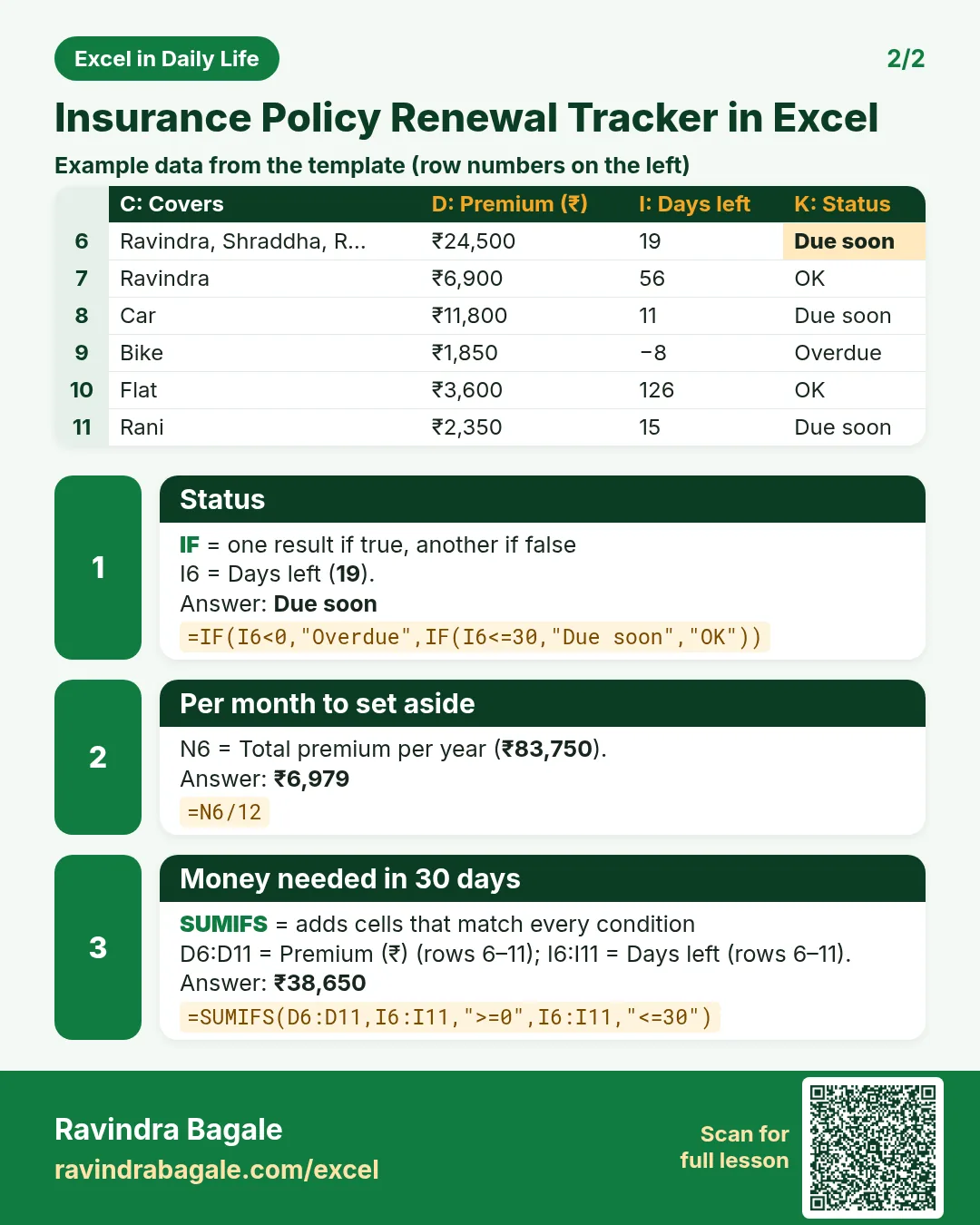
Each card shows formulas from this page, each with an example and its answer from the template. Scan the QR code on a card to open this lesson. All names and numbers are made up for practice.
झटपट उजळणी
प्रत्येक card वर या page मधले formulas, त्यांचं example आणि template मधलं उत्तर आहे. Card वरचा QR code scan केला की हा lesson उघडतो. सगळी नावं आणि आकडे सरावासाठी काल्पनिक आहेत.
झटपट दोहराई
हर card पर इस page के formulas, उनका example और template का उत्तर है. Card का QR code scan करें तो यह lesson खुलेगा. सभी नाम और आंकड़े अभ्यास के लिए काल्पनिक हैं.


More cards: Ravi Sir's Cards.
6. Frequently asked questions
How do I find the next premium due date in Excel?
Use =EDATE(last_paid_date, months): 12 for yearly, 6 for half-yearly, 3 for quarterly, 1 for monthly.
What does EDATE do?
It returns the same day of the month a set number of months before or after a date. =EDATE(05-11-2025,12) gives 05-11-2026.
How do I count days until renewal?
Subtract today from the next due date: =H6-$B$3. Negative means overdue.
How do I compare yearly and monthly premiums?
Convert all to a yearly cost: =premium*12/months between payments.
How much should I set aside each month?
Total yearly cost ÷ 12. Here ₹83,750 ÷ 12 = about ₹6,979.
7. Quick quiz
Ten questions on this page. Sign in to save your score.
Loading practice tasks...
- Total premium (Easy): Add up Premium (£) in C2:C11. (sheet "Data")
- Total claims (Easy): Add up Claim count in E2:E11. (sheet "Data")
- Due policies (Easy): How many rows have Status "Due"? (sheet "Data")
- Min days to renew (Easy): Smallest Days to renew in D2:D11. (sheet "Data")
- London rows (Easy): How many rows have City "London"? (sheet "Data")
- Due premium (Medium): Total of Premium (£) where Status is "Due". (sheet "Data")
- Days under 20 (Medium): How many policies have Days to renew < 20? (sheet "Data")
- Premium of POL-103 (Medium): Premium (£) for Policy "POL-103". (sheet "Data")
- Pune premium (Medium): Total of Premium (£) where City is "Pune". (sheet "Data")
- Share Due premium (Hard): Due premium / all premium, 3 decimals. (sheet "Data")
- Avg premium (Hard): Average of Premium (£) in C2:C11, rounded to 1 decimal. (sheet "Data")
- Above avg premium? (Hard): "High" if C2 > average premium else "OK". (sheet "Data")