Chapter 88: Amazon EKS for DevOps
88.9 Upgrade strategy and drain
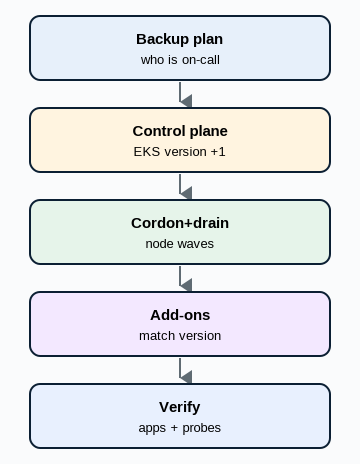
Story. A Walmart-style retail team in Bentonville upgraded the EKS control plane on Friday night without draining nodes. Pods stuck on old kubelet versions. Checkout partial outage lasted 40 minutes. The runbook changed: upgrade control plane first (AWS guidance), then node groups in waves, cordon and drain each node, watch PodDisruptionBudgets, then add-ons. Cost of the incident was about $12,000 (near ₹10 lakh) in lost orders — approximate business impact they recorded, not an AWS fee.
Why
Kubernetes versions skew between API and kubelet. Jumping without drain leaves pods on incompatible nodes.
What
- Control plane upgrade — EKS updates the managed API to a newer Kubernetes version (often one minor at a time).
- Node group upgrade — Replace or update worker AMI/kubelet to match.
- cordon — Mark a node unschedulable.
- drain — Evict pods safely so they reschedule elsewhere.
- PodDisruptionBudget (PDB) — Limits how many replicas you may take down at once.
How
- Read AWS EKS version compatibility for add-ons and node AMIs.
- Upgrade the control plane during a change window with clear rollback owners.
- Upgrade node groups in batches: cordon, drain, wait for Ready pods, next batch.
- Upgrade managed add-ons; run smoke tests and dashboards from chapter 87.
Example 1: Cordon and drain one node
kubectl cordon ip-10-0-1-23.ap-south-1.compute.internal
kubectl drain ip-10-0-1-23.ap-south-1.compute.internal --ignore-daemonsets --delete-emptydir-data
Output
node/ip-10-0-1-23.ap-south-1.compute.internal cordoned
evicting pod shop/pay-api-6d9f...
pod/pay-api-6d9f... evicted
What it shows: The node takes no new pods; existing workloads move (respecting PDBs). DaemonSets stay by design with --ignore-daemonsets.
Example 2: Watch nodes during an upgrade wave
kubectl get nodes -L eks.amazonaws.com/nodegroup
Output
NAME                       STATUS                     NODEGROUP
ip-10-0-1-23...            Ready,SchedulingDisabled   ng-m5
ip-10-0-2-44...            Ready                      ng-m5
ip-10-0-3-10...            Ready                      ng-m5
What it shows: One node is cordoned (SchedulingDisabled) while others still take pods.
Ravindra Bagale's Tip
Never upgrade production on Friday without a tested drain and a human watching PDBs and error rate.
शुक्रवारी production upgrade नको — drain test आणि PDB/error rate बघणारी व्यक्ती शिवाय.
शुक्रवार को production upgrade नहीं — drain test और PDB/error rate देखने वाले बिना.
Quick quiz
Q1. Typical order of an EKS version upgrade?
Control plane, then nodes in waves with drain, then add-ons — follow current AWS guidance.
Q2. What does kubectl drain do?
Evicts pods from a node so they reschedule elsewhere, respecting PDBs when possible.
Q3. Why mention PDBs?
They stop you from taking down too many replicas during drain.
Did you understand? Let us try it once more.