Chapter 88: Amazon EKS for DevOps
88.5 Networking — VPC CNI and security groups for pods
Story. A Razorpay-style payments team in Bengaluru saw pods fail to start with IP allocation errors. Their VPC CNI had run out of secondary IPs on the node ENIs. They resized subnets and tuned CNI warm IP settings. Later they used security groups for pods so the pay-api pods could reach RDS on port 5432 without opening the whole node. Networking on EKS is mostly AWS VPC — learn CNI basics before you blame Kubernetes.
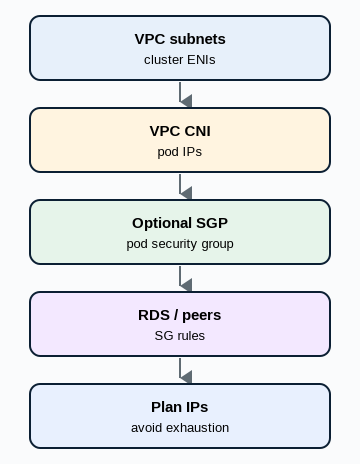
Why
On EKS, pods usually get real VPC IPs. If the subnet or ENI IP pool is empty, scheduling looks fine until the pod cannot start.
What
- Amazon VPC CNI — Default CNI plugin that gives pods addresses from your VPC.
- ENI — Elastic Network Interface on the node; holds secondary IPs for pods.
- Security groups for pods — Attach an SG to pods (awareness) so rules target workloads, not only nodes.
- Subnet sizing — Private subnets must have enough free IPs for nodes and pods.
How
- Place worker subnets with room to grow (plan IP capacity).
- Keep VPC CNI healthy as a managed add-on when possible.
- Use NetworkPolicy inside the cluster when you need Kubernetes-level rules.
- For database access, prefer tight security group rules (node SG or security groups for pods).
Example 1: Check VPC CNI pods
kubectl -n kube-system get pods -l k8s-app=aws-node -o wide
Output
NAME                             READY   STATUS    AGE   IP
aws-node-aaaaa                   1/1     Running   3d    10.0.1.23
aws-node-bbbbb                   1/1     Running   3d    10.0.2.44
What it shows: The VPC CNI DaemonSet (aws-node) is Running on each node. If these pods crash, new pod IPs will fail.
Example 2: See pod IP in the VPC range
kubectl get pod pay-api-0 -n shop -o wide
Output
NAME        READY   STATUS    IP           NODE
pay-api-0   1/1     Running   10.0.1.77    ip-10-0-1-23...
What it shows: 10.0.1.77 is a VPC address from the node subnet pool, not a fake overlay-only address.
Ravindra Bagale's Tip
Before a big launch, count free IPs in every worker subnet. IP exhaustion looks like random Pending pods.
मोठ्या launch आधी प्रत्येक worker subnet मधील free IPs मोजा. IP exhaustion = Pending pods.
बड़े launch से पहले हर worker subnet की free IPs गिनें. IP exhaustion = Pending pods.
Quick quiz
Q1. What does the VPC CNI do?
Assigns pods IP addresses from your AWS VPC via the aws-node plugin.
Q2. Why can pods stay Pending for networking reasons?
No free secondary IPs on node ENIs or empty subnets.
Q3. What are security groups for pods?
An awareness feature to attach AWS security groups to pods for finer traffic rules.
Did you understand? Let us try it once more.