Chapter 88: Amazon EKS for DevOps
88.8 Load balancers — AWS LB Controller and Ingress
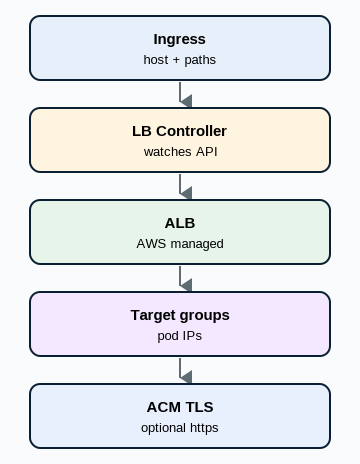
Story. Neha in Pune exposed a Service as type: LoadBalancer and got a Classic or Network Load Balancer she did not expect. For HTTP routing with path rules she installed the AWS Load Balancer Controller, created an Ingress, and got an Application Load Balancer (ALB) with target groups to pods. TLS certificates came from ACM. The controller needs IRSA permissions for elasticloadbalancing APIs. Without the controller, Ingress annotations will not create an ALB on EKS.
Why
Browsers speak HTTP. An ALB Ingress gives host and path routing without teaching every Service a public NLB.
What
- AWS Load Balancer Controller — Kubernetes controller that creates ALB/NLB from Ingress or Service objects.
- Ingress — Cluster object for HTTP(S) routing rules.
- Target group — AWS object pointing at pods (IP mode is common with VPC CNI).
- ACM — AWS Certificate Manager certificates attached to the ALB listener.
How
- Install the controller (Helm is common — skills from chapter 85) with an IRSA role.
- Annotate Ingress for the
albingress class as required by current controller docs. - Confirm an ALB appears in EC2 → Load Balancers.
- Point DNS (Route 53 or your DNS) at the ALB.
Example 1: Ingress shape for ALB
apiVersion: networking.k8s.io/v1
kind: Ingress
metadata:
  name: shop
  namespace: shop
  annotations:
    kubernetes.io/ingress.class: alb
    alb.ingress.kubernetes.io/scheme: internet-facing
    alb.ingress.kubernetes.io/target-type: ip
spec:
  rules:
    - host: shop.example.com
      http:
        paths:
          - path: /
            pathType: Prefix
            backend:
              service:
                name: shop-api
                port:
                  number: 80
What it shows: An internet-facing ALB in IP target mode sending / to Service shop-api. Annotation keys can evolve — confirm against current controller documentation when you install.
Example 2: Confirm controller pods
kubectl -n kube-system get deploy aws-load-balancer-controller
Output
NAME                           READY   UP-TO-DATE   AVAILABLE
aws-load-balancer-controller   2/2     2            2
What it shows: The controller Deployment is available. If it is missing, Ingress will not create an ALB.
Ravindra Bagale's Tip
Install the AWS Load Balancer Controller before you debug why an Ingress has no ADDRESS on EKS.
EKS वर Ingress ला ADDRESS नाही तर आधी AWS Load Balancer Controller बसला का ते तपासा.
EKS पर Ingress का ADDRESS नहीं तो पहले AWS Load Balancer Controller लगा है क्या जांचें.
Quick quiz
Q1. What does the AWS Load Balancer Controller do?
Creates and manages ALB/NLB from Kubernetes Ingress or Service objects.
Q2. Why use target-type ip with VPC CNI?
Pods have VPC IPs, so the ALB can register pod IPs directly.
Q3. Where do TLS certs often come from?
ACM certificates attached to the ALB listener.
Did you understand? Let us try it once more.