Chapter 90: GitHub Actions Deep Dive
90.8 Caching, artifacts and status checks
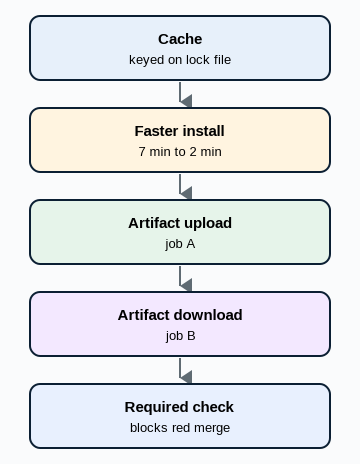
Story (fictional teaching scenario). Ishaan's React build in Jaipur took 7 minutes because npm ci downloaded everything each time. A cache keyed on the lock file cut it to 2 minutes. His test job made a coverage report, but the deploy job could not see it, because jobs do not share disks. An artifact carried it across. Finally Olivia, the tech lead from Sydney, made the test check required in branch protection. Now nobody could merge a red PR, not even by accident.
Why
Slow pipelines get skipped. Lost files break later jobs. Optional checks get ignored. These three tools fix all three.
What
- Cache — Saves folders like
~/.npmbetween runs. Restored when the key matches. - Cache key — Usually a hash of the lock file. New lock file means a new cache.
- Artifact — A file a job uploads so another job, or a person, can download it.
- Retention — How many days an artifact is kept. Storage counts toward your plan (approximate, check GitHub billing).
- Status check / branch protection — A rule that a named check must pass before merge.
How
- Use the built-in
cache:option of setup-node or setup-python, oractions/cache. - Upload outputs with
actions/upload-artifactand setretention-days. - Download them in a later job with
actions/download-artifactandneeds:. - In Settings → Branches (or rulesets), mark the test check as required on
main.
Example 1: Built-in npm cache
- uses: actions/setup-node@v7
  with:
    node-version: 24
    cache: npm
- run: npm ci
Output (illustrative) (second run)
Cache restored from key: node-cache-Linux-npm-5c1e...
added 214 packages in 2s
What it shows: The cache matched the lock file hash, so install took 2 seconds instead of minutes.
Example 2: Pass a report from test to deploy
jobs:
  test:
    runs-on: ubuntu-latest
    steps:
      - run: mkdir -p out && echo "coverage 87%" > out/report.txt
      - uses: actions/upload-artifact@v7
        with:
          name: report
          path: out/report.txt
          retention-days: 5
  deploy:
    needs: test
    runs-on: ubuntu-latest
    steps:
      - uses: actions/download-artifact@v8
        with:
          name: report
      - run: cat report.txt
Output (illustrative) (deploy job)
coverage 87%
What it shows: The file crossed from one runner to another through the artifact store. It is deleted after 5 days.
Example 3: See the required check on a PR
gh pr checks 42
Output (illustrative)
test   fail   1m03s
lint   pass   0m11s
Some checks were not successful
What it shows: test failed, and because it is required, the Merge button stays blocked. PR number is an example.
Ravindra Bagale's Tip
Cache is for speed and can be missing. Artifacts are for handing over results. Do not mix them up.
Cache speed साठी असतो, कधी नसलाही तरी चालतो. Artifacts results पुढे देण्यासाठी असतात. दोन्ही गोंधळू नका.
Cache speed के लिए है, कभी न मिले तो भी चलता है. Artifacts results आगे देने के लिए हैं. दोनों को mix मत करो.
Quick quiz
Q1. What is a good cache key?
A hash of the lock file.
Q2. How does job B get a file from job A?
Job A uploads an artifact; job B downloads it with needs: on A.
Q3. How do you stop red PRs from merging?
Make the check required in branch protection or a ruleset.
Did you understand? Let us try it once more.