Chapter 90: GitHub Actions Deep Dive
90.2 Workflows, jobs, steps and runners
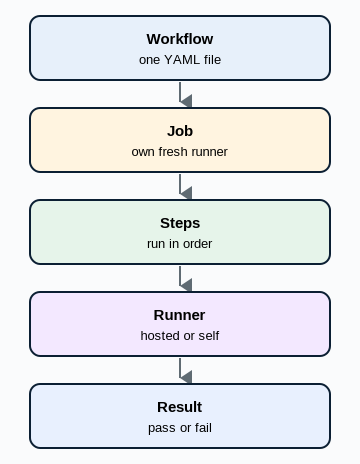
Story (fictional teaching scenario). Aisha in Bengaluru drew GitHub Actions as a building. The workflow is the building. Each job is a room that gets its own fresh computer. Each step is one task in that room. The runner is the computer itself. GitHub gives you rented rooms (GitHub-hosted runners). Your company can also bring its own rooms (self-hosted runners). Once Liam, her junior from Toronto, saw that two jobs do not share files by default, his broken pipeline made sense.
Why
If you think jobs share one machine, you will save a file in job A and fail to find it in job B. Knowing the levels saves hours.
What
- Job — A group of steps that runs on one runner. Jobs run in parallel unless you link them.
- Step — One
run:command or oneuses:action. Steps in a job share the same disk. - Action — A ready-made step, like
actions/checkout@v7, that clones your code. - GitHub-hosted runner — A clean virtual machine from GitHub, such as
ubuntu-latest. It is thrown away after the job. - Self-hosted runner — Your own machine that runs jobs. Useful for private networks or special hardware. You patch and secure it.
How
- Give each job a
runs-on:label. - Start most jobs with
actions/checkout@v7so the code is on the runner. - Keep steps small so the log shows exactly which one failed.
- Use self-hosted runners only for private repos you trust, and keep them patched.
Example 1: Two jobs run at the same time
jobs:
  lint:
    runs-on: ubuntu-latest
    steps:
      - uses: actions/checkout@v7
      - run: echo "lint ok"
  test:
    runs-on: ubuntu-latest
    steps:
      - uses: actions/checkout@v7
      - run: echo "tests ok"
Output (illustrative) (run summary)
lint   ✓ 9s
test   ✓ 11s
What it shows: Both jobs started together on two different runners. Neither waited for the other.
Example 2: Point a job at a self-hosted runner
jobs:
  deploy-internal:
    runs-on: [self-hosted, linux, office-lab]
    steps:
      - run: hostname
Output (illustrative)
lab-runner-01
What it shows: The job ran on a machine with all three labels. The hostname is your own server, not a GitHub one.
Ravindra Bagale's Tip
Jobs do not share files. Steps inside one job do. To pass files between jobs, use artifacts (lesson 8).
Jobs files share करत नाहीत. एकाच job मधल्या steps करतात. Jobs मध्ये files पाठवायच्या असतील तर artifacts वापरा (lesson 8).
Jobs files share नहीं करते. एक job के steps करते हैं. Jobs के बीच files भेजनी हों तो artifacts इस्तेमाल करो (lesson 8).
Quick quiz
Q1. Do two jobs share a disk by default?
No. Each job gets its own fresh runner.
Q2. What does actions/checkout do?
It clones your repo code onto the runner.
Q3. Who patches a self-hosted runner?
You do. GitHub-hosted runners are managed and thrown away after each job.
Did you understand? Let us try it once more.