Chapter 90: GitHub Actions Deep Dive
90.6 Build, test and publish — Node, Python and Docker
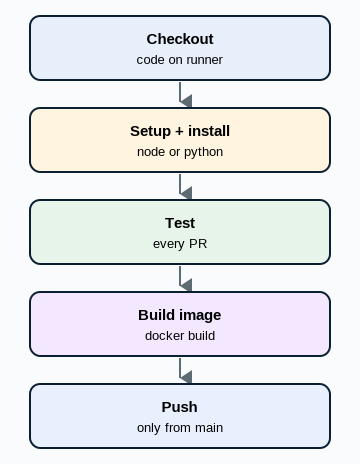
Story (fictional teaching scenario). Three teams at a Zomato-style company in Gurugram shared one pattern. Yuki's Node service, Arjun's Python worker and Hannah's Docker image all followed the same order: checkout, set up the language, install, test, then publish only from main. A PR never pushed an image. A green main always did. Reviewers stopped asking "did you run tests?" because the tick answered it.
Why
One clear order makes every repo predictable. Publishing only from main stops half-reviewed code from reaching the registry.
What
- setup-node / setup-python — Actions that install a chosen language version.
- npm ci — Clean, exact install from
package-lock.json. - pip install -r — Install Python packages from a requirements file.
- docker build / push — Make an image and send it to a registry, such as Amazon ECR (chapter 89).
- if: condition — Runs a step only when a rule is true, like the branch is
main.
How
- Checkout.
- Set up the language version.
- Install dependencies with a lock file.
- Run tests.
- On
mainonly, log in to the registry with OIDC and push a tagged image.
Example 1: Node test job
steps:
  - uses: actions/checkout@v7
  - uses: actions/setup-node@v7
    with:
      node-version: 24
  - run: npm ci
  - run: npm test
Output (illustrative)
added 214 packages in 6s
PASS  tests/price.test.js
Tests: 12 passed, 12 total
What it shows: Exact install, then 12 tests passed. A failing test turns the job red and blocks the merge.
Example 2: Python test job
steps:
  - uses: actions/checkout@v7
  - uses: actions/setup-python@v7
    with:
      python-version: "3.12"
  - run: pip install -r requirements.txt
  - run: pytest -q
Output (illustrative)
........                                   [100%]
8 passed in 1.42s
What it shows: Eight Python tests passed. Same shape as Node, different tools.
Example 3: Push a Docker image to ECR only from main
- name: Push image
  if: github.ref == 'refs/heads/main'
  run: |
    aws ecr get-login-password --region ap-south-1 | docker login --username AWS --password-stdin 123456789012.dkr.ecr.ap-south-1.amazonaws.com
    docker build -t 123456789012.dkr.ecr.ap-south-1.amazonaws.com/menu-api:${{ github.sha }} .
    docker push 123456789012.dkr.ecr.ap-south-1.amazonaws.com/menu-api:${{ github.sha }}
Output (illustrative) (on main)
Login Succeeded
...: digest: sha256:7be1... size: 1573
What it shows: The image is tagged with the commit id, so every image maps to one commit. On a PR, this step shows as skipped. The account id is an example. ECR storage is billed (approximate, check AWS pricing).
Ravindra Bagale's Tip
Tag images with the commit SHA, not only latest. Then you always know which code is running.
Images ला फक्त latest नको, commit SHA ने tag करा. मग कोणता code चालू आहे ते नेहमी कळतं.
Images को सिर्फ latest नहीं, commit SHA से tag करो. फिर हमेशा पता रहता है कौन सा code चल रहा है.
Quick quiz
Q1. Why npm ci instead of npm install in CI?
It installs exact versions from the lock file, cleanly.
Q2. How do you push only from main?
Add if: github.ref == 'refs/heads/main' on the push step or job.
Q3. Why tag with github.sha?
Each image maps to exactly one commit.
Did you understand? Let us try it once more.