Chapter 94: HashiCorp Vault and Secrets Management
94.5 KV v2 — mounts, data paths and metadata paths
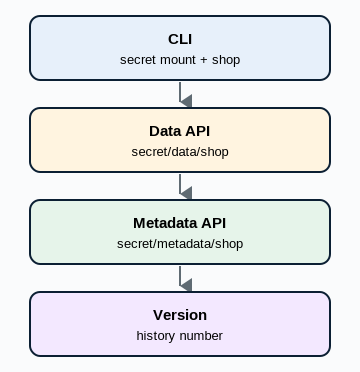
Story (fictional teaching scenario). In a fictional Surat app team, Omar from Doha writes policy for secret/shop and gets denied. Kavya checks that the engine is KV v2: its API uses data and metadata subpaths.
Why
CLI convenience hides path translation. Policies and direct API clients must use the actual engine paths.
What
- Secrets engine implements operations such as key/value storage or credential generation.
- Mount is the path where an engine is enabled, such as secret/.
- KV v2 is versioned key/value storage.
- Data path reads/writes the value. Metadata path reads version information or lists key names.
- A logical CLI path is not always the raw API policy path.
How
-
Identify the mount and engine version.
-
Use -mount for CLI clarity.
-
Write policies against the documented v2 API paths.
Example 1: Write one fake field
- Read the command or request.
vault kv put -mount=secret shop label=DEMO_ONLY
- Read the result.
Output (illustrative; NOT executed against Vault)
Key: version
Value: 1
- Line by line:
putcreates a new secret version.labelis a harmless demonstration field, not a credential. Existing KV data may be replaced by a put unless the intended whole value is supplied; use the documented patch operation when appropriate.
Example 2: Read via CLI
- Read the command or request.
vault kv get -mount=secret -field=label shop
- Read the result.
Output (illustrative; NOT executed against Vault)
DEMO_ONLY
- Line by line:
-fieldselects one value instead of the full response. It still prints that value. Do not use this display pattern for a real secret in logs or recorded terminals.
Example 3: Raw API path and JSON shape
- Read the command or request.
GET /v1/secret/data/shop
- Read the result.
Output (illustrative; NOT executed against Vault)
{"data":{"data":{"label":"DEMO_ONLY"},"metadata":{"version":1}}}
- Line by line: The first
datawraps the engine response. The seconddatacontains user fields.metadata.versiondescribes the stored version. Reading metadata alone uses /v1/secret/metadata/shop; listing uses LIST on a metadata prefix. No actual API request was made.
Ravindra Bagale's Tip
For KV v2, data and metadata are different policy paths.
KV v2 मध्ये data आणि metadata चे policy paths वेगळे असतात.
KV v2 में data और metadata के policy paths अलग होते हैं.
Did you understand? Let us try it once more.