Chapter 94: HashiCorp Vault and Secrets Management
94.2 Architecture — client, API, storage and the barrier
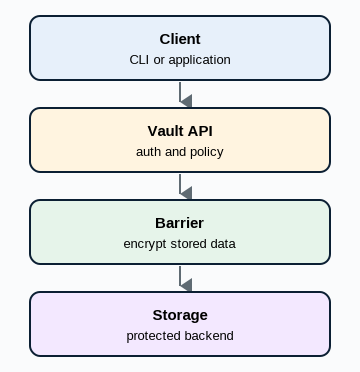
Story (fictional teaching scenario). At a fictional Nashik shop, Sara from Oslo draws four vertical boxes. The app does not read the storage files directly; it asks the Vault API.
Why
If you confuse encrypted storage with the API, you may back up the wrong things or expose a storage backend.
What
- Client is a human CLI or application requesting an operation.
- API is the request interface, commonly HTTP over TLS.
- Storage backend holds Vault data. Integrated Storage uses a Raft cluster for replicated storage.
- Encryption barrier is Vault’s cryptographic boundary around stored data.
- TLS protects traffic in transit; encrypted storage is not a replacement for TLS.
How
-
Use a client identity and TLS for real deployments.
-
Send operations to the API, not the storage backend.
-
Plan storage availability and operator responsibilities separately.
Example 1: Request route
- Read the command or request.
CLI: vault kv get -mount=secret shop
Route: client -> Vault API -> policy -> storage engine
- Read the result.
Output (illustrative; NOT executed against Vault)
An authorized caller receives a response; a storage-file reader does not get a normal API result.
- Line by line:
kv getis a CLI command.-mount=secretnames an engine mount.shopis a logical path. This would display secret values, so use only fake demonstration fields and never record real output.
Ravindra Bagale's Tip
Encrypted storage and encrypted network traffic solve different problems.
Storage encryption आणि network encryption वेगळ्या गोष्टी सांभाळतात.
Storage encryption और network encryption अलग समस्याएँ सुलझाते हैं.
Did you understand? Let us try it once more.