45.1 CALCULATE and Filter Context Mastery
Chala mitrano — CALCULATE is not magic spice. It changes filter context. Today we see why, with small INR examples from MH sales.
चला मित्रांनो — CALCULATE जादूची मसाला नाही. तो filter context बदलतो. आज MH sales च्या छोट्या INR उदाहरणांनी का ते पाहू.
चला मित्रों — CALCULATE जादुई मसाला नहीं। यह filter context बदलता है। आज MH sales के छोटे INR उदाहरणों से क्यों देखेंगे।
- Contrast filter context and row context in plain English.
- Explain what CALCULATE does to filters.
- Use REMOVEFILTERS/ALL patterns carefully.
- Apply KEEPFILTERS when overwrite is wrong.
- Describe context transition with an iterator example.
- Spot interview myths about CALCULATE.
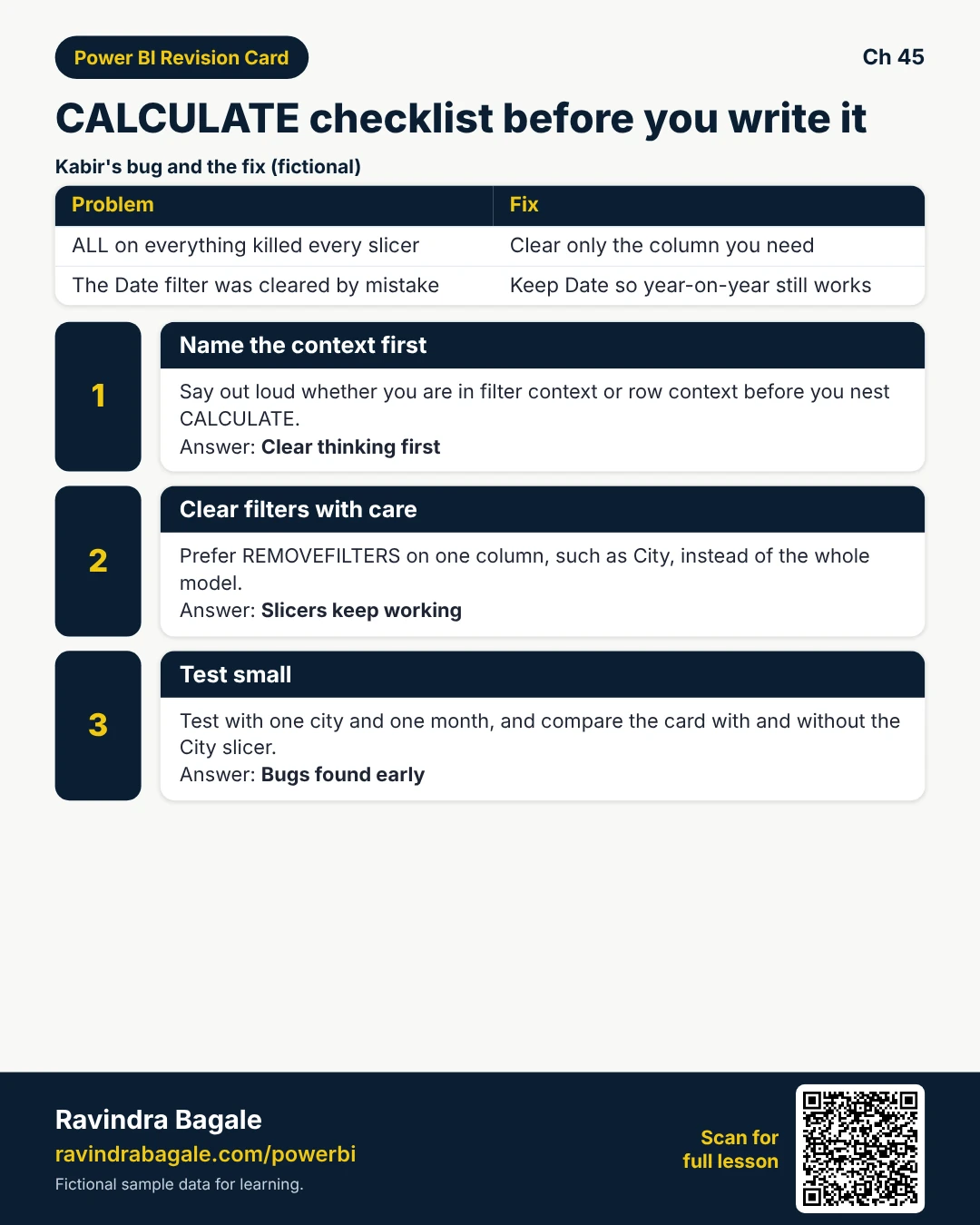
Start with a problem (fictional). Intern Kabir Mehta wrote Sales YoY with CALCULATE but every slicer died. Mentor Priya showed he blanketed the model with ALL(everything). In Nashik vs Pune (fictional), they rebuild: clear only Date when needed, KEEPFILTERS on Region, and respect row context inside SUMX.
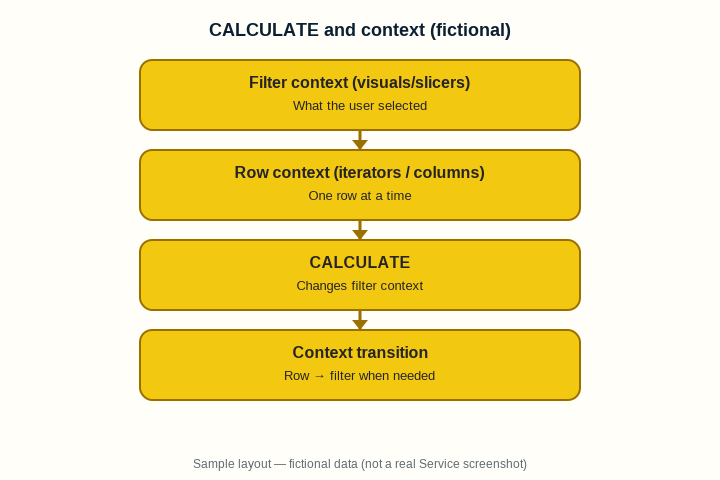
1. Filter context vs row context
Why: Students mix what the visual filtered with which row we are on.
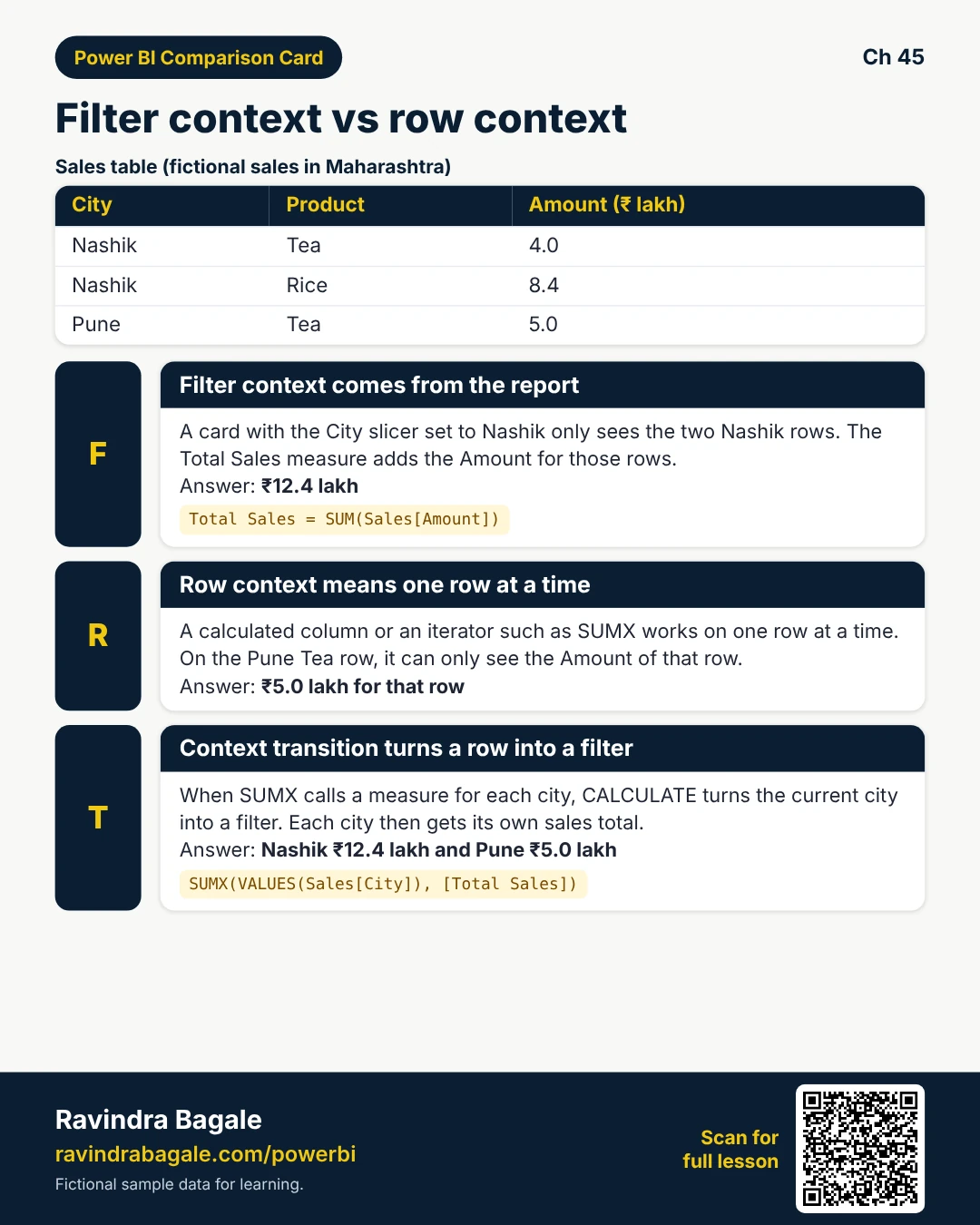
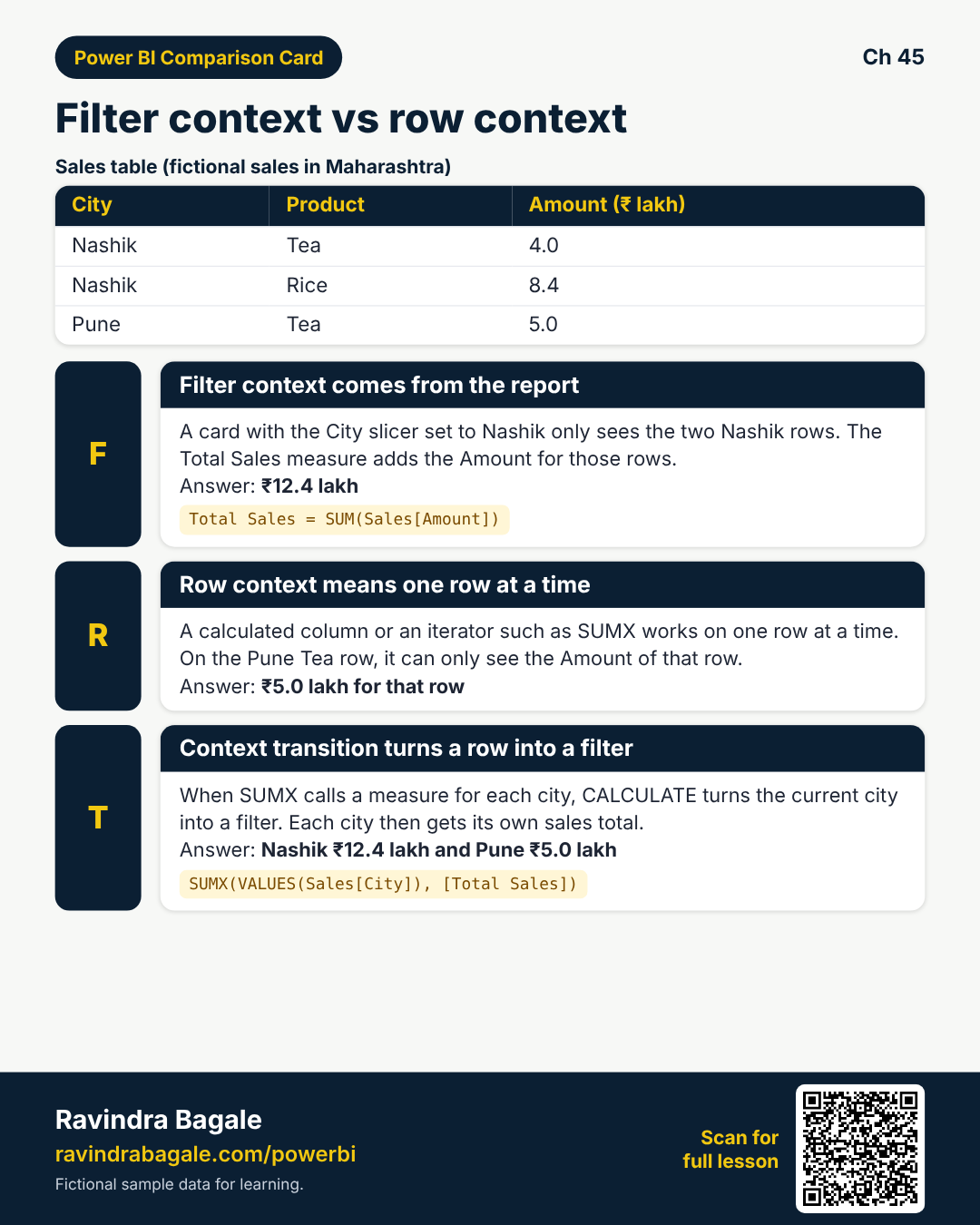
What: Filter context comes from visuals, slicers, and CALCULATE. Row context exists when a formula iterates rows (calculated column, FILTER, SUMX).
How — name them out loud:
Steps
- Look at a card with City slicer = Nashik — that is filter context.
- Look at a calculated column on Sales — that is row context per row.
- Measures usually start with filter context from the visual.
- Iterators add row context on top.
- Write one sentence for each before coding.
Tiny example: Card shows INR 12.4L for Nashik because filter context keeps City = Nashik (fictional).
Ravindra Bagale's Tip
Friends, if you cannot say which context you are in, do not nest CALCULATE yet.
Ravindra Bagale's Tip – मराठी
मित्रांनो, कोणता context आहे हे सांगता येत नसेल तर CALCULATE nest करू नका.
Ravindra Bagale's Tip – हिंदी
दोस्तों, कौन सा context है न कह सकें तो CALCULATE nest न करें।
2. What CALCULATE actually does
Why: People say CALCULATE makes it a measure — incomplete.
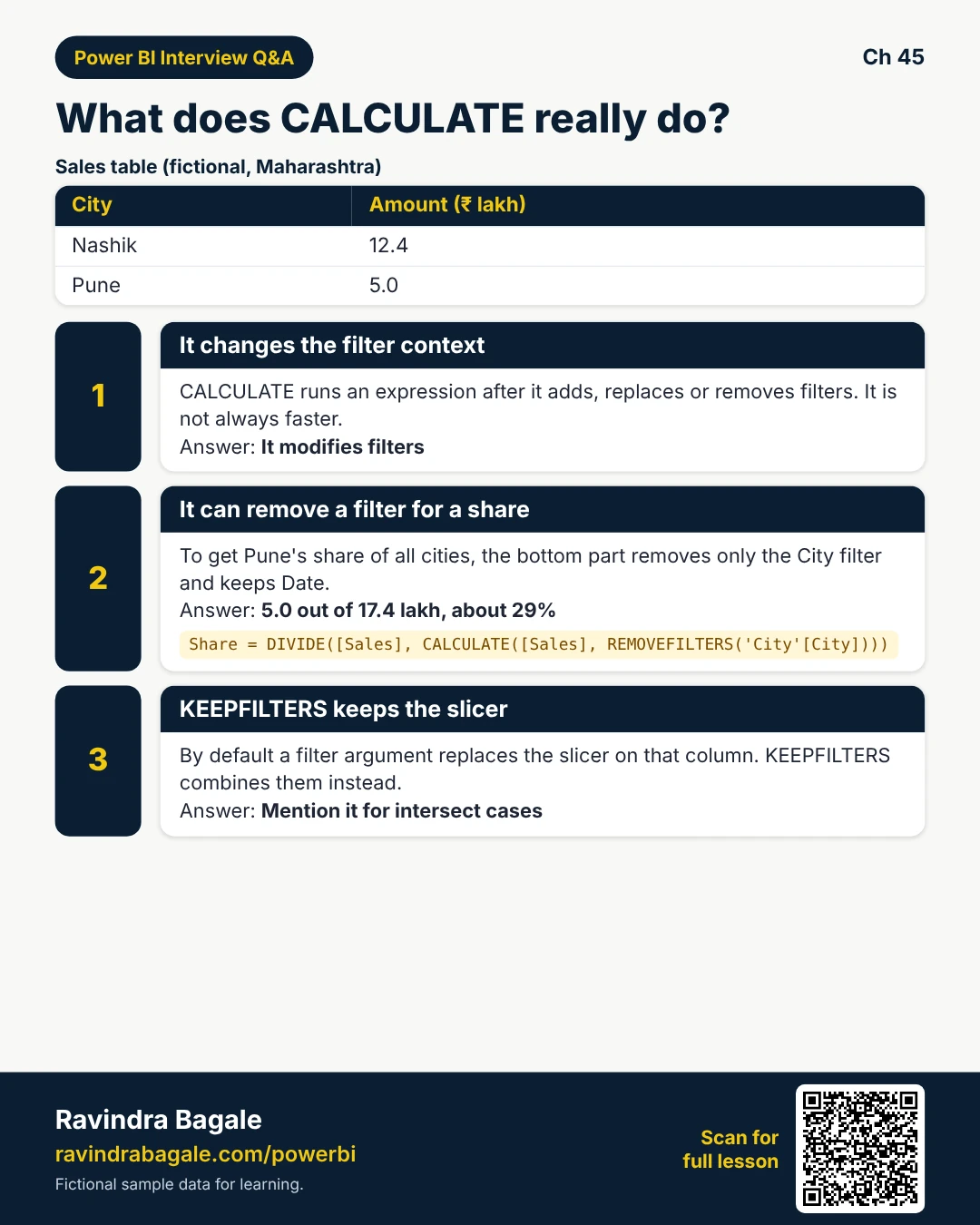
What: CALCULATE evaluates an expression under a modified filter context (and can force context transition).
How — modify on purpose:
Steps
- Start from the visual filters.
- Add/replace/remove filters in CALCULATE arguments.
- Evaluate the expression in that new filter context.
- Return the scalar result to the visual.
- Test with one city and one month only.
Tiny example: Sales LY = CALCULATE([Sales], SAMEPERIODLASTYEAR('Date'[Date])) keeps City slicer, shifts dates (concept).
Ravindra Bagale's Tip
Friends, CALCULATE is a filter wrench — not a performance fairy.
Ravindra Bagale's Tip – मराठी
मित्रांनो, CALCULATE filter चा रेंच आहे — performance परी नाही.
Ravindra Bagale's Tip – हिंदी
दोस्तों, CALCULATE filter की रेन्च है — performance परियाँ नहीं।
3. REMOVEFILTERS / ALL — clear with care
Why: ALL(everything) makes percent of total wrong or ignores the user slicer when you did not mean to.
What: REMOVEFILTERS (or ALL on a table/column) clears filters so you can compute a denominator or ignore a dimension.
How — clear only what you must:
Steps
- For percent of all cities: clear City filters in the denominator, keep Date.
- Prefer REMOVEFILTERS('City'[City]) over removing the whole model.
- Verify the slicer for Date still affects both parts.
- Name measures percent of Total City clearly.
- Compare card with and without City slicer.
Tiny example: Percent of MH = DIVIDE([Sales], CALCULATE([Sales], REMOVEFILTERS('City'[City]))) — Pune share of all cities (fictional).
Ravindra Bagale's Tip
Friends, clearing Date by accident is the classic YoY bug — be surgical.
Ravindra Bagale's Tip – मराठी
मित्रांनो, चुकून Date clear करणे क्लासिक YoY bug — शस्त्रक्रिया करा.
Ravindra Bagale's Tip – हिंदी
दोस्तों, गलती से Date clear करना क्लासिक YoY bug — सर्जरी करें।
4. KEEPFILTERS when overwrite hurts
Why: CALCULATE filter arguments replace filters on the same column by default — sometimes you wanted to intersect.
What: KEEPFILTERS keeps existing filters and intersects with the new predicate.
How — intersect instead of replace:
Steps
- Notice when a slicer is ignored after CALCULATE.
- Wrap the filter argument with KEEPFILTERS(...).
- Retest with two slicers on related columns.
- Document why KEEPFILTERS is there.
- Prefer clear model design over clever nesting.
Tiny example: Region = West with KEEPFILTERS still respects a City slicer inside West (concept).
Ravindra Bagale's Tip
Friends, if the slicer died, ask: replace vs intersect — KEEPFILTERS is often the fix.
Ravindra Bagale's Tip – मराठी
मित्रांनो, slicer मेला असेल तर विचारा: replace vs intersect — KEEPFILTERS अनेकदा उपाय.
Ravindra Bagale's Tip – हिंदी
दोस्तों, slicer मर गया हो तो पूछें: replace vs intersect — KEEPFILTERS अक्सर हल।
5. Context transition (simple picture)
Why: Inside SUMX you are in row context. A bare aggregation such as SUM(Sales[Amount]) ignores the current row, but a measure reference does not, because DAX wraps every measure in an automatic CALCULATE.
What: Context transition turns the current row into a filter. It happens when you call a measure inside an iterator, or when you wrap an expression in CALCULATE yourself.
How — see it once:
Steps
- Write a SUMX over cities of a sales measure.
- Notice CALCULATE/measure call applies each city as a filter.
- Avoid accidental transition that explodes cardinality.
- Prefer clear measures over hidden transitions in columns.
- Test on a tiny city table first.
Tiny example: The City table has one row each for Pune and Nashik, and it filters the Sales table through a one-to-many relationship on City. The measure is Sales = SUM(Sales[Amount]).
Table 1. Sales by city (fictional)
| City | Sales (₹) |
|---|---|
| Pune | 1,200 |
| Nashik | 300 |
Table 2. Three formulas on a card with no slicer
| Formula | Result (₹) |
|---|---|
SUMX(City, [Sales]) | 1,500 |
SUMX(City, SUM(Sales[Amount])) | 3,000 |
SUMX(City, CALCULATE(SUM(Sales[Amount]))) | 1,500 |
- The first formula calls a measure, which causes context transition. Each city row filters Sales, so the result is 1,200 plus 300.
- The second formula uses a bare SUM, which has no transition. Each city row adds the full 1,500, so the result is 3,000.
- The third formula wraps SUM in CALCULATE, which adds the transition back, so the result matches the first formula.
Ravindra Bagale's Tip
Friends, transition is powerful and expensive on big tables — know when it fires.
Ravindra Bagale's Tip – मराठी
मित्रांनो, transition शक्तिशाली आणि मोठ्या टेबलवर महाग — कधी पेटते ते जाणा.
Ravindra Bagale's Tip – हिंदी
दोस्तों, transition शक्तिशाली और बड़ी टेबल पर महंगा — कब जलता है जानें।
6. Interview myths to kill
Why: Myths waste interview minutes.
What: CALCULATE is not always faster, not only for time intel, and not a substitute for a proper Date table.
How — answer cleanly:
Steps
- Say: modifies filter context.
- Give one REMOVEFILTERS denominator example.
- Mention KEEPFILTERS for intersect.
- Admit when you escalate complex transition bugs.
- Refuse ALL(everything) as a default habit.
Tiny example: Strong line: I clear only the columns I must; I keep user slicers unless the measure says otherwise.
Ravindra Bagale's Tip
Friends, draw filter context with boxes on paper in interviews — it looks senior.
Ravindra Bagale's Tip – मराठी
मित्रांनो, interview मध्ये filter context पेपरवर काढा — senior दिसते.
Ravindra Bagale's Tip – हिंदी
दोस्तों, interview में filter context कागज़ पर बनाएं — senior लगता है।
Quiz (5 questions)
1. Filter context mainly comes from:
2. What is the job of CALCULATE?
3. A City slicer is on Pune. What does DIVIDE([Sales], CALCULATE([Sales], REMOVEFILTERS(City[City]))) show?
4. A Product slicer is on Coffee. What does CALCULATE([Sales], KEEPFILTERS(Product[Product] = "Tea")) show?
5. When does context transition happen?
Practice tasks (12) — hints only, no full answers
- Task. Define filter context vs row context in two lines.
Hint: section 1. - Task. Rewrite a wrong CALCULATE makes measures interview myth.
Hint: section 2. - Task. Write a percent of all cities measure idea with REMOVEFILTERS.
Hint: section 3. - Task. When would ALL('Date') break a YoY card?
Hint: clears dates. - Task. Explain KEEPFILTERS with a Region + City slicer story.
Hint: section 4. - Task. Tiny example: why SUMX(City,[Sales]) needs transition thinking.
Hint: section 5. - Task. List three CALCULATE interview myths to avoid.
Hint: section 6. - Task. Nashik INR 12.4L card — which context?
Hint: filter. - Task. Surgical clear: City only vs whole model — which and why?
Hint: section 3. - Task. Draw boxes: visual filters to CALCULATE to result.
Hint: paper. - Task. Name one performance risk of heavy transition on big tables.
Hint: section 5 tip. - Task. Fix Kabir ALL everything YoY — what do you clear instead?
Hint: story.
Ravi Sir's cards (Excel card style)
Standalone cards — no tip or photo sections. QR points to this lesson. Download PNG to revise offline.
Think like a professional
In a real tenant, rights and sharing are controlled by Fabric / Power BI admins. Always follow your company policy. This lesson uses fictional people and numbers so you can practise the ideas safely.