Chapter 18: Cloud IAM and Workload Identity
18.1 Why.
Welcome to Chapter 18.
I am Ravindra Bagale.
Raju had no engineering degree. He had an access key in a file named keys.txt and he called it temporary because he planned to delete it. Guru-ji did not sit down until the file was gone from the Magical Code Library table. "Humans and workloads are different creatures," he said. "A human can use a second factor and a short console session. A workload cannot type a password. If you give the workload a key that lives for a year, you have hired a stranger who never sleeps and never rotates."
Raju thought of the Tesla console and the Verizon store. "Those were open doors."
"Doors with names on them," Guru-ji said. "The name was too powerful. Suppose we are Paytm and the payment function can read every bucket in the account. Suppose we are Swiggy and the CI job that builds a menu image can also change production roles. Suppose we are Amazon and the metadata of a virtual machine hands out credentials for a role you attached. Suppose we are Infosys and the client asks you to prove no long-lived key sits in Git. WhatsApp, Zomato, Netflix, BHIM UPI, and PayFast-shaped systems fail in public when that proof is missing. Identity is the control that makes Chapter 17's rooms mean something."
Identity is the new perimeter
In the cloud, whoever holds a valid credential is "inside". IAM decides what that person or program can do.
Long-lived keys on GitHub
Researchers and AWS itself have shown that access keys pushed to public GitHub are found by bots within minutes. AWS now quarantines keys it detects in public repos.
Instance metadata (IMDSv1)
In the Capital One case, a server-side request reached the instance metadata service and got role credentials. AWS released IMDSv2 in November 2019, which needs a session token and blocks many such requests.
18.2 What.
Human identity versus workload identity. Humans are people: engineers, auditors, on-call. They belong in an identity provider, with MFA, and they assume a role for a reason that ends. Workloads are programs: a pod, a function, a VM, a pipeline. They should receive short-lived credentials for the role of that one job. A shared "cloud admin" user that both humans and scripts use is how you lose the plot of an incident. You cannot tell who acted. Split them on paper before you split them in the account.
Role chaining and assumption. Assumption means a principal you already trust is allowed to become a role for a while. A human assumes a read-only role to debug, or a break-glass role with a ticket. A pipeline assumes a deploy role. Chaining means one role assumes another. Chains are useful and dangerous. Each hop must be intentional. A role that can assume every other role is a skeleton key. Write the allowed hops down. Alert when a new trust is added. Session time should be short for humans and sized to the job for pipelines, not "twelve hours because the default felt fine."
Temporary credentials. The cloud hands the workload a key id, a secret, and a token that expires. When the job ends, the credential dies. That is the opposite of an access key you download and paste into a CI variable for a year. Temporary credentials can still be stolen during their life. Short life and narrow rights limit the theft. Logs should show the session name so you can see which pod or which pipeline run used it. Chapter 10's rule about not inventing cryptography sits beside this: use the provider's credential service.
Policies and evaluation. An identity policy says what this principal may do. A resource policy says who may touch this bucket, this key, or this queue, and can grant or deny from the resource's side. Both can matter in one request. A deny usually wins over an allow. Permission boundaries are a fence around what a delegated admin can grant. Organization policies and service control policies are a fence around the whole account. The effective right is the overlap, not the friendliest document. When access is denied, read the evaluation instead of adding "Action": "*" to make the error go away. When access is allowed and you feel surprised, you have found the real bug.
Resource policies versus identity policies. New engineers attach everything to the user. Then a bucket policy, a key policy, or a queue policy quietly grants a second path. Review both. A bucket that trusts a wide principal will ignore your careful role. The Verizon partner story in Chapter 17 was a resource exposed too widely. Identity work includes those documents. Put them in IaC so the review happens in Git.
Cross-account access. A central deploy account or a log account will need to act in a workload account, or a workload will need to read a shared artifact account. Do this with a role that trusts a specific principal, an external id or equivalent confusion-resistant condition where the provider recommends it, and a narrow action list. Do not copy account-root trust from a blog. Cross-account is a hallway. Hallways get names.
Managed identities and workload identity federation. Azure managed identities, Google service accounts attached to a runtime, and Amazon roles attached to compute are the same kindness: the platform injects short-lived credentials and you do not store a key. Workload identity federation goes further. A Kubernetes service account, or a CI job, proves who it is with a signed token. The cloud exchanges that token for a role session. No static key in the cluster. The trust policy must pin the issuer, the namespace, and the service account name, or the repository and the branch for CI. A trust that accepts any token from a large organization is a wide door wearing a modern hat.
Kubernetes to cloud. Chapter 15 gave each app its own service account. This chapter lets that account become a cloud role that can read one secret or one prefix. It should not become the node role. The node role is for the kubelet’s needs. Applications that use the node role inherit every neighbor’s power. Projected tokens, short audiences, and no static keys in environment variables are the practice. Test in a lab cluster you own, with a lab role that can touch only a lab bucket.
CI and OIDC federation. The pipeline is a workload. Let it assume a role using OIDC from your Git host, bound to the repository and the protected branch or the environment. Pull-request pipelines from forks should not receive the production role. Chapter 11 separated untrusted builds from release builds. The cloud trust must repeat that separation. A token that can build and also rewrite IAM is two jobs glued together. Split the roles: one to push an image, one to apply infrastructure, neither able to invite a new admin.
Least privilege from access logs. Start from what the job did, not from what you fear it might need someday. Access analyzers and last-access data in the major clouds show unused actions. Remove them. A role that has not used a permission in months is a role that should lose it, after you confirm no yearly job depends on it. This is maintenance, like patching. Schedule it.
Privilege escalation, named not demonstrated. Some permissions are meta-permissions. They let a principal grant itself or another principal more power: attaching a higher role, changing a trust policy, passing a powerful role to a service that will run code, or editing the policy that was supposed to be the fence. You do not need a recipe to respect the danger. You need a review rule. Production grant of those meta-permissions belongs to a tiny group, with MFA, alerts, and no path from the application role. Permission boundaries and organization guardrails exist so a team admin cannot mint an administrator. If your lab role can change its own policy, the lab is teaching the wrong lesson. This chapter will not walk an escalation chain. It will tell you to forbid the pattern and to test that a forbidden call fails.
Service control policies and guardrails. Even account administrators should not be able to turn off trails, leave the allowed regions, or create public storage if the organization forbids it. Test the guardrail. A policy that is not attached to the right root is a PDF. Chapter 17 introduced the landing zone. Identity is where you prove the guardrail holds against a local admin, not only against a developer.
Credential exposure response. When a key, a token, or a kubeconfig leaks into a repository, a log, or a ticket, you treat it as burned. Revoke or disable it. Rotate the secrets it could read. Look at audit logs for use you do not recognize. Search the git history, not only the latest commit. Tell the owner. A leaked lab key that could only touch a lab bucket is still practice for the real call. A leaked key you leave "because the repo is private" repeats mistakes this volume already buried in Chapters 6 and 10.
Reading an access-denied line. A denied call is a sentence: principal, action, resource, and sometimes a condition that failed. Copy those four into the pull request before you change policy. Conditions matter. A role that allows a storage read only when the caller arrives from a named network, or only when a tag matches, will deny a laptop that would otherwise look "authorized." Do not delete the condition to go green. Decide whether the workload should meet the condition. Azure and Google Cloud show the same idea under different field names. The discipline is identical. Infosys-shaped evidence is the denied line plus the approved change, not a screenshot of a wider role.
Break-glass without a shared password. On-call will someday need more power than the daily role. Put that power in a role that requires MFA, a ticket id in the session name, and an alert to a channel the team watches. The credentials are not written on a shared page. The role expires the same day. Afterward, write what was done into the IaC if the change should live, or revert it if it should not. A break-glass user that everyone knows the password to is the shared admin habit from Chapter 8, wearing a cloud logo. Paytm-shaped payment incidents and Netflix-shaped outages both tempt people to keep the wide role attached "until things calm down." Calendar the removal while the incident is still open.
A narrow lab policy shape. This is the kind of allow you want on a payment-shaped lab role. It is not a full policy document, and the names must be resources you created.
{
  "Version": "2012-10-17",
  "Statement": [
    {
      "Effect": "Allow",
      "Action": ["s3:GetObject"],
      "Resource": "arn:aws:s3:::your-lab-bucket/receipts/*"
    }
  ]
}
The shape to reject in review is a statement that allows all actions on all resources, or a trust policy that allows any identity in the world to assume the role. If a tutorial gives you that shape, treat it as a sketch of what not to ship. Translate the same narrowness to Azure role assignments and Google IAM bindings: one member, one role, one resource.
Federation sketch for a pipeline you own.
protected branch on your git host
  -> OIDC token naming the repo and the branch
  -> cloud role trusts only that issuer, repo, and branch
  -> session can push one registry and nothing else
  -> session expires when the job ends
Implement it in a lab account. Confirm a token from a different branch is denied. That single denied call teaches evaluation better than a diagram.
Ravindra Bagale's Tip
When a deploy fails with access denied, do not widen the role to all actions. Read which action was denied and add that action on that resource, or fix the wrong role. Speed that skips this step is how lab keys become company keys.
Practice task
In a lab account you own, create a role that can read one prefix only. Attach it to a lab workload or exchange it from a lab OIDC pipeline. Prove a second prefix is denied. Remove any long-lived access key you created along the way. Do not test denial by attacking Paytm, Swiggy, Amazon, or any account that is not your lab.
Worked example: what a role trust policy and a service account annotation can establish
This block is a worked example for reading. It uses one fictional, incomplete AWS IAM role trust policy and one fictional Kubernetes ServiceAccount for a classroom lab. This page did not create cloud resources, did not assume any role, and did not probe any live account, cluster, or API. The goal is to state what this pairing can establish, what it cannot establish, and what safe defensive follow-up belongs in a lab you own.
Shared classroom input A (fictional incomplete JSON excerpt of a role trust policy). This is not a complete runnable account or Terraform configuration. The account number 111122223333 and the provider ID EXAMPLED539D4633E53DE1B71EXAMPLE are documentation-style placeholders. The role name classroom-api-lab-role is reserved classroom fiction only. Do not apply this excerpt to an account you do not own, and do not use it as production configuration.
{
  "RoleName": "classroom-api-lab-role",
  "AssumeRolePolicyDocument": {
    "Version": "2012-10-17",
    "Statement": [{
      "Effect": "Allow",
      "Principal": {
        "Federated": "arn:aws:iam::111122223333:oidc-provider/oidc.eks.region-code.amazonaws.com/id/EXAMPLED539D4633E53DE1B71EXAMPLE"
      },
      "Action": "sts:AssumeRoleWithWebIdentity",
      "Condition": {
        "StringEquals": {
          "oidc.eks.region-code.amazonaws.com/id/EXAMPLED539D4633E53DE1B71EXAMPLE:aud": "sts.amazonaws.com",
          "oidc.eks.region-code.amazonaws.com/id/EXAMPLED539D4633E53DE1B71EXAMPLE:sub": "system:serviceaccount:classroom-lab:classroom-api"
        }
      }
    }]
  }
}
Shared classroom input B (fictional incomplete YAML excerpt of a ServiceAccount). This excerpt shows only the name, the namespace, and one annotation. It does not show the Deployment, the pod spec, or any RBAC objects.
apiVersion: v1
kind: ServiceAccount
metadata:
  name: classroom-api
  namespace: classroom-lab
  annotations:
    eks.amazonaws.com/role-arn: arn:aws:iam::111122223333:role/classroom-api-lab-role
Illustrative meaning. The trust policy says who may assume the role. It allows a web identity token from one named OIDC provider, but only when the token audience is sts.amazonaws.com and the token subject is the service account classroom-api in the namespace classroom-lab. The annotation tells the EKS pod identity webhook which role a pod using that service account should try to assume. Together they describe the IAM roles for service accounts (IRSA) pattern from the Amazon EKS documentation.
What it can establish. If this trust policy is really attached to the live role, then only tokens from that one OIDC provider with that exact audience and subject can be exchanged for this role through this statement. A pod that runs as a different service account, or in a different namespace, does not match the sub condition, so this statement does not let it assume the role. The annotation and the trust policy name the same role, the same namespace, and the same service account, so the two excerpts are at least consistent with each other.
What it does not establish. The trust policy does not say what the role can do. The permissions come from the identity-based policies attached to the role, and those are omitted here, so this excerpt does not tell you whether the pod is “now admin” or can read only one prefix. The excerpt does not prove that the OIDC provider exists in the account or that its URL matches the cluster issuer; if it does not exist or does not match, no assume happens. If the annotation names a different role, or the service account name or namespace differs from the sub value, the assume fails. A trust policy does not encrypt anything. It is not a Kubernetes network policy, so it does not limit which pods can talk to each other. It is not a Kubernetes RBAC Role or RoleBinding, so it grants nothing inside the Kubernetes API. It does not prove anything about Azure managed identities, Azure workload identity, or Google Cloud Workload Identity Federation; those are different mechanisms with their own documentation, and you should not invent their settings from this AWS-shaped JSON. A JSON or YAML file in Git is not proof that the live IAM role or the live service account matches that file.
Vertical reading steps
- Read the principal first. Note which identity provider is trusted and confirm it is a federated OIDC provider, not a whole account or a wildcard.
- Read the action. Confirm the action is
sts:AssumeRoleWithWebIdentityand that no other broad action is allowed in the same statement. - Read both conditions. Check that the
audkey is pinned and that thesubkey names one namespace and one service account. A missingsubcondition, or a wildcard in it, means many service accounts could match. - Match the annotation. Compare the role in the annotation with the role that holds this trust policy, and compare the service account name and namespace with the
subvalue. Any mismatch means no assume. - Ask for the missing half. Request the identity-based policies attached to the role before you say anything about what the pod can read or change. Without them, say “permissions unknown”.
- Separate Git from live. Treat both files as a claim. In your own lab, compare them with the live role and the live service account before you rely on them.
- Defensive follow-up in a lab you own. In a lab account and cluster you control and are authorized to change, run one pod with the matching service account and one pod with a different service account. Confirm that only the matching pod receives role credentials, and that it is denied an action outside its narrow permissions. Then clean up. Do not probe employer clouds or any account you are not authorized to test.
Limits to keep in mind
- Trust decides who can become the role; permissions decide what the role can do. You need both to judge risk.
- A tight
subcondition does not help if anyone who can create pods in that namespace can use that service account. - One correct review is not continuous proof against later edits to trust or permissions.
Primary sources
- Amazon EKS — IAM roles for service accounts
- Amazon EKS — Assign IAM roles to Kubernetes service accounts
- AWS IAM — Create a role for OIDC federation
- AWS IAM — Condition keys for STS and federation
- Kubernetes — Using RBAC authorization
- Azure — Microsoft Entra Workload ID on AKS
- Azure — Managed identities for Azure resources
- Google Cloud — Workload Identity Federation for GKE
- Google Cloud — Workload Identity Federation
Ravindra Bagale's Tip
When you see a role annotation on a service account, do not say “this pod is admin”. First read who the trust policy lets in, then read what the role's permission policies allow. Trust and permissions are two different questions.
Ravindra Bagale's Tip – मराठी
Service account वर role चे annotation दिसले म्हणून “हा pod admin आहे” असं लगेच म्हणू नका. आधी trust policy कोणाला आत येऊ देते ते बघा, मग त्या role च्या permission policies काय करू देतात ते वाचा. Trust आणि permissions हे दोन वेगळे प्रश्न आहेत.
Ravindra Bagale's Tip – हिंदी
Service account पर role का annotation दिखे तो तुरंत “यह pod admin है” मत कहो. पहले देखो trust policy किसे अंदर आने देती है, फिर पढ़ो उस role की permission policies क्या करने देती हैं. Trust और permissions दो अलग सवाल हैं.
18.3 How.
- Write "own lab only" and separate the words human and workload on the page.
- List every long-lived cloud key in the lab account and in the lab repository history.
- Disable keys you do not need, and rotate any that remain for a documented break-glass purpose with MFA.
- Put human access behind the identity provider with MFA and short sessions.
- Create a read-only human role and a separate apply role.
- Require a second person for the apply role if the tool allows an approval.
- Create a workload role whose policy names one service and one resource path.
- Attach that role to a lab function, VM, or pod using the provider's workload identity, not a pasted key.
- If you use Kubernetes, bind one service account to that role and do not use the node role for the app.
- Confirm the workload can read the one prefix or secret it needs.
- Confirm it cannot list unrelated buckets or assign roles.
- Configure CI OIDC so only the protected branch or environment can assume the deploy role.
- Run a pull-request build and confirm it did not receive the deploy role.
- Set session duration to the length of the job, not to the longest default you can find.
- Turn on an access analyzer or last-access view and delete one unused action.
- Add a permission boundary or an organization policy that blocks granting administrator rights from the lab project.
- Attempt, as the workload, one meta-permission such as changing its own trust, and confirm the call fails.
- Alert on new trust policies and on new access keys.
- Put the policy in IaC and review it in a pull request.
- Write the response steps for a leaked key on one page your team can find.
- Practice that page by leaking a lab key into a private lab commit, revoking it, and checking the audit log.
- Remove the leaked secret from git history in the lab repo using the Chapter 6 habit, then rotate again because history cleanup is not revocation.
- Document cross-account trusts, if any, with the principal and the purpose.
- Schedule a quarterly unused-permission review.
- Stop. No escalation drills against real companies, no borrowed production keys, no shared admin passwords.
Least privilege in practice
- Give workloads roles, not access keys.
- Start with narrow policies; widen only with a ticket.
- Use IAM Access Analyzer or similar to find unused permissions.
- Require IMDSv2 on all EC2 instances.
- Use OIDC federation for CI (GitHub Actions, GitLab) instead of stored keys.
- Review admin roles every quarter.
AWS
IAM roles, IRSA for EKS, IAM Identity Center for people, Access Analyzer.
Azure
Managed identities, Entra ID roles, Privileged Identity Management.
GCP
Service accounts with Workload Identity Federation, IAM Recommender.
18.4 A real public incident.
Name. Capital One data security incident.
Date. Capital One said the unauthorized access occurred on 22 and 23 March 2019. A configuration vulnerability was reported through its responsible disclosure program on 17 July 2019. Capital One said it determined on 19 July 2019 that an outsider had obtained personal information, and it announced the incident on 29 July 2019.
Source. Capital One's 29 July 2019 press release and FAQ, including the timeline above, and public discussion of the cloud configuration in official follow-on materials. This chapter does not repeat intrusion steps, requests, or metadata addresses.
What happened. Capital One said an outside individual reached personal information related to people who applied for its credit card products and to credit card customers, and later public figures discussed on the order of one hundred million people in the United States and about six million in Canada. The company said it fixed the configuration vulnerability and worked with law enforcement. Public accounts of the incident have been used in the industry as a workload-identity lesson: cloud credentials attached to compute were broad enough that a single exposed configuration became access to large data stores. Whatever the precise path, the defensive moral is stable. A role should be able to do the job, not browse the estate. Temporary credentials are still credentials. Resource policies should not assume the network makes identity unnecessary. Encryption did not, by itself, end the incident. Capital One noted that the access also allowed data to be decrypted in the circumstances of this case. Keys and identity travel together.
How to stop.
- Fix the exposed configuration on systems you own and isolate affected workloads.
- Revoke sessions and rotate roles and keys that may have been obtained.
- Tighten the role to the resources the job actually needs, and deny the meta-permissions.
- Preserve audit logs and work with law enforcement when the incident is criminal.
- Notify affected people and regulators as the facts and the law require.
How to prevent it again.
- Workload identity with least privilege, reviewed in IaC, not a wide role copied from a demo.
- Resource policies and network privacy together, which Chapter 17 drew.
- Organization guardrails so one account cannot quietly disable logs or go public.
- Alerts on unusual data reads and on new assumes of powerful roles.
- IMDSv2-style hardening and no long-lived keys on instances, using your provider's current guidance.
- Practice a too-wide role and a narrowed role in a lab account you own. Do not probe financial institutions.
This is for learning only, and only inside a system you are allowed to test.
18.5 A simple picture.
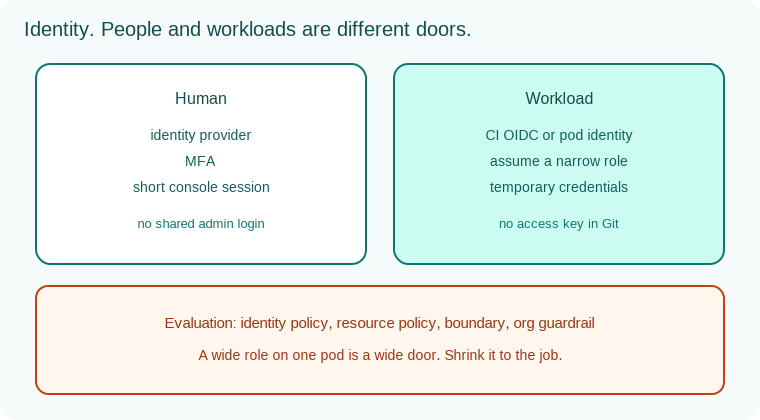
Humans enter through an identity provider and MFA. Workloads enter through federation and a narrow role. Temporary credentials fade. Policy evaluation still checks identity, resource, boundary, and organization guardrail.
18.6 A short animation.
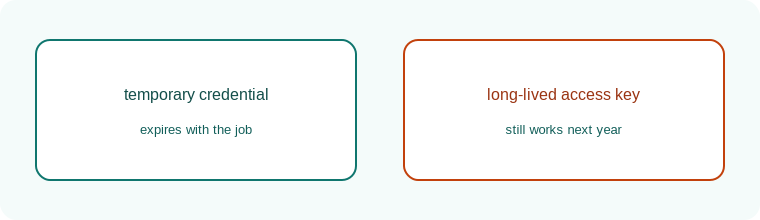
A temporary credential fades when the job ends. A long-lived access key does not. Prefer the one that fades.
18.7 Conclusion.
Raju had no keys.txt left. The lab role could read one prefix and nothing else. Guru-ji closed the notebook. "You can now walk from a commit to a digest, from a digest to a humble container, from a container to a cluster policy, from a plan to a private cloud room, and from that room to a name that expires. Later chapters, when they are opened, can stand on this identity instead of on a shared password. Until then, keep the lab yours."
- Humans use MFA and short sessions. Workloads use roles that expire.
- Effective permission is identity policy, resource policy, boundary, and guardrail together.
- Federation from Kubernetes and from CI removes long-lived keys when the trust is pinned.
- Meta-permissions that grant more power stay with a tiny group. This chapter does not teach how to abuse them.
- Capital One, announced 29 July 2019, is the broad workload-identity lesson.
- Own lab only.
END OF CHAPTER 18 MASTER CLASS
| Habit | Stops |
|---|---|
| Roles over keys | Leaked keys being useful |
| IMDSv2 required | SSRF stealing role credentials |
| OIDC in CI | Secrets stored in pipelines |
| Unused-permission reviews | Quiet privilege creep |