Chapter 93: AWS Lambda and Serverless for DevOps
93.12 Versions, aliases and rollback
Story (fictional teaching scenario). At a fictional Solapur shop, Zoe from Dublin releases a broken price rule. Rather than editing live code by hand, she wants a stable name she can point back at the previous tested version.
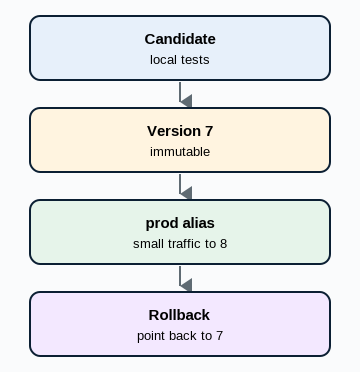
Why
A release should be reproducible and reversible. Replacing mutable code gives you a poor rollback record.
What
- $LATEST is the mutable working version.
- Published version is an immutable snapshot of code and most configuration.
- Alias is a stable name pointing at a published version; it can also split traffic between two versions.
- Canary sends a small share to a new version while you watch metrics.
- Rollback restores the previous known-good route. External database/schema changes may still need a separate recovery plan.
How
-
Test the candidate code.
-
Publish a version in a future approved deployment.
-
Point a stable alias at tested versions, not $LATEST.
-
Monitor errors; revert the alias if needed.
Example 1: Release routing plan
- Read the input and the code.
Before: {alias: prod, primary: 7}
Canary: {alias: prod, primary: 7, additional: {8: 0.1}}
Rollback: {alias: prod, primary: 7, additional: {}}
- Read the result.
Output (illustrative; not executed on AWS)
Approximate canary split: 90% to version 7, 10% to version 8.
- What each part means: This YAML is a human-readable plan, not an AWS API payload or executed command. Weighted routing is probabilistic, so a small request sample need not split exactly 90/10. Removing additional traffic returns new alias-routed requests to 7; in-flight work and already-written data are not undone.
Ravindra Bagale's Tip
Code rollback does not roll back business data.
Code rollback झाला म्हणून business data मागे जात नाही.
Code rollback से business data वापस नहीं होता.
Did you understand? Let us try it once more.