Chapter 89: Amazon ECS for DevOps
89.4 ALB target groups and service discovery
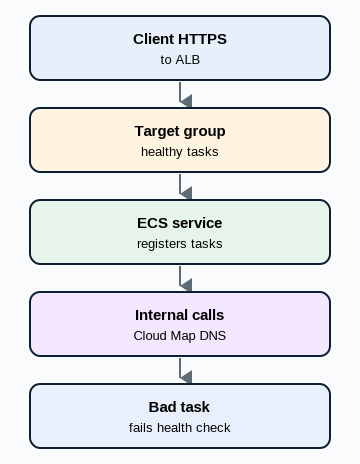
Story. A Razorpay-style payments edge in Bengaluru put pay-api behind an Application Load Balancer. The ECS service registered tasks into a target group. Health checks on /healthz replaced bad tasks automatically. For internal worker-to-worker calls they used AWS Cloud Map service discovery so tasks found each other by DNS name inside the VPC. Public HTTPS entered through ALB; east-west traffic used discovery. Clear paths beat random public IPs.
Why
Tasks come and go during deploys. A stable ALB DNS name and health checks keep users off dying tasks.
What
- ALB — Application Load Balancer (layer 7) in front of HTTP/HTTPS services.
- Target group — Set of targets (here: task IPs/ports) the ALB sends traffic to.
- Health check — Path and codes that mark a target healthy or not.
- Service discovery (Cloud Map) — Optional DNS names for tasks inside the namespace — useful for internal APIs.
- Security groups — ALB SG allows 443 in; task SG allows the container port from the ALB SG only.
How
- Create an ALB and a target group for the container port.
- When creating/updating the ECS service, attach the load balancer config (target group ARN + container name/port).
- Point health checks at a cheap path your app owns.
- For service-to-service inside the VPC, consider Cloud Map instead of hard-coded IPs.
Example 1: Service load balancer block (shape)
"loadBalancers": [
  {
    "targetGroupArn": "arn:aws:elasticloadbalancing:ap-south-1:123456789012:targetgroup/pay-api/abc",
    "containerName": "pay-api",
    "containerPort": 8080
  }
]
What it shows: The service registers the pay-api container port 8080 into that target group. ARNs are examples.
Example 2: See target health (shape)
aws elbv2 describe-target-health --target-group-arn arn:aws:elasticloadbalancing:ap-south-1:123456789012:targetgroup/pay-api/abc
Output
{
    "TargetHealthDescriptions": [
        {
            "Target": { "Id": "10.0.1.50", "Port": 8080 },
            "TargetHealth": { "State": "healthy" }
        }
    ]
}
What it shows: At least one task IP is healthy on port 8080. Unhealthy targets stop receiving new traffic.
Ravindra Bagale's Tip
Lock task security groups so only the ALB (or internal callers) can hit the container port — not 0.0.0.0/0.
Task security group मध्ये container port फक्त ALB (किंवा internal callers) साठी उघडा — 0.0.0.0/0 नको.
Task security group में container port सिर्फ ALB (या internal callers) के लिए खोलें — 0.0.0.0/0 नहीं.
Quick quiz
Q1. What does a target group hold?
The tasks (IPs/ports) the load balancer can send traffic to.
Q2. Why health checks matter?
Unhealthy tasks are taken out of rotation so users avoid bad deploys.
Q3. What is Cloud Map used for here?
Optional DNS-based service discovery for internal task-to-task calls.
Did you understand? Let us try it once more.