16. Live Project: Building a Reels App with EC2, S3 and RDS
16.1 Project Overview and Architecture
Aadhi chitra samju – code nantar. Pratyek arrow kontya port ne aani kontya permission ne jato te bagha.
                    https://reels.yourdomain.com
  ┌──────────┐   443   ┌─────────────────────── EC2 (web-sg) ───────────────────────┐
  │ Browser  │────────►│ Nginx ──► PHP-FPM ──► app code (/var/www/reels)            │
  │ (mobile) │         │                 │  IAM role: reels-ec2-role (no keys)      │
  └────┬─────┘         └─────────────────┼───────────────┬──────────────────────────┘
       │                                 │ PutObject     │ 3306 + TLS
       │  GET video (presigned URL)      ▼               ▼
       └───────────────────────►  ┌─────────────┐  ┌──────────────────┐
                                  │ S3 bucket   │  │ RDS MySQL        │
                                  │ (private)   │  │ (private, db-sg) │
                                  └─────────────┘  └──────────────────┘
| Flow | What happens |
|---|---|
| Upload | Browser POSTs the video to upload.php → PHP checks size and real file type → putObject to S3 under a random key → a row is inserted into posts in RDS |
| Feed | reels.js calls feed.php → PHP reads 5 posts from RDS → for each video creates a presigned URL valid for 20 minutes → returns JSON |
| Playback | The <video> tag loads the presigned URL directly from S3 – video bytes never pass through your EC2 server |
| Like | reels.js POSTs to like.php with a CSRF token → a row in likes is added or removed |
File layout – only public/ is visible to the web; config, code and libraries stay outside it:
/var/www/reels/
├── composer.json        ← dependency list (AWS SDK for PHP)
├── config.php           ← DB endpoint, bucket name (NOT web-reachable)
├── schema.sql           ← tables: users, posts, likes
├── src/bootstrap.php    ← session, PDO, S3 client, helpers
├── vendor/              ← created by composer install
├── deploy/reels.conf    ← Nginx server block
├── deploy/99-reels.ini  ← PHP upload limits
└── public/              ← Nginx document root
    ├── index.php  feed.php  upload.php  like.php
    ├── login.php  register.php  logout.php
    └── assets/reels.css  assets/reels.js
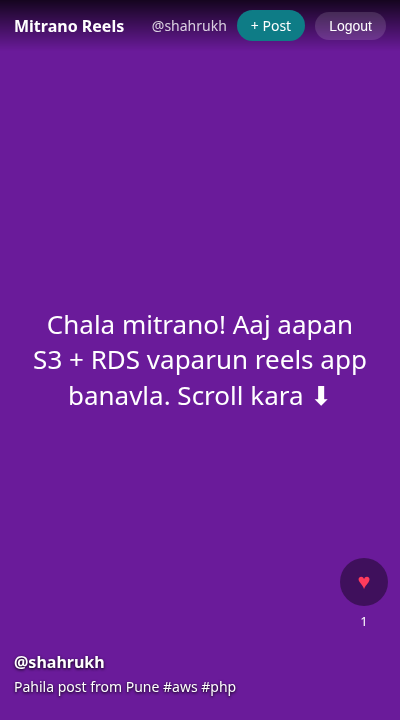
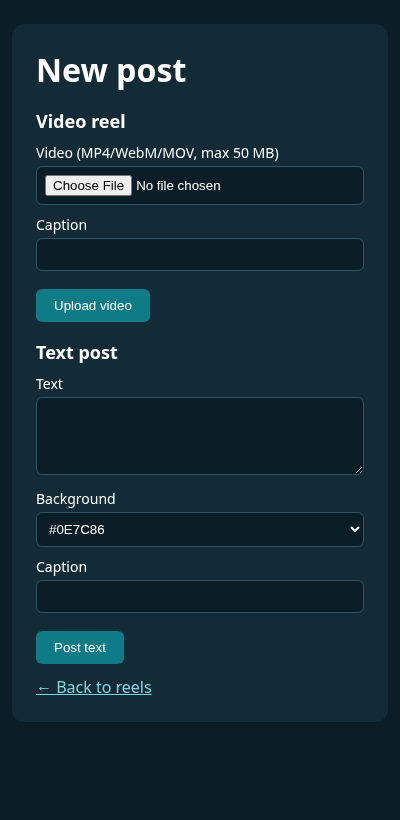
The finished app in a mobile-sized browser: a text reel in the feed (left) and the New post page (right).
Why this matters for security
Every box in the diagram is a separate trust zone (विश्वास क्षेत्र). The browser is untrusted, EC2 is the only thing allowed to write to S3 and talk to RDS, and S3 and RDS are never public. When you later test this app with Burp Suite and Nmap, you will attack exactly these arrows – so draw them before you write code.
Ravindra Bagale's Tip
Many students start writing code and only later ask "where should the video be saved?" First draw this architecture diagram in your notebook – who talks to whom, on which port, with which permission. If the diagram is clear, both debugging and interviews become easy. When an interviewer says "explain your project", draw this very diagram!
Ravindra Bagale's Tip – मराठी
बरेच students code लिहायला सुरुवात करतात आणि नंतर विचारतात "video कुठे save करायचा?" आधी हे architecture diagram वहीत काढा – कोणत्या port ने कोण कोणाशी बोलतो, कोणत्या permission ने. Diagram clear असेल तर debugging आणि interview दोन्ही सोपे होतात. Interview मध्ये "explain your project" विचारलं की हाच diagram काढा!
Ravindra Bagale's Tip – हिंदी
बहुत से students code लिखना शुरू कर देते हैं और बाद में पूछते हैं "video कहाँ save करना है?" पहले यह architecture diagram अपनी copy में बनाओ – कौन किससे किस port पर, किस permission से बात करता है. Diagram clear हो तो debugging और interview दोनों आसान हो जाते हैं. Interview में "explain your project" पूछा जाए तो यही diagram बनाओ!
Practice task
Draw the architecture diagram yourself and mark on each arrow: protocol, port, and the permission that allows it (security group rule, IAM policy or MySQL GRANT).